
Web app · Finance
ChalkSpend
Watch your $300 educator deduction fill up — and keep counting past it
The receipt tracker built only for teachers: log a classroom purchase in two taps, sort it into out-of-pocket, district, PTA/grant or DonorsChoose, follow reimbursement requests from submitted to paid, and flip every total between the tax year and the school year. Free, no account, nothing leaves your browser.
Stored in your browser only. Nothing you do in the web version is sent to our servers. Clear your browser data and it's gone — so export a backup from the in-app menu if you want to keep it.
This app is a community proposal.
Try the full browser version now. We build the iPhone and Android app once 100 people upvote it.
We'll email you once, when it ships. Unsubscribe anytime.
In your browser
What you can do in ChalkSpend on the web
The $300 deduction meter
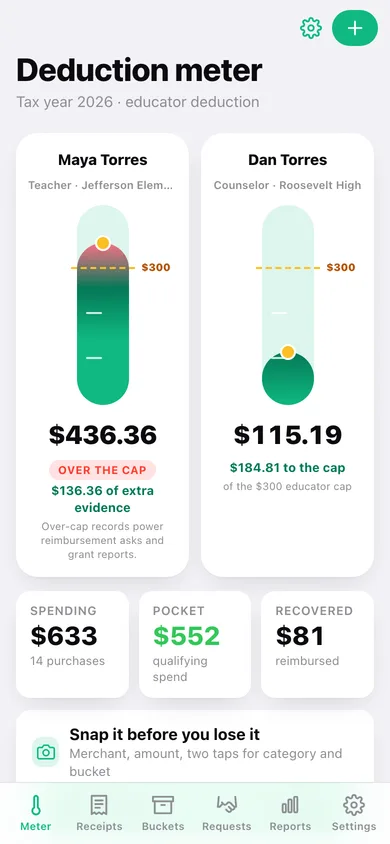
A thermometer that fills toward the IRS educator-expense cap (Topic 458) with milestone ticks at $100 and $200, a dashed cap line at $300, and a deeper over-cap zone — because past the cap, every dollar is evidence for a reimbursement ask or a grant report.
Money buckets that keep the meter honest
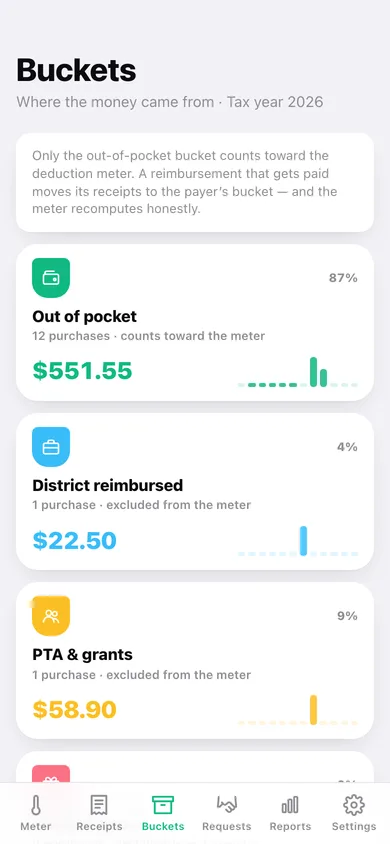
Out of pocket, district reimbursed, PTA & grants, DonorsChoose. Only unreimbursed spending qualifies, so the meter counts one bucket and the other three are tracked separately with their own totals and monthly sparklines.
Two educators, two meters that never pool
Married to another educator? Both $300 caps sit side by side on the home screen, each fed only by that person's own out-of-pocket receipts — because the caps cannot be combined, even filing jointly.
Reimbursement requests, submitted to paid
Group receipts into a request to the district, PTA, a grant or DonorsChoose, then move it along. Marking it paid re-buckets its receipts to whoever paid, and the deduction meter recomputes on the spot.
Two calendars, one tap apart
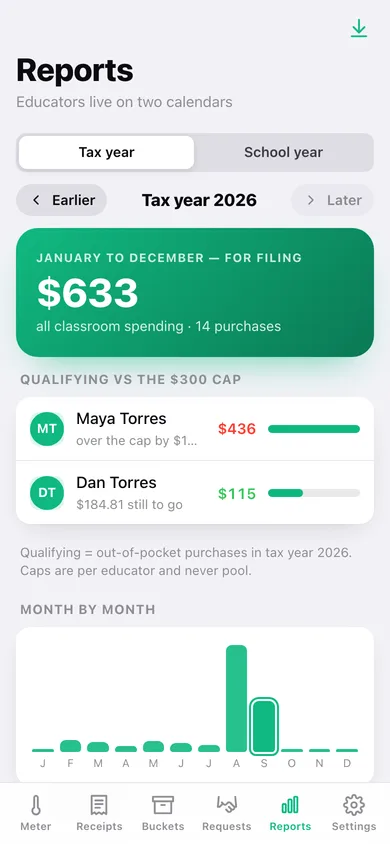
Tax year (January to December, for filing) and school year (your own start month to the month before, for principal and budget conversations) — with per-category, per-bucket and month-by-month breakdowns of each.
Audit binder and CSV
A dated record of every purchase in a range — date, merchant, amount, category, bucket, whether it counts toward the cap, educator and linked request — as a text binder or a CSV your preparer can open.
Screens
Every screen, rebuilt for the browser
-
1
Deduction meter
Side-by-side $300 thermometers, this year's spending, and the latest receipts.
-
2
Buckets
Out of pocket, district, PTA & grants and DonorsChoose with totals, share of spend and monthly sparklines.
-
3
Reports
Tax year or school year totals, cap progress per educator, month bars and a bucket donut.
-
4
Receipts
Every purchase grouped by month, searchable and filterable by category or bucket.
-
5
Receipt detail
One purchase: amount, category, bucket, whose meter it feeds, its request and its note.
-
6
Log an expense
Date, merchant, amount, category, bucket with a live meter hint, educator and note.
-
7
Bucket detail
Everything in one bucket, with a per-category split.
-
8
Requests
Requested vs recovered, and every reimbursement grouped by status.
-
9
Request detail
Move a request from submitted to paid, attach receipts, and see what it still owes.
-
10
New request
Title, who you are asking, submitted date, amount requested, status and amount paid.
-
11
Audit binder
Pick a range, preview the binder and download it as text or CSV.
-
12
Educator
Name, role, school and which $300 meter this person owns.
-
13
Settings
Educators, school-year start month, seasonal nudges, backup, sample data and erase.
Try it with sample data: Loads two educators — a teacher already over her $300 cap and a counselor still climbing his — with thirteen classroom purchases across the year and four reimbursement requests from submitted to paid. You can start fresh at any time.
Ready? It's free.
No account, no install, no subscription. Everything you do stays in this browser.
Your say
What should ChalkSpend do? Tell us before we build it.
Tell us what to build next.
Comments need a free Google sign-in, so every one is from a real person.
Sign in with Google to commentNo comments yet — be the first to say what this app should do next.
Questions
Is the web version of ChalkSpend free?+
Yes. Every screen is free to use: no subscription, no in-app purchases, no account.
Do I need an account?+
No. Open ChalkSpend and start using it right away. Sign in with Google only if you want to upvote an app, save it to your list, or leave a comment.
Where is my data stored?+
Only in this browser's local storage. Nothing you enter is sent to our servers, so we can't see it, back it up, or restore it. Clearing site data, a private window, or another device starts empty. Export a backup from the in-app menu to keep it.
Is there a ChalkSpend app for iPhone or Android?+
Not yet. ChalkSpend is a community proposal: the browser version is complete, and we build the iPhone and Android app once 100 people upvote it. Upvoters get one email when it ships.