
Web app · Finance
CertDay
Never lose a benefit week — certify on time and keep audit-proof records
Set your state and certification day once. CertDay opens a card for every claim week, counts your work-search activities against your state's minimum, and keeps the employer name, address, phone, contact method and result an auditor asks to see. Free, offline, no account.
Stored in your browser only. Nothing you do in the web version is sent to our servers. Clear your browser data and it's gone — so export a backup from the in-app menu if you want to keep it.
This app is a community proposal.
Try the full browser version now. We build the iPhone and Android app once 100 people upvote it.
We'll email you once, when it ships. Unsubscribe anytime.
In your browser
What you can do in CertDay on the web
The weekly ritual, on one screen
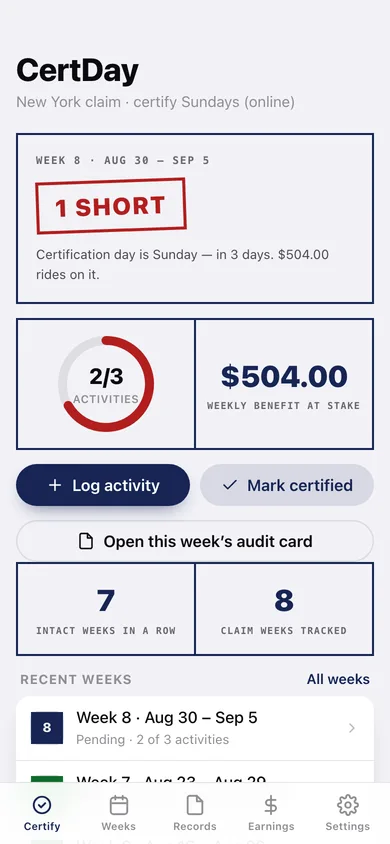
Days until your certification window closes, a ring of activities logged against your state's minimum, the benefit riding on the week, and one tap to stamp it certified.
All 51 state minimums built in
Pick your state and CertDay pre-fills its common weekly work-search minimum — from Alaska's 1 to Florida and Kentucky's 5 — editable, with the reminder to confirm it in your own claimant handbook.
Every field auditors verify
Employer name, address, phone, position, contact method (online, in-person, phone, email, job fair, workshop) and result (applied, interview scheduled, no openings, follow-up, attended, hired, rejected).
Grouped by claim week, like the letter asks
Activities file themselves into the claim week their date falls in, searchable by employer or filterable by contact method, with a completeness check per week.
The audit-ready week card
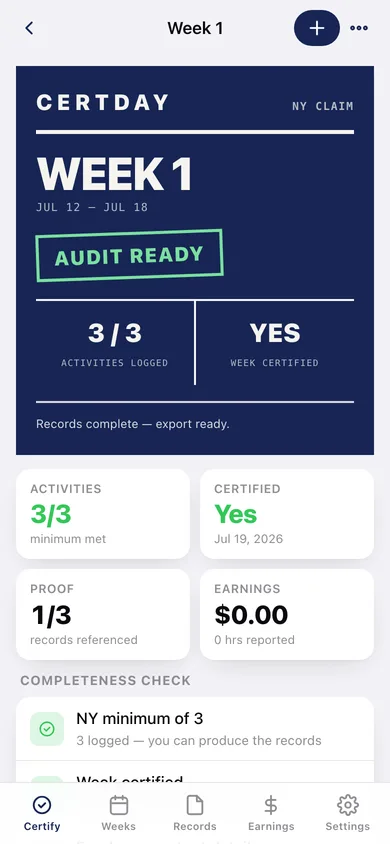
A stamped poster per week — week number, certified or not, activities logged against the minimum, records complete — plus a copyable audit packet and per-week or whole-claim CSV.
Earnings while claiming
A dated record of every gig shift, its hours and gross pay, filed into the same claim weeks so your weekly answers are consistent instead of reconstructed from memory.
Intact-week streak
Consecutive weeks that were both certified and met the minimum, plus cumulative benefits certified across the claim.
Screens
Every screen, rebuilt for the browser
-
1
Certify
This week's status stamp, activities-vs-minimum ring, benefit at stake, and the intact-week streak.
-
2
Claim week
The audit-ready week poster, completeness check, every activity and any earnings in that week.
-
3
Log an activity
Employer, address, phone, position, contact method, result, confirmation reference and notes.
-
4
Log earnings
Date, source, hours and gross pay for a shift worked while claiming.
-
5
Weeks
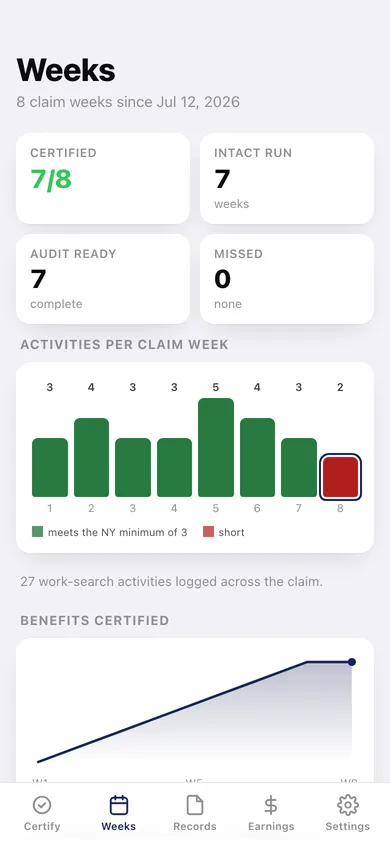
Every claim week with its status, activities per week charted, and benefits certified over time.
-
6
Records
The whole work-search log, searchable and filterable by contact method, grouped by claim week.
-
7
Earnings
Total reported while claiming, every shift dated and tied to its claim week.
-
8
Settings
State, certification day and method, weekly benefit, work-search minimum, claim start, the state table, CSV export and erase.
Try it with sample data: Loads an eight-week New York claim: seven weeks certified, the current week one activity short, twenty-seven real work-search records across Hudson Valley employers, and three gig shifts. You can start fresh at any time.
Ready? It's free.
No account, no install, no subscription. Everything you do stays in this browser.
Your say
What should CertDay do? Tell us before we build it.
Tell us what to build next.
Comments need a free Google sign-in, so every one is from a real person.
Sign in with Google to commentNo comments yet — be the first to say what this app should do next.
Questions
Is the web version of CertDay free?+
Yes. Every screen is free to use: no subscription, no in-app purchases, no account.
Do I need an account?+
No. Open CertDay and start using it right away. Sign in with Google only if you want to upvote an app, save it to your list, or leave a comment.
Where is my data stored?+
Only in this browser's local storage. Nothing you enter is sent to our servers, so we can't see it, back it up, or restore it. Clearing site data, a private window, or another device starts empty. Export a backup from the in-app menu to keep it.
Is there a CertDay app for iPhone or Android?+
Not yet. CertDay is a community proposal: the browser version is complete, and we build the iPhone and Android app once 100 people upvote it. Upvoters get one email when it ships.