
Web app · Finance
Cartwise
The price book that answers “is this actually a good price?” in the aisle
Log what you pay — item, store, package size, total — and Cartwise normalises it to $/oz, $/100g, $/fl oz, $/100mL or $/each, then tells you straight up whether this beats the lowest you've ever seen. Free, works offline, nothing leaves your browser.
Stored in your browser only. Nothing you do in the web version is sent to our servers. Clear your browser data and it's gone — so export a backup from the in-app menu if you want to keep it.
This app is a community proposal.
Try the full browser version now. We build the iPhone and Android app once 100 people upvote it.
We'll email you once, when it ships. Unsubscribe anytime.
In your browser
What you can do in Cartwise on the web
Unit price, worked out for you
A giant box against a small one in one glance. Type the size in oz, lb, g, kg, fl oz, quarts, gallons, mL, litres or a count — Cartwise converts and compares like for like.
The good-deal verdict
Every price is scored against that item's own lowest ever: best price you've seen, good, a little over your low, or over your low — with the exact percentage.
Live verdict while you type
The quick-log screen shows the unit price and the verdict before you save, so you can decide at the shelf rather than at the till.
Cheapest-first store comparison
Per item, one row per store keeping that store's best price, crowned winner first, with how far above your low each of the others sits.
Best-price wins across your whole book
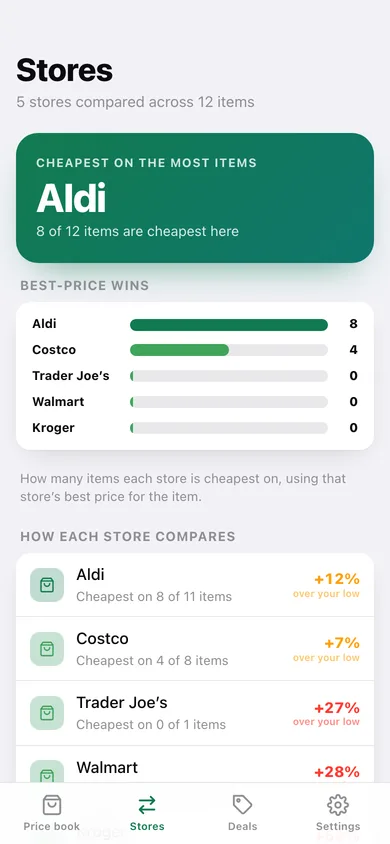
A leaderboard of which store is cheapest on the most items, what the others cost you on average, and your basket priced at your best stores versus your worst.
Price history and stock-up flags
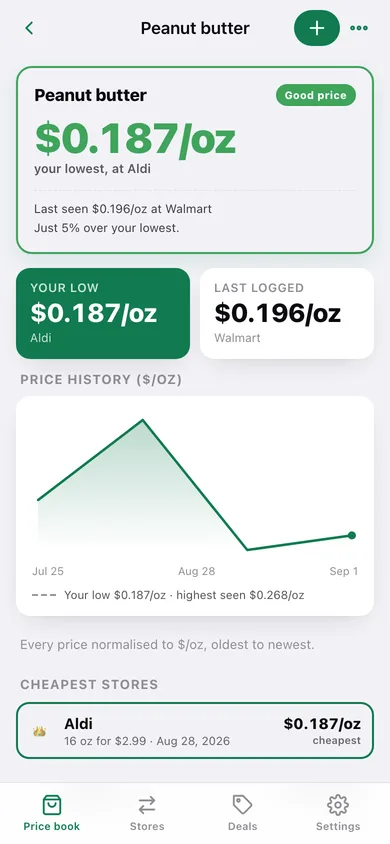
A line chart of every logged price for an item, plus Stock up / Worth watching / Wait lists driven by how close today's price sits to your record low.
Your book, exportable
Download the whole price book as CSV with every normalised unit price, or a JSON backup — everything included, nothing locked.
Screens
Every screen, rebuilt for the browser
-
1
Price book
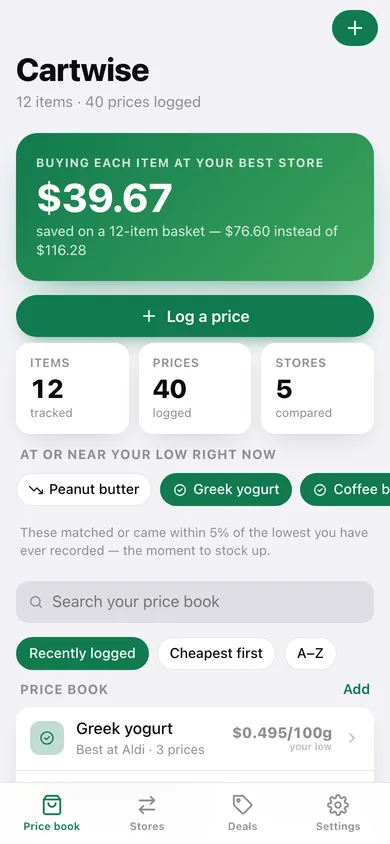
Basket savings, what's at your low right now, and every item with its lowest price and best store.
-
2
Item detail
The shelf tag verdict, price history chart against your low, cheapest stores and every price ever logged.
-
3
Log a price
Item, store, size in any compatible unit and total — with a live unit price and verdict as you type.
-
4
Stores
Which store wins on the most items, what the others cost you, and the biggest spreads in your book.
-
5
Deals
Stock up now, worth watching and wait — plus your basket priced at your best and worst stores.
-
6
Settings
Default measure, price-book order, the unit table Cartwise normalises, CSV export, sample data and erase.
Try it with sample data: Loads a twelve-item price book — peanut butter, olive oil, eggs, yogurt, coffee, chicken, oats, milk, cheese, paper towels, beans and bananas — priced across Aldi, Kroger, Walmart, Costco and Trader Joe's over the last six weeks. You can start fresh at any time.
Ready? It's free.
No account, no install, no subscription. Everything you do stays in this browser.
Your say
What should Cartwise do? Tell us before we build it.
Tell us what to build next.
Comments need a free Google sign-in, so every one is from a real person.
Sign in with Google to commentNo comments yet — be the first to say what this app should do next.
Questions
Is the web version of Cartwise free?+
Yes. Every screen is free to use: no subscription, no in-app purchases, no account.
Do I need an account?+
No. Open Cartwise and start using it right away. Sign in with Google only if you want to upvote an app, save it to your list, or leave a comment.
Where is my data stored?+
Only in this browser's local storage. Nothing you enter is sent to our servers, so we can't see it, back it up, or restore it. Clearing site data, a private window, or another device starts empty. Export a backup from the in-app menu to keep it.
Is there a Cartwise app for iPhone or Android?+
Not yet. Cartwise is a community proposal: the browser version is complete, and we build the iPhone and Android app once 100 people upvote it. Upvoters get one email when it ships.