
Web app · Finance
CareFee
The tuition ledger for a home daycare — running balances, late fees, statements
Every family gets a running balance from tuition, copays, fees, credits and payments. Post the billing week in one tap, let your own late-fee rule count the days, and hand a parent an itemized statement instead of Venmo screenshots. Free, no install.
Stored in your browser only. Nothing you do in the web version is sent to our servers. Clear your browser data and it's gone — so export a backup from the in-app menu if you want to keep it.
This app is a community proposal.
Try the full browser version now. We build the iPhone and Android app once 100 people upvote it.
We'll email you once, when it ships. Unsubscribe anytime.
In your browser
What you can do in CareFee on the web
A running balance per family
Charges, payments and credits in one dated ledger grouped by month, so what a family owes is never a guess — and every line says how it was paid, by cash, check, Venmo or Zelle.
Post the billing week in one tap
Set each family's rate and cadence once, then post this week's tuition to every active family at once. Subsidy families post as two itemized lines — the agency portion and the parent copay.
Late fees your contract actually calls for
Encode the clause once — grace days, flat or per-day, optional cap — and CareFee counts the days from each family's due weekday and shows the exact fee, which you confirm before it ever lands on a ledger.
A statement of account, on your letterhead
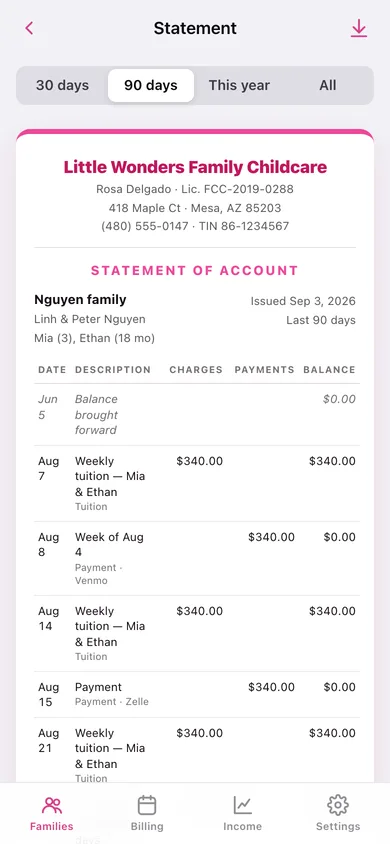
A printable sheet with your business header and aligned Charges / Payments / Balance columns for the last 30, 90 or 365 days, copyable as text or downloadable as CSV.
Year-end paperwork without an evening of typing
Paid totals per family for the year, plus the provider name, address and taxpayer number that IRS Form W-10 asks for, ready to copy.
Income summary for Schedule C
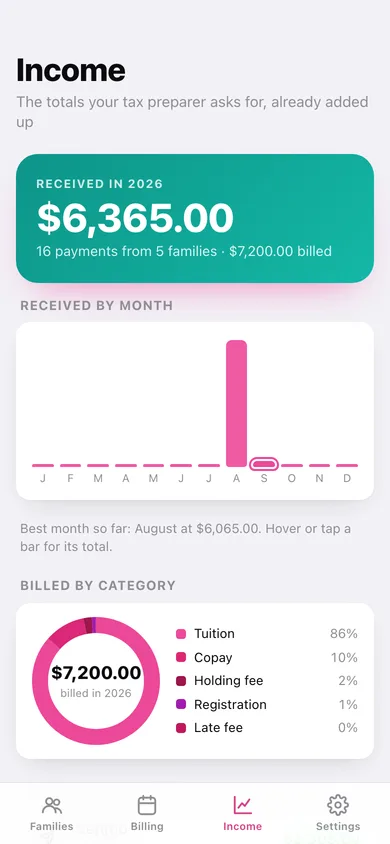
Everything received rolled up by month, by billed category, by payment method and per family, with CSV export of the summary or the whole ledger.
Screens
Every screen, rebuilt for the browser
-
1
Families
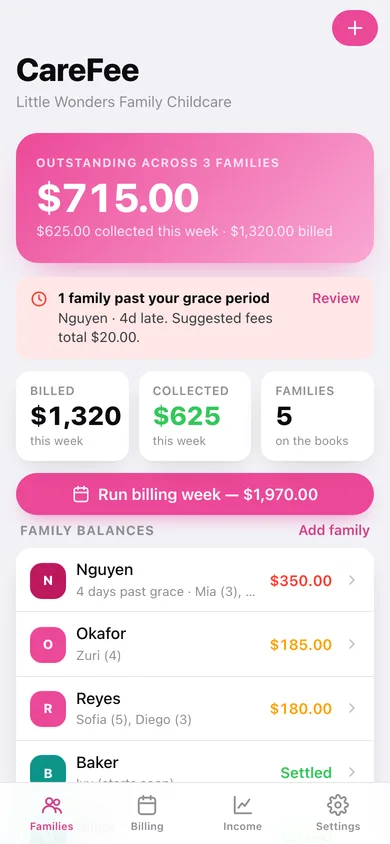
Total outstanding, this week's billed and collected, who is past grace, and every family's balance.
-
2
Family ledger
One family's running balance, overdue pill with the suggested fee, and every entry grouped by month.
-
3
Statement of account
The printable letterhead sheet with dated Charges / Payments / Balance columns and year-end paperwork.
-
4
Ledger entry
Add a tuition charge, copay, late fee, holding or registration fee, credit, payment or subsidy remittance.
-
5
Family & rate plan
Parents, children, contact details, tuition rate and cadence, due weekday and the subsidy split.
-
6
Billing week
Every active family with its rate, toggles and editable amounts, posted to all the ledgers in one tap.
-
7
Overdue & late fees
Your written policy in plain language and each family past grace with the exact fee it calls for.
-
8
Income
Received by month, billed by category, how families paid, and the per-family year-end totals.
-
9
Settings
Business details for statements, the late-fee rule, ledger CSV, backup, sample data and erase.
Try it with sample data: Loads five families of a real home daycare — an overdue Nguyen, a DES subsidy split, a fully settled Miller, a sibling rate with a vacation credit, and a held spot — with six weeks of tuition, payments and fees. You can start fresh at any time.
Ready? It's free.
No account, no install, no subscription. Everything you do stays in this browser.
Your say
What should CareFee do? Tell us before we build it.
Tell us what to build next.
Comments need a free Google sign-in, so every one is from a real person.
Sign in with Google to commentNo comments yet — be the first to say what this app should do next.
Questions
Is the web version of CareFee free?+
Yes. Every screen is free to use: no subscription, no in-app purchases, no account.
Do I need an account?+
No. Open CareFee and start using it right away. Sign in with Google only if you want to upvote an app, save it to your list, or leave a comment.
Where is my data stored?+
Only in this browser's local storage. Nothing you enter is sent to our servers, so we can't see it, back it up, or restore it. Clearing site data, a private window, or another device starts empty. Export a backup from the in-app menu to keep it.
Is there a CareFee app for iPhone or Android?+
Not yet. CareFee is a community proposal: the browser version is complete, and we build the iPhone and Android app once 100 people upvote it. Upvoters get one email when it ships.