
Web app · Utilities
Cardstash
Catalogue and value your card collection — unlimited, in the browser
Type what you can read off a Pokémon, Magic, Yu-Gi-Oh! or Lorcana card, confirm the ranked match, and it lands in your stash with a condition-adjusted value, set completion and a chase list. Free, no account, no scan limit.
Stored in your browser only. Nothing you do in the web version is sent to our servers. Clear your browser data and it's gone — so export a backup from the in-app menu if you want to keep it.
This app is a community proposal.
Try the full browser version now. We build the iPhone and Android app once 100 people upvote it.
We'll email you once, when it ships. Unsubscribe anytime.
In your browser
What you can do in Cardstash on the web
Confirm-first matcher, never a silent guess
The same normalised-name + collector-number ranking the iPhone app runs on OCR text, shown as candidates with a confidence score — “Pikachu ex 238/191” resolves to one card, nonsense resolves to nothing.
Scan tray, then add the whole batch
Confirmed cards stack in a tray with a running session total, exactly like scanning card after card on the phone, and commit to your stash in one tap.
Condition-adjusted value
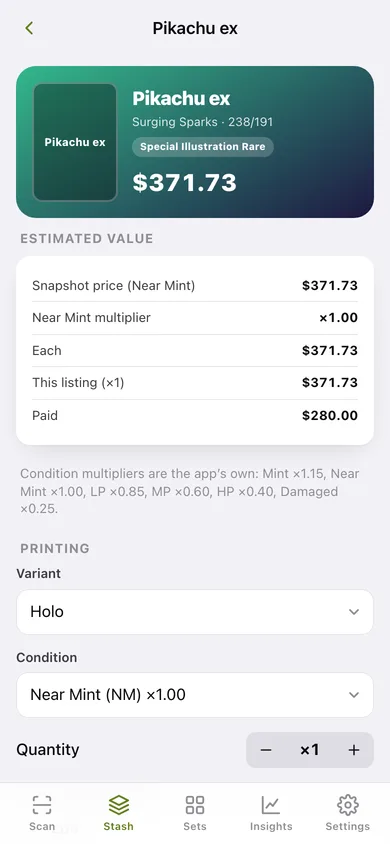
Every listing is priced from the 2026-06-19 snapshot times the app's own condition multipliers — Mint ×1.15, Near Mint ×1.00, LP ×0.85, MP ×0.60, HP ×0.40, Damaged ×0.25 — across variant and quantity.
Set completion with Have / Need
Sets you have started are ranked by how close you are, counted against each set's real printed total (165 for 151, 191 for Surging Sparks), with a per-set Need list.
Insights, chase list and cost basis
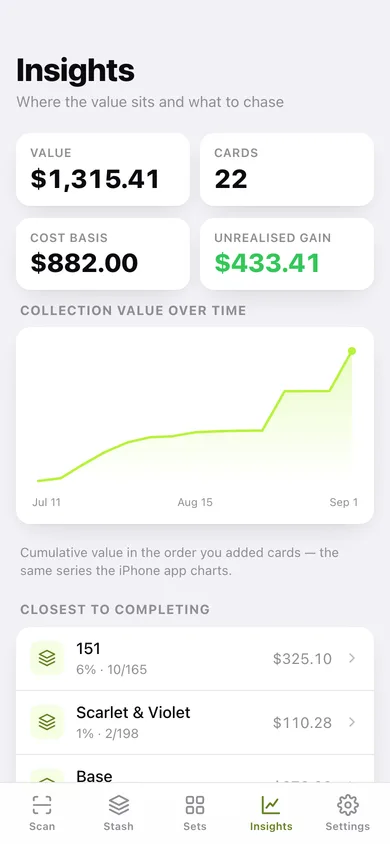
Cumulative collection value over time, value split by game, your most valuable listings, unrealised gain against what you paid, and the high-value cards you are still missing from sets you collect.
CSV and JSON export
One row per listing with unit value, total value, cost basis and date added — or a full JSON backup. Everything stays in this browser.
Screens
Every screen, rebuilt for the browser
-
1
Stash
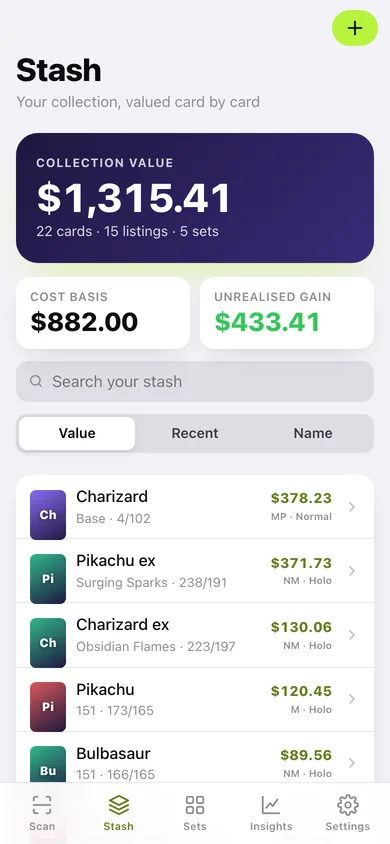
Collection value, cost basis and every listing, searchable and sortable by value, recency or name.
-
2
Scan
Type what the camera would have read; ranked candidates with confidence, a scan tray and a running session total.
-
3
Sets
Every set you have started, ranked by completion against its real printed total.
-
4
Set completion
A completion ring plus Need / Have / All lists for one set.
-
5
Insights
Collection value over time, value by game, closest sets, your most valuable cards and a chase list.
-
6
Card detail
The value breakdown for one listing, plus variant, condition, quantity, cost basis and notes.
-
7
Find & add
Search the bundled catalog by name and add a card with its variant, condition and quantity.
-
8
Settings
Catalog and snapshot details, condition multipliers, CSV/JSON export, sample collection and erase.
Try it with sample data: Adds fifteen real listings across 151, Surging Sparks, Obsidian Flames, Scarlet & Violet and Base — including a Base Charizard — spread over the last eight weeks, with cost basis on most of them. You can start fresh at any time.
Ready? It's free.
No account, no install, no subscription. Everything you do stays in this browser.
Your say
What should Cardstash do? Tell us before we build it.
Tell us what to build next.
Comments need a free Google sign-in, so every one is from a real person.
Sign in with Google to commentNo comments yet — be the first to say what this app should do next.
Questions
Is the web version of Cardstash free?+
Yes. Every screen is free to use: no subscription, no in-app purchases, no account.
Do I need an account?+
No. Open Cardstash and start using it right away. Sign in with Google only if you want to upvote an app, save it to your list, or leave a comment.
Where is my data stored?+
Only in this browser's local storage. Nothing you enter is sent to our servers, so we can't see it, back it up, or restore it. Clearing site data, a private window, or another device starts empty. Export a backup from the in-app menu to keep it.
Is there a Cardstash app for iPhone or Android?+
Not yet. Cardstash is a community proposal: the browser version is complete, and we build the iPhone and Android app once 100 people upvote it. Upvoters get one email when it ships.