
Web app · Finance
Cardkeep
Every gift card you own, with the balance that's actually left on it
Add your gift cards and store credit, log what you spend, and Cardkeep counts the balance down for you — plus a running total of the free money you're sitting on and a warning before a card lapses. Free, no install, nothing leaves your browser.
Stored in your browser only. Nothing you do in the web version is sent to our servers. Clear your browser data and it's gone — so export a backup from the in-app menu if you want to keep it.
This app is a community proposal.
Try the full browser version now. We build the iPhone and Android app once 100 people upvote it.
We'll email you once, when it ships. Unsubscribe anytime.
In your browser
What you can do in Cardkeep on the web
A real card face per store
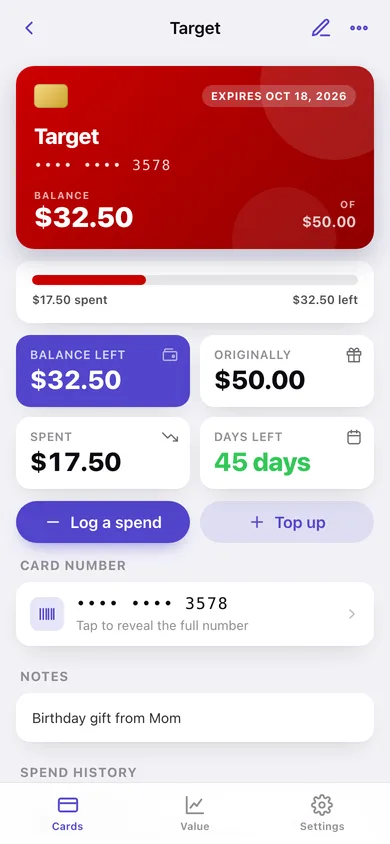
Each card gets its own gradient card face with the store, the number (masked until you reveal it) and the balance in big figures — readable at the register.
Log a spend, balance updates
Enter what you used with a live 'balance after' preview that refuses to go past what's on the card; the spend lands in a dated history you can undo.
Expiry warnings before money lapses
Set an expiry per card and choose your warning window (7–120 days). Cards inside it move to Needs attention, and expired balances drop out of your total.
Total value across the whole wallet
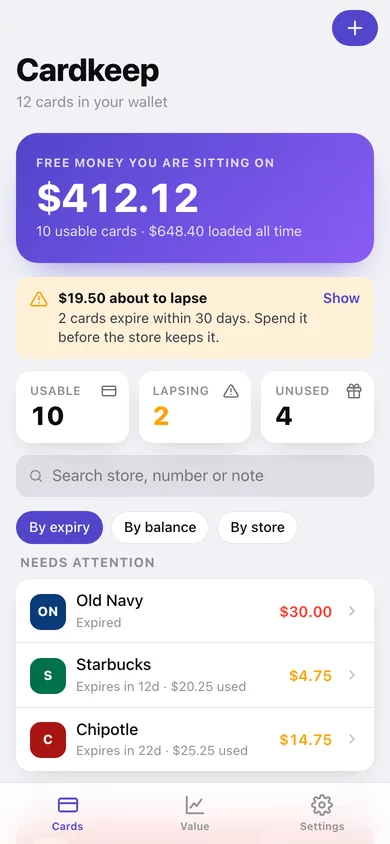
One hero number for the usable balance, plus what's expiring soon, what you've spent, and what has already lapsed.
Balance by store and spending trend
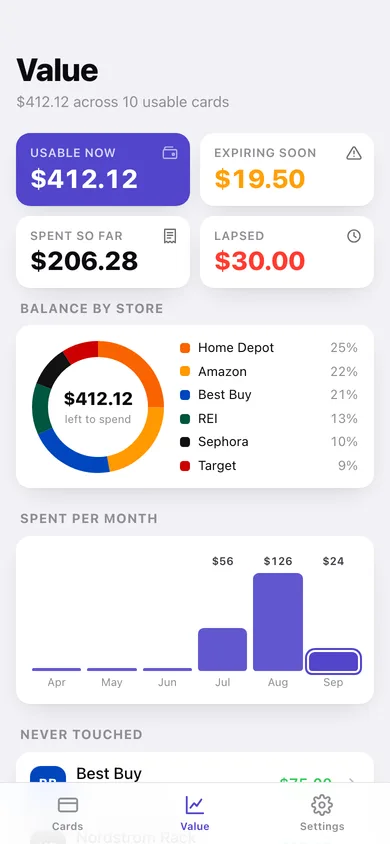
A donut of where your remaining balance sits, six months of spending bars, and a 'never touched' list led by your biggest unused card.
Yours only, exportable
Card numbers and PINs stay in this browser. Export a JSON backup or a CSV of every balance whenever you like.
Screens
Every screen, rebuilt for the browser
-
1
Wallet
Total free money, cards about to lapse, and every card sorted by expiry, balance or store.
-
2
Card detail
The gift-card face, the spent-vs-left meter, expiry countdown and the full spend history.
-
3
Log a spend
Amount, where and when, with a live balance-after preview and quick $5–$50 presets.
-
4
Add or edit a card
Store, card number, PIN, balance, expiry and where the card came from.
-
5
Value
Balance by store, spending per month, cards you've never touched and the ones to use first.
-
6
Settings
Expiry warning window, currency, default sort, CSV/JSON export, sample data and erase.
Try it with sample data: Loads a twelve-card wallet — Target, Amazon, Starbucks, Best Buy, Chipotle, Sephora, Home Depot and more — with real balances, expiry dates and six weeks of spend history. You can start fresh at any time.
Ready? It's free.
No account, no install, no subscription. Everything you do stays in this browser.
Your say
What should Cardkeep do? Tell us before we build it.
Tell us what to build next.
Comments need a free Google sign-in, so every one is from a real person.
Sign in with Google to commentNo comments yet — be the first to say what this app should do next.
Questions
Is the web version of Cardkeep free?+
Yes. Every screen is free to use: no subscription, no in-app purchases, no account.
Do I need an account?+
No. Open Cardkeep and start using it right away. Sign in with Google only if you want to upvote an app, save it to your list, or leave a comment.
Where is my data stored?+
Only in this browser's local storage. Nothing you enter is sent to our servers, so we can't see it, back it up, or restore it. Clearing site data, a private window, or another device starts empty. Export a backup from the in-app menu to keep it.
Is there a Cardkeep app for iPhone or Android?+
Not yet. Cardkeep is a community proposal: the browser version is complete, and we build the iPhone and Android app once 100 people upvote it. Upvoters get one email when it ships.