
Web app · Entertainment
Cardbinder
Every card you own and every card you want — in one offline binder
Build binders, drop sets inside them, and log each card with its number, condition, quantity, estimated value and notes. A live collection total sits on top, a want-list follows you to the show, and Value Insights shows which sets hold the money. Free, no install.
Stored in your browser only. Nothing you do in the web version is sent to our servers. Clear your browser data and it's gone — so export a backup from the in-app menu if you want to keep it.
This app is a community proposal.
Try the full browser version now. We build the iPhone and Android app once 100 people upvote it.
We'll email you once, when it ships. Unsubscribe anytime.
In your browser
What you can do in Cardbinder on the web
Binders, sets, cards
The same three-level structure as the iPhone app: a coloured binder for each game or sport, sets inside it, and a card grid for every set with a live count and total.
Real condition and value tracking
Log RAW, NM, LP, PL or PR condition, quantity and an estimated value per card. Card total is value × quantity, and it rolls up through the set, the binder and the whole collection.
Want-list hunting view
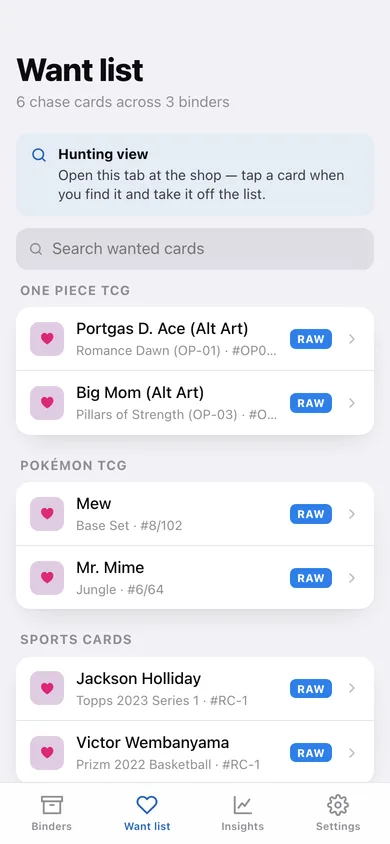
Flag any card as a chase card and it appears in the Want list tab grouped by binder, searchable, ready to check at a shop, show or swap meet.
Value Insights
Total collection value, a share-of-value donut by binder, a top-sets bar chart and leaderboard, plus value broken down by card condition.
Search, filter and sort
Search any set by card name or number, filter it down to wanted cards only, and sort the binder order by card number, name or highest value.
Exports, and nothing leaves the browser
Download a JSON backup or a full collection CSV with one row per card. Cardbinder never looks up a market price, so your totals only change when you change them.
Screens
Every screen, rebuilt for the browser
-
1
Binders
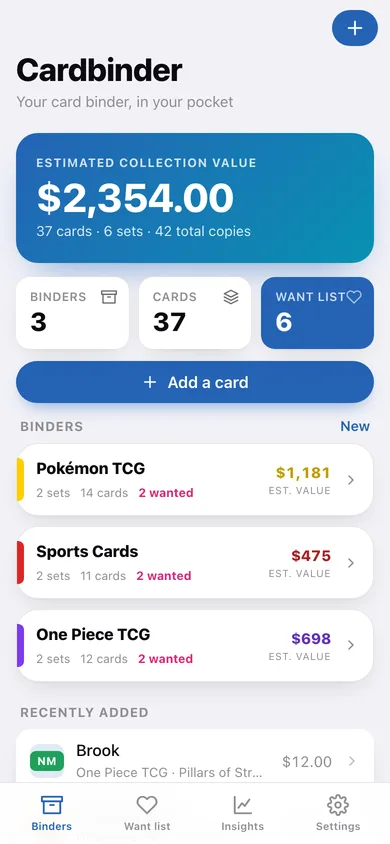
Live collection value, binder count, card count and want-list badge, then every binder with its spine colour and estimated value.
-
2
Binder detail
Sets, cards, wanted and estimated value for one binder, with each set's own card count and total.
-
3
Edit binder
Name the binder, pick one of eight spine colours and add notes.
-
4
Set detail
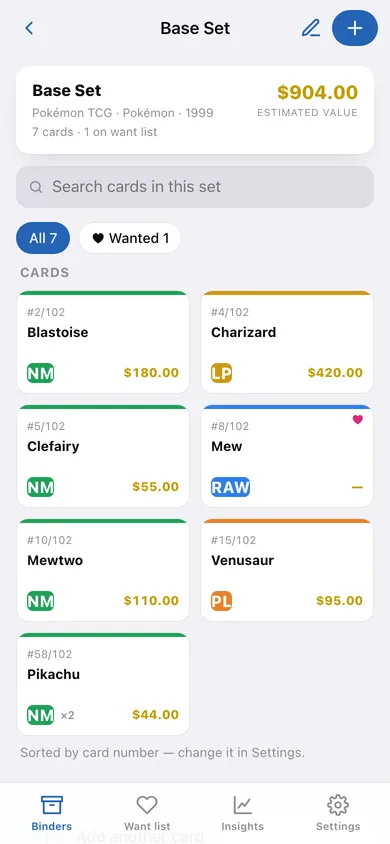
A card grid for one set with condition strips, want hearts and per-card value, plus search and a wanted-only filter.
-
5
Edit set
Set name, genre or game, year, and which binder it belongs to.
-
6
Card detail
The card face with its condition badge, number, total value, full details and notes, plus want-list, duplicate and delete actions.
-
7
Add or edit card
Name, number, set, condition, quantity, estimated value, notes and the want-list flag, with validation.
-
8
Want list
Every chase card grouped by binder with its set and card number, searchable for use in a shop.
-
9
Value insights
Total collection value, share of value by binder, top sets by value and a breakdown by card condition.
-
10
Settings
Default condition, card sort order, whole-dollar rounding, JSON backup, collection CSV, sample data and erase.
Try it with sample data: Loads three binders — Pokémon TCG, Sports Cards and One Piece TCG — with six sets and 37 cards including six chase cards on the want list. You can start fresh at any time.
Ready? It's free.
No account, no install, no subscription. Everything you do stays in this browser.
Your say
What should Cardbinder do? Tell us before we build it.
Tell us what to build next.
Comments need a free Google sign-in, so every one is from a real person.
Sign in with Google to commentNo comments yet — be the first to say what this app should do next.
Questions
Is the web version of Cardbinder free?+
Yes. Every screen is free to use: no subscription, no in-app purchases, no account.
Do I need an account?+
No. Open Cardbinder and start using it right away. Sign in with Google only if you want to upvote an app, save it to your list, or leave a comment.
Where is my data stored?+
Only in this browser's local storage. Nothing you enter is sent to our servers, so we can't see it, back it up, or restore it. Clearing site data, a private window, or another device starts empty. Export a backup from the in-app menu to keep it.
Is there a Cardbinder app for iPhone or Android?+
Not yet. Cardbinder is a community proposal: the browser version is complete, and we build the iPhone and Android app once 100 people upvote it. Upvoters get one email when it ships.