
Web app · Finance
Cancellr
Every subscription you pay for, as one honest monthly number
Type in what bills you — no bank login, no inbox scraping, no account. Cancellr normalises weekly, quarterly and yearly plans to one monthly total, counts down every renewal, flags the ones you have not used in 60 days, and tells you where each service hides its cancel button. Free, nothing to install.
Stored in your browser only. Nothing you do in the web version is sent to our servers. Clear your browser data and it's gone — so export a backup from the in-app menu if you want to keep it.
This app is a community proposal.
Try the full browser version now. We build the iPhone and Android app once 100 people upvote it.
We'll email you once, when it ships. Unsubscribe anytime.
In your browser
What you can do in Cancellr on the web
One monthly number, whatever the cycle
Weekly × 52/12, quarterly ÷ 3, yearly ÷ 12 — the same normalisation the iPhone app uses, so a $139 annual plan and a $22.99 monthly one finally sit on the same scale.
A 30-day renewal runway
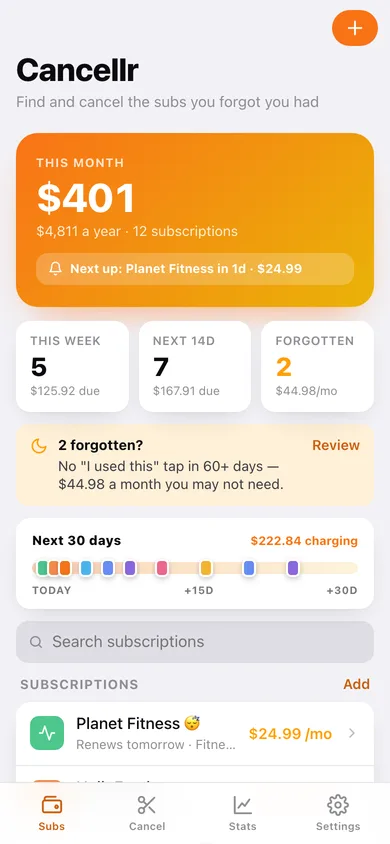
Every upcoming charge as a coloured pin on one strip, plus counts and totals for the next 7 and 14 days, so nothing renews behind your back.
The “Forgotten?” flag
Tap “I used this” when you actually use a service. Anything idle past your threshold (60 days by default) gets flagged as a cancel candidate with the money it is costing you.
Cancel directory for 250+ services
Netflix, Spotify, Adobe, ChatGPT, Peloton, HelloFresh and hundreds more, each with the exact account page or menu path where its cancel button lives — searchable and filterable by category.
Category and month breakdowns
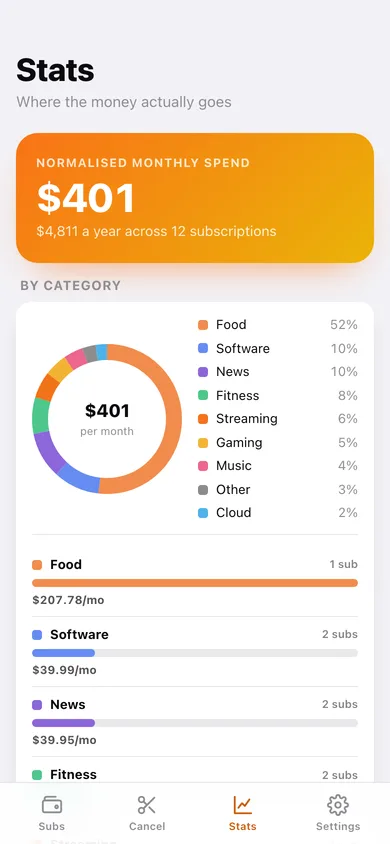
A donut and a ranked board of monthly spend per category, your five biggest line items, and a 12-month chart of what actually leaves your account rather than a flat average.
Yours alone, in this browser
Nothing is sent anywhere. Export a JSON backup or a CSV of every subscription whenever you like, and erase the lot in one tap.
Screens
Every screen, rebuilt for the browser
-
1
Subscriptions
Monthly total with the yearly equivalent, the 30-day renewal runway, forgotten-subscription banner and every plan sorted by what renews next.
-
2
Subscription detail
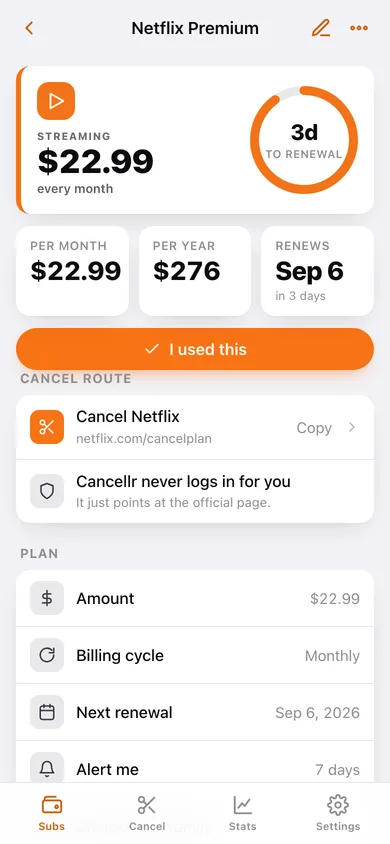
Amount, cycle, a countdown ring to the next renewal, monthly and yearly cost, the cancel route for that service, and “I used this”.
-
3
Stats
Category donut and spend board, real month-by-month charges, biggest line items and the cancel candidates with what they would free up.
-
4
Add or edit a subscription
Name with live directory matching and category auto-suggest, amount, billing cycle, next renewal, alert window, family sharing and notes.
-
5
Cancel directory
Search or filter 250+ services by category and copy the page path where each one hides its cancellation flow.
-
6
Settings
Default alert window, forgotten-flag threshold, currency, rolling past renewals forward, privacy summary, JSON and CSV export, sample data and erase.
Try it with sample data: Loads twelve realistic subscriptions — Netflix, Spotify Family, iCloud+, Adobe, ChatGPT, HelloFresh weekly, Amazon Prime yearly and more — with renewals spread across the next six weeks and two already flagged as forgotten. You can start fresh at any time.
Ready? It's free.
No account, no install, no subscription. Everything you do stays in this browser.
Your say
What should Cancellr do? Tell us before we build it.
Tell us what to build next.
Comments need a free Google sign-in, so every one is from a real person.
Sign in with Google to commentNo comments yet — be the first to say what this app should do next.
Questions
Is the web version of Cancellr free?+
Yes. Every screen is free to use: no subscription, no in-app purchases, no account.
Do I need an account?+
No. Open Cancellr and start using it right away. Sign in with Google only if you want to upvote an app, save it to your list, or leave a comment.
Where is my data stored?+
Only in this browser's local storage. Nothing you enter is sent to our servers, so we can't see it, back it up, or restore it. Clearing site data, a private window, or another device starts empty. Export a backup from the in-app menu to keep it.
Is there a Cancellr app for iPhone or Android?+
Not yet. Cancellr is a community proposal: the browser version is complete, and we build the iPhone and Android app once 100 people upvote it. Upvoters get one email when it ships.