
Web app · Productivity
Brieflet
Your family-based immigration paperwork, organized — in any browser
Six questions tell you which USCIS forms apply, what they cost with concurrent-filing waivers applied, and exactly what evidence each one needs. Then track the case from filing to decision, with an RFE countdown and 79 interview questions to practise. Free, nothing leaves this browser.
Stored in your browser only. Nothing you do in the web version is sent to our servers. Clear your browser data and it's gone — so export a backup from the in-app menu if you want to keep it.
This app is a community proposal.
Try the full browser version now. We build the iPhone and Android app once 100 people upvote it.
We'll email you once, when it ships. Unsubscribe anytime.
In your browser
What you can do in Brieflet on the web
Path picker in six questions
Sponsor status, relationship, where the beneficiary is, how they last entered, prior filings — and the recommended form set updates live as you answer.
The register of twelve forms
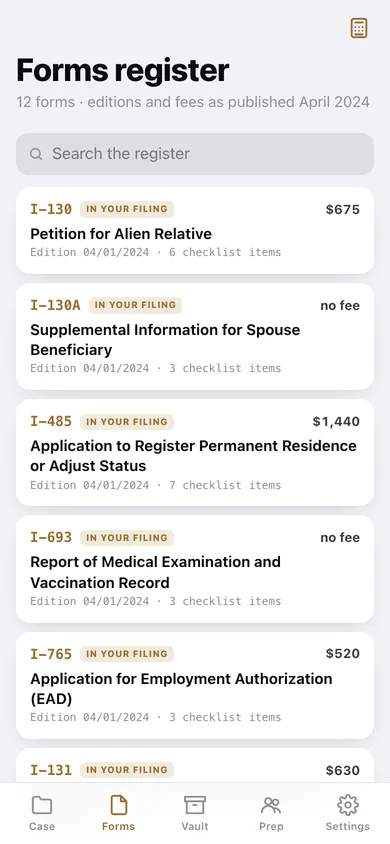
I-130, I-130A, I-485, I-693, I-765, I-131, I-864, I-944 (rescinded), G-1145, G-28, I-589 and N-400 — each with its edition date, fee, purpose and full evidence checklist.
Fee calculator with the real waivers
I-765 and I-131 carry no separate fee when filed with a paid I-485, so the total shows what you actually owe and what the waiver saved you.
Document vault as a live checklist
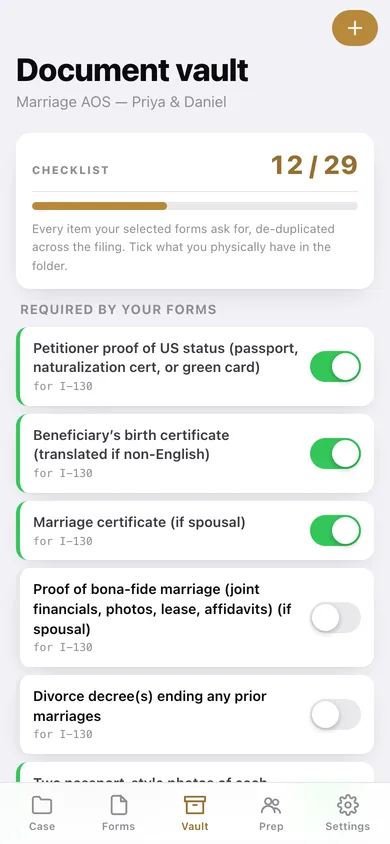
Every evidence item your selected forms require, de-duplicated across the filing, with the key dates and numbers you will have to transcribe.
Timeline with RFE countdown
Filed → receipt → biometrics → RFE → interview → decision, with the day gap between each of your own milestones and a countdown on any open Request for Evidence.
79 interview questions
The bank an adjustment-of-status officer actually works from, grouped by topic, with your own answer saved against each and a practised percentage.
Screens
Every screen, rebuilt for the browser
-
1
Your case
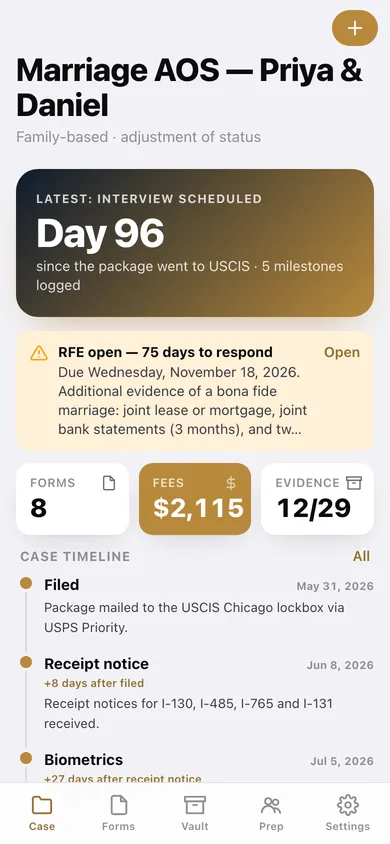
Days since filing, the open RFE, the fee total, evidence progress and the milestone timeline.
-
2
Document vault
The de-duplicated checklist from your forms, plus every document you have logged.
-
3
Forms register
All twelve forms with edition dates, fees and checklist sizes, searchable.
-
4
Path picker
The six-question decision tree, with the recommended forms and fee total updating as you answer.
-
5
Case detail
The situation, the fee breakdown, and which forms are in this filing.
-
6
One form
Purpose, edition, fee and the full what-to-send checklist, with the forms it can be filed alongside.
-
7
Fee calculator
Toggle the forms you are mailing and see the total with concurrent-filing waivers applied.
-
8
Case timeline
Every milestone with the day gap, and any RFE with its response countdown.
-
9
Interview prep
79 questions by category, your own answers, and a practised percentage.
-
10
Official links
USCIS case status, processing times, fee schedule, civil surgeon locator — and when to stop and hire a lawyer.
-
11
Settings
RFE warnings, fee waivers, CSV and JSON export, erase everything.
Try it with sample data: Loads a marriage adjustment-of-status case mid-flight — Priya and Daniel, 96 days since filing, receipt and biometrics done, an interview notice in hand and an open RFE on bona fide marriage evidence with 75 days left — plus a second consular-processing case for a parent. You can start fresh at any time.
Ready? It's free.
No account, no install, no subscription. Everything you do stays in this browser.
Your say
What should Brieflet do? Tell us before we build it.
Tell us what to build next.
Comments need a free Google sign-in, so every one is from a real person.
Sign in with Google to commentNo comments yet — be the first to say what this app should do next.
Questions
Is the web version of Brieflet free?+
Yes. Every screen is free to use: no subscription, no in-app purchases, no account.
Do I need an account?+
No. Open Brieflet and start using it right away. Sign in with Google only if you want to upvote an app, save it to your list, or leave a comment.
Where is my data stored?+
Only in this browser's local storage. Nothing you enter is sent to our servers, so we can't see it, back it up, or restore it. Clearing site data, a private window, or another device starts empty. Export a backup from the in-app menu to keep it.
Is there a Brieflet app for iPhone or Android?+
Not yet. Brieflet is a community proposal: the browser version is complete, and we build the iPhone and Android app once 100 people upvote it. Upvoters get one email when it ships.