
Web app · Food And Drink
Brewlog
Every batch you have fermenting, ranked by what needs you first
Log beer, cider, kombucha and kraut batches with gravity or pH readings on a timeline chart, a target-ready countdown, your full recipe, and star-rated tasting notes. Free in the browser, nothing to install.
Stored in your browser only. Nothing you do in the web version is sent to our servers. Clear your browser data and it's gone — so export a backup from the in-app menu if you want to keep it.
This app is a community proposal.
Try the full browser version now. We build the iPhone and Android app once 100 people upvote it.
We'll email you once, when it ships. Unsubscribe anytime.
In your browser
What you can do in Brewlog on the web
Urgency-sorted ferment dashboard
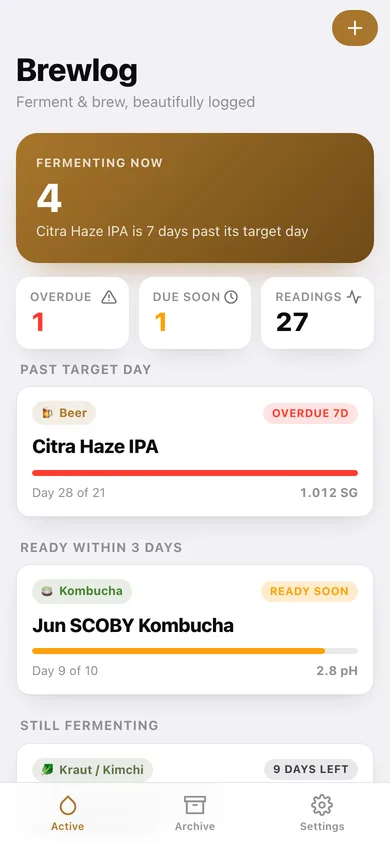
Active batches group into Past target day, Ready soon and Still fermenting, each card showing a type badge, day X of Y progress bar and the last reading.
Four batch types with their own units
Beer and cider log gravity in SG to three decimals (21 and 28 day defaults); kombucha and kraut/kimchi log pH to one decimal (10 and 14 day defaults), with the right range hint on every entry.
Reading timeline and chart
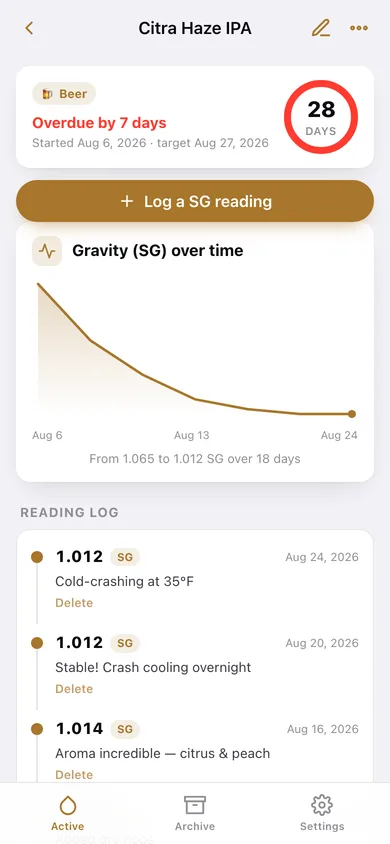
Each batch gets a line chart of its readings plus a dated timeline with the note you wrote at the time, and the total drop from first to last reading.
Recipe kept with the batch
Paste the grain bill, hop schedule, brine ratio or SCOBY notes into the batch and it stays attached — then brew it again in one tap.
Tasting notes and searchable archive
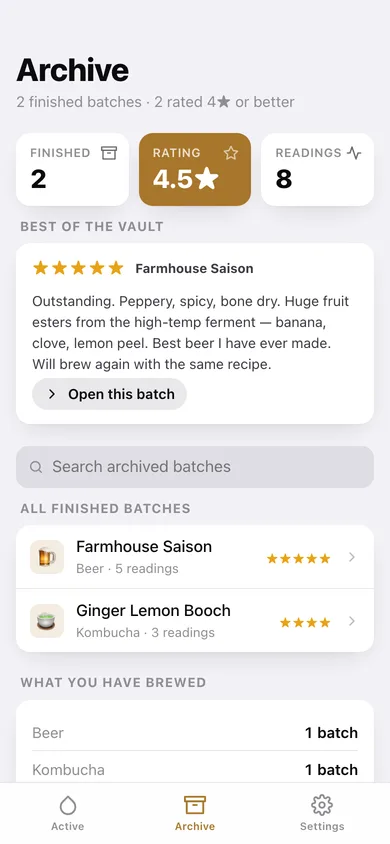
Rate a finished batch 1–5 stars with a Drain pour to Perfect! label, write what you'd change, archive it, and search the vault by name or type later.
Your data, exportable
Everything is saved in this browser only; download a JSON backup or a CSV of every reading for your spreadsheet.
Screens
Every screen, rebuilt for the browser
-
1
Active ferments
Hero count of what's fermenting, overdue and ready-soon tallies, and every active batch as a progress card.
-
2
Batch detail
Countdown ring, readings chart, dated reading log, recipe and tasting note for one batch.
-
3
New / edit batch
Name, type picker, start date, target days with a live target-ready date, and the recipe field.
-
4
Tasting note
Tap a star rating, write how it turned out, and archive the batch in the same step.
-
5
Archive
Searchable list of finished batches with their type, length and star rating.
-
6
Settings
Default batch type, ready-soon window, JSON and CSV export, sample data and erase.
Try it with sample data: Adds six batches — an overdue Citra Haze IPA, a Jun kombucha due tomorrow, a wild apple cider, a caraway sauerkraut, plus an archived Farmhouse Saison and Ginger Lemon Booch with 5★ and 4★ tasting notes — and 27 dated readings between them. You can start fresh at any time.
Ready? It's free.
No account, no install, no subscription. Everything you do stays in this browser.
Your say
What should Brewlog do? Tell us before we build it.
Tell us what to build next.
Comments need a free Google sign-in, so every one is from a real person.
Sign in with Google to commentNo comments yet — be the first to say what this app should do next.
Questions
Is the web version of Brewlog free?+
Yes. Every screen is free to use: no subscription, no in-app purchases, no account.
Do I need an account?+
No. Open Brewlog and start using it right away. Sign in with Google only if you want to upvote an app, save it to your list, or leave a comment.
Where is my data stored?+
Only in this browser's local storage. Nothing you enter is sent to our servers, so we can't see it, back it up, or restore it. Clearing site data, a private window, or another device starts empty. Export a backup from the in-app menu to keep it.
Is there a Brewlog app for iPhone or Android?+
Not yet. Brewlog is a community proposal: the browser version is complete, and we build the iPhone and Android app once 100 people upvote it. Upvoters get one email when it ships.