
Web app · Finance
Borderpay
The binder a borderless worker takes to a tax preparer
Log every invoice with its source country, currency and the FX rate the day it landed, tap the days you spent in each country, and see how close you are to your home country's residency line — with tax primers for eight countries and the W-8BEN cheat sheet. Free, no account, nothing leaves your browser.
Stored in your browser only. Nothing you do in the web version is sent to our servers. Clear your browser data and it's gone — so export a backup from the in-app menu if you want to keep it.
This app is a community proposal.
Try the full browser version now. We build the iPhone and Android app once 100 people upvote it.
We'll email you once, when it ships. Unsubscribe anytime.
In your browser
What you can do in Borderpay on the web
Multi-currency income ledger
Every receipt keeps its source country, source currency, payment rail and the rate you locked on the day of receipt — not the rate at filing — with the USD equivalent computed as you type.
Residency day log with threshold flags
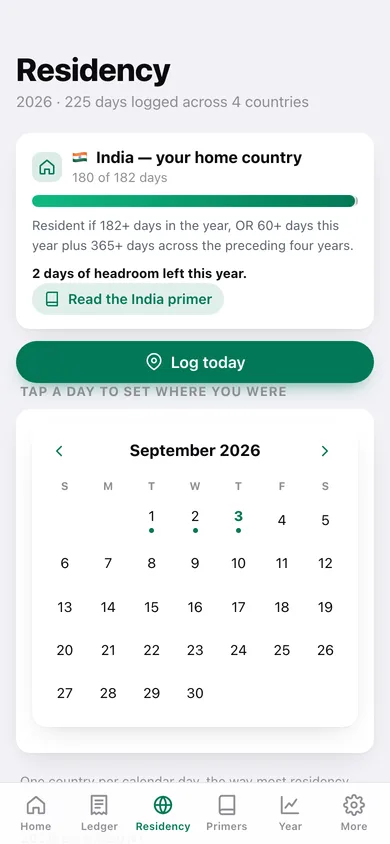
Tap any day on the calendar to say which country you slept in. Borderpay counts the year, ranks every country and measures you against your home country's own rule — India's 182 days, Brazil's 183, Argentina's twelve months.
Eight home-country tax primers
India, the Philippines, Brazil, Argentina, Nigeria, Pakistan, Egypt and Mexico: the tax-resident test, the foreign-income rule, the treaty headline, the typical form and a practical note for each.
Stablecoin-aware
USDC and USDT receipts land in the same ledger as fiat equivalents, flagged so you remember to record the wallet-to-bank movement separately — a different date and a different question.
W-8BEN / W-9 cheat sheet
Which form your US client needs from you and why — W-8BEN, W-8BEN-E, W-9, the 1099-NEC, Form 8233 and your own home-country return.
Year summary and CSV for your accountant
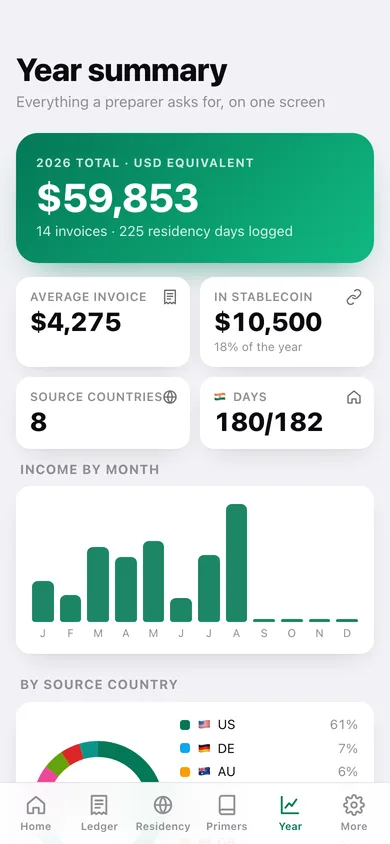
Income by month, by source country and by payment rail, days by country, and a one-tap CSV of every receipt with its locked rate.
Screens
Every screen, rebuilt for the browser
-
1
Home
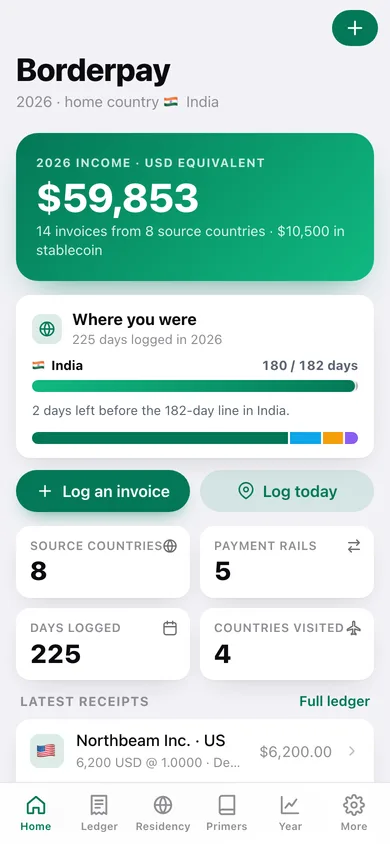
Year-to-date USD income, how close you are to the residency line, and your latest receipts.
-
2
Ledger
Every invoice for the year, filtered by source country or payment rail.
-
3
Invoice
One receipt: amount, currency, the rate locked at receipt, the USD equivalent and the rail.
-
4
Log an invoice
Date, client, source country, amount, currency, rate and rail — with a live USD preview.
-
5
Residency
The home-country threshold bar, a tap-to-log calendar and the day count for every country.
-
6
Country primers
The eight largest remote-worker exporters, with your home country pinned to the top.
-
7
Primer detail
One country's residency test, foreign-income rule, treaty headline, typical form and aid note.
-
8
Forms
W-8BEN, W-8BEN-E, W-9, 1099-NEC and Form 8233 explained, plus the stablecoin note.
-
9
Year summary
Income by month, by source country and by rail, days by country, and the CSV export.
-
10
Settings
Home country, tax year, rate prefill, backup, CSV, sample data and erase.
Try it with sample data: Loads a worked year: fourteen invoices from the US, Germany, the UK, Singapore, the Netherlands, Australia, Canada and the UAE across Deel, Wise, Stripe, wire and stablecoin rails, plus a travel log of India, a US work trip, a Lisbon stint and a Dubai stretch. You can start fresh at any time.
Ready? It's free.
No account, no install, no subscription. Everything you do stays in this browser.
Your say
What should Borderpay do? Tell us before we build it.
Tell us what to build next.
Comments need a free Google sign-in, so every one is from a real person.
Sign in with Google to commentNo comments yet — be the first to say what this app should do next.
Questions
Is the web version of Borderpay free?+
Yes. Every screen is free to use: no subscription, no in-app purchases, no account.
Do I need an account?+
No. Open Borderpay and start using it right away. Sign in with Google only if you want to upvote an app, save it to your list, or leave a comment.
Where is my data stored?+
Only in this browser's local storage. Nothing you enter is sent to our servers, so we can't see it, back it up, or restore it. Clearing site data, a private window, or another device starts empty. Export a backup from the in-app menu to keep it.
Is there a Borderpay app for iPhone or Android?+
Not yet. Borderpay is a community proposal: the browser version is complete, and we build the iPhone and Android app once 100 people upvote it. Upvoters get one email when it ships.