
Web app · Books
Bookbench
The private reading log you keep — four shelves, decimal ratings, your own quotes
Currently reading, Finished, Want to read and DNF. Rate books in 0.25 steps, tag the mood and topic, capture quotes with page numbers, search everything, and see pages per week, books per month and your longest streak. No account, no feed, free in any browser.
Stored in your browser only. Nothing you do in the web version is sent to our servers. Clear your browser data and it's gone — so export a backup from the in-app menu if you want to keep it.
This app is a community proposal.
Try the full browser version now. We build the iPhone and Android app once 100 people upvote it.
We'll email you once, when it ships. Unsubscribe anytime.
In your browser
What you can do in Bookbench on the web
Four shelves you can actually use
Currently reading, Finished, Want to read and DNF — move a book between shelves with one tap; started and finished dates fill in as you go.
Decimal ratings and guilt-free DNF
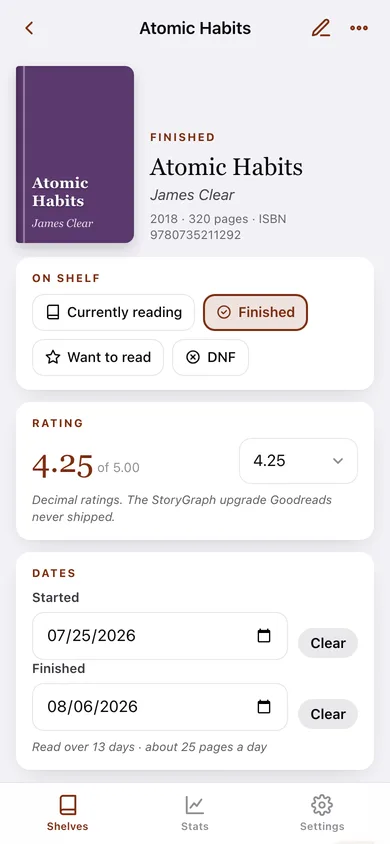
Rate from 1.00 to 5.00 in 0.25 steps, the thing Goodreads never shipped, and mark a book DNF without deleting what you thought of it.
Your private commonplace book
Capture quotes with a page number and your own note, copy them with a proper citation, and export them all as CSV.
Mood and topic tags
Twelve mood tags (cozy, thrilling, slow…) and twenty topic tags (memoir, sci-fi, essays…) built in, so your shelves can be searched by feel.
Search the whole bench
One search box across titles, authors, notes, tags, quote text and quote notes — every hit opens the book.
Reading stats
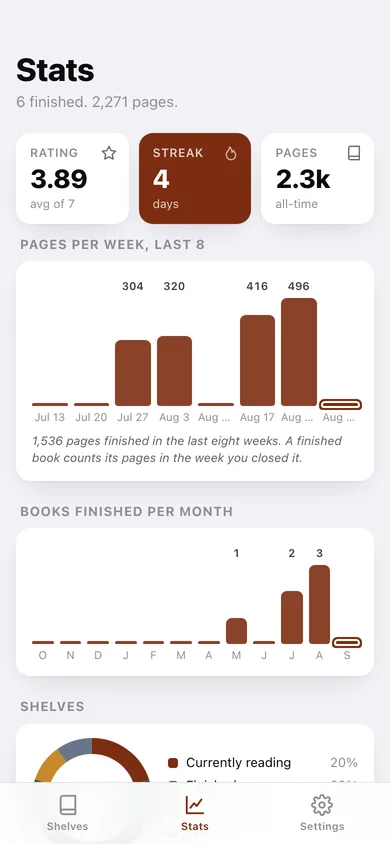
Average rating, longest reading streak, all-time pages, pages per week for the last eight weeks, books finished per month for the last twelve, and a shelf breakdown.
Screens
Every screen, rebuilt for the browser
-
1
Shelves
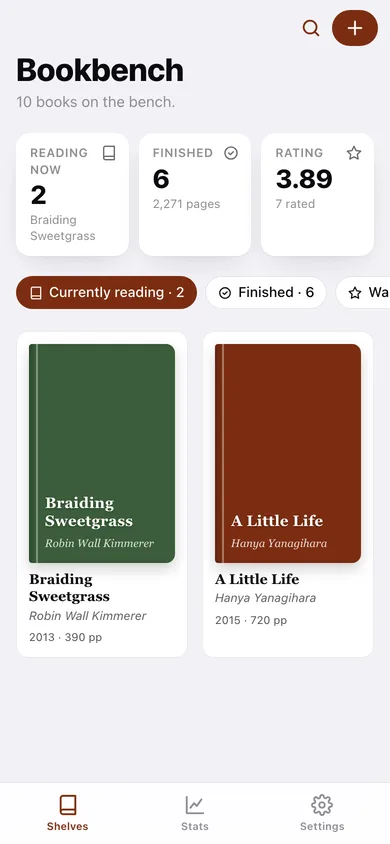
Books on the bench, the shelf you’re browsing, and a cover grid with ratings.
-
2
Book
Cover, shelf, decimal rating, dates, mood and topic tags, notes and captured quotes.
-
3
Book details
Add or edit title, author, year, pages, ISBN and shelf.
-
4
Capture quote
Type a passage with its page number and your note.
-
5
Search
Search titles, authors, notes, tags and quotes.
-
6
Stats
Average rating, streak, pages per week, books per month, shelves and highest rated.
-
7
Settings
Library counts, default shelf, CSV and JSON export, sample library, erase.
Try it with sample data: Adds ten books across the four shelves — six finished over the last three months with ratings, two in progress, one to read and one DNF — plus seven captured quotes. You can start fresh at any time.
Ready? It's free.
No account, no install, no subscription. Everything you do stays in this browser.
Your say
What should Bookbench do? Tell us before we build it.
Tell us what to build next.
Comments need a free Google sign-in, so every one is from a real person.
Sign in with Google to commentNo comments yet — be the first to say what this app should do next.
Questions
Is the web version of Bookbench free?+
Yes. Every screen is free to use: no subscription, no in-app purchases, no account.
Do I need an account?+
No. Open Bookbench and start using it right away. Sign in with Google only if you want to upvote an app, save it to your list, or leave a comment.
Where is my data stored?+
Only in this browser's local storage. Nothing you enter is sent to our servers, so we can't see it, back it up, or restore it. Clearing site data, a private window, or another device starts empty. Export a backup from the in-app menu to keep it.
Is there a Bookbench app for iPhone or Android?+
Not yet. Bookbench is a community proposal: the browser version is complete, and we build the iPhone and Android app once 100 people upvote it. Upvoters get one email when it ships.