
Web app · Finance
PayLater Tracker
Every Klarna, Affirm, Afterpay and Zip plan on one screen
Add each pay-in-4 plan once and PayLater builds the whole installment schedule, totals what you actually owe, and lights up the calendar days where two or three payments land together. Mark installments paid, see the payoff order, and keep it all in your browser. Free, no account, no bank login.
Stored in your browser only. Nothing you do in the web version is sent to our servers. Clear your browser data and it's gone — so export a backup from the in-app menu if you want to keep it.
This app is a community proposal.
Try the full browser version now. We build the iPhone and Android app once 100 people upvote it.
We'll email you once, when it ships. Unsubscribe anytime.
In your browser
What you can do in PayLater Tracker on the web
One total outstanding
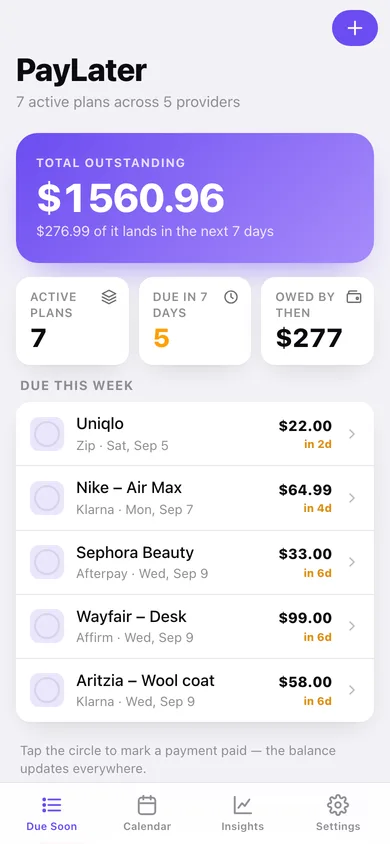
Klarna, Affirm, Afterpay and Zip each show only their own plans. Due Soon stacks them: total outstanding, active plans, and everything landing in the next seven days.
Schedules built for you
Give it the merchant, provider, total, number of payments, cadence and first due date — PayLater splits the amount evenly, folds the rounding remainder into the last payment, and dates every installment.
Collision calendar
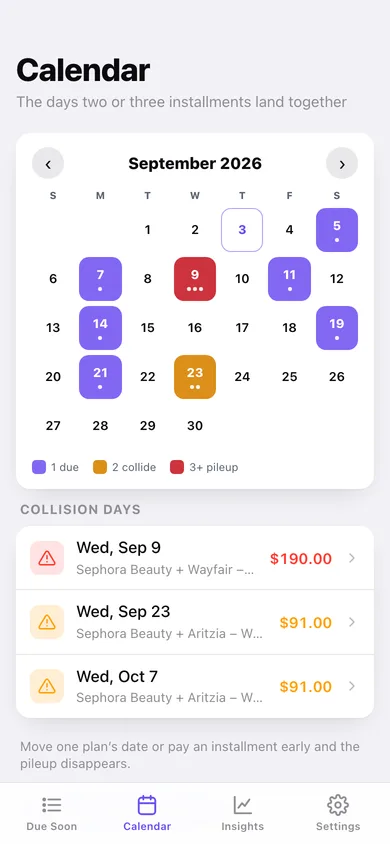
A month heatmap where one payment glows violet, two collide in amber and three or more turn red, with every collision day listed and a tap-a-day breakdown.
Mark paid, watch the balance fall
Tap the circle on any installment to clear it. The plan's remaining balance, payoff progress and your household total update everywhere at once.
Payoff insights
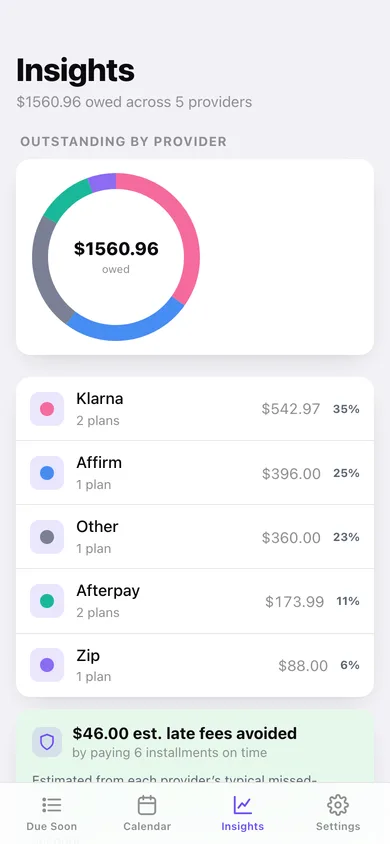
A donut of what you owe by provider, a payoff-order optimizer that switches between smallest balance and soonest due, an eight-week cash-flow chart, and an estimate of the late fees you have dodged.
Private by default
No account, no bank login, no server. Every plan, amount and date stays in this browser, and you can export the schedule as CSV or a JSON backup any time.
Screens
Every screen, rebuilt for the browser
-
1
Due Soon
Total outstanding, what lands this week, and every plan with its payoff progress.
-
2
Collision calendar
The month heatmap that flags the days two or three installments land together.
-
3
Insights
Outstanding by provider, the payoff-order optimizer, late fees avoided and the eight-week outlook.
-
4
Plan detail
Remaining balance, payoff bar and every installment with its due date and paid state.
-
5
Plan form
Merchant, provider, total, payment count, cadence and first due date, with a live schedule preview.
-
6
Every installment
Every unpaid payment across all providers, grouped by month with a running monthly total.
-
7
Settings
Default provider and cadence, payoff strategy, CSV and JSON export, sample data and erase.
Try it with sample data: Loads seven plans across Klarna, Affirm, Afterpay, Zip and a dentist payment plan — 30 dated installments with several already paid, an overdue-free week ahead, and two genuine collision days where payments stack up. You can start fresh at any time.
Ready? It's free.
No account, no install, no subscription. Everything you do stays in this browser.
Your say
What should PayLater Tracker do? Tell us before we build it.
Tell us what to build next.
Comments need a free Google sign-in, so every one is from a real person.
Sign in with Google to commentNo comments yet — be the first to say what this app should do next.
Questions
Is the web version of PayLater Tracker free?+
Yes. Every screen is free to use: no subscription, no in-app purchases, no account.
Do I need an account?+
No. Open PayLater Tracker and start using it right away. Sign in with Google only if you want to upvote an app, save it to your list, or leave a comment.
Where is my data stored?+
Only in this browser's local storage. Nothing you enter is sent to our servers, so we can't see it, back it up, or restore it. Clearing site data, a private window, or another device starts empty. Export a backup from the in-app menu to keep it.
Is there a PayLater Tracker app for iPhone or Android?+
Not yet. PayLater Tracker is a community proposal: the browser version is complete, and we build the iPhone and Android app once 100 people upvote it. Upvoters get one email when it ships.