
Web app · Health And Fitness
Bikebook Wrench Log
Turn a chain-checker reading into a replace-now verdict, offline
A garage of every bike you own, each component tracking its own miles, and the chain-wear engine that says replace now or keep riding based on your drivetrain speed — plus projected miles left at your own wear rate. Free, no account, no Strava.
Stored in your browser only. Nothing you do in the web version is sent to our servers. Clear your browser data and it's gone — so export a backup from the in-app menu if you want to keep it.
This app is a community proposal.
Try the full browser version now. We build the iPhone and Android app once 100 people upvote it.
We'll email you once, when it ships. Unsubscribe anytime.
In your browser
What you can do in Bikebook Wrench Log on the web
Multi-bike garage
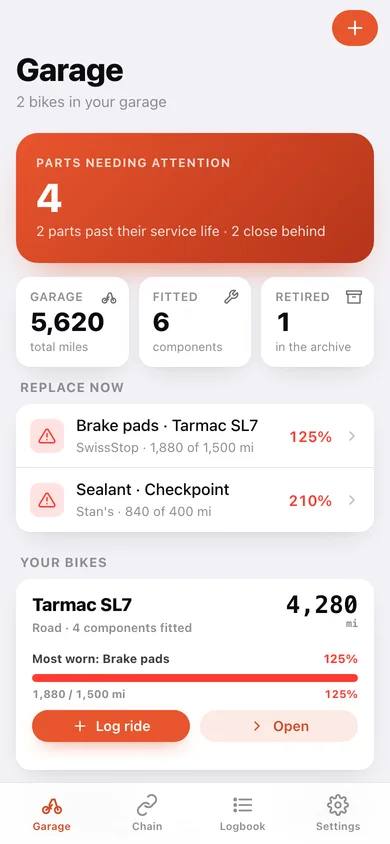
Every bike with its type and odometer, its fitted components, and the most-worn part called out with a wear gauge.
Chain-wear verdict engine
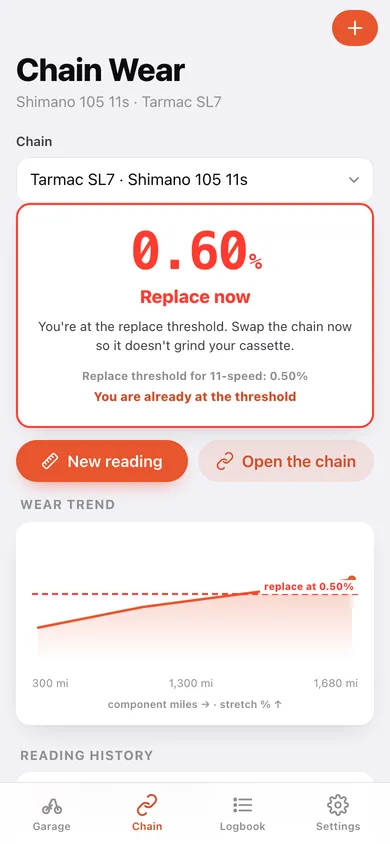
Enter your 0.25 / 0.5 / 0.75 / 1.0% checker reading and the drivetrain speed and get good, monitor, replace-now or cassette-at-risk — thresholds are 1.00% at 5–8 speed, 0.75% at 9–10 and 0.50% at 11/12+.
Projected miles until replace
From the slope between your last two readings, Bikebook works out how many miles are left before the chain hits its threshold, and charts the wear trend against the replace line.
Per-component mileage
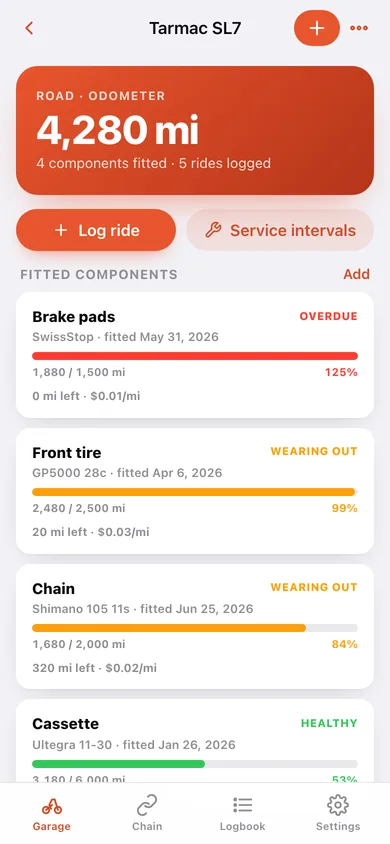
Chain, cassette, chainrings, pads, tires, cables, bottom bracket, sealant, bar tape and pedals each carry their own miles, expected life, cost and cost per mile.
One-tap ride logging
Log a ride or bump the odometer and the miles roll onto the bike and every fitted component at once — retired parts stop accruing.
Service intervals, transfer and retirement
Reminders by miles or days with the standard Road, Gravel, MTB and Commuter templates; move a part to another bike with its history intact, or retire it to the archive with its full lifespan.
Screens
Every screen, rebuilt for the browser
-
1
Garage
Parts needing attention, every bike with its odometer and most-worn component, and service due soon.
-
2
Bike detail
Odometer, fitted components with wear gauges, service intervals, ride history and retired parts.
-
3
Component
Wear gauge, miles left, cost per mile, chain readings and the full service log for one part.
-
4
Chain wear
The replace-now verdict, projected miles remaining, the wear trend against the threshold line and every reading.
-
5
Service intervals
Progress toward each reminder by miles or days, mark done, plus the standard templates for this bike type.
-
6
Logbook
Lifetime parts and service spend, spend by part type, and the whole service timeline.
-
7
Retired parts
The archive of worn-out parts with lifespan and cost per mile.
-
8
Settings
Default drivetrain speed, JSON backup, parts-log CSV, sample data and erase.
Try it with sample data: Loads a 4,280-mile Tarmac SL7 with a chain at 0.60% stretch, worn pads and a tire past its life, a 1,340-mile Checkpoint gravel bike, service intervals for both, recent rides and one retired chain in the archive. You can start fresh at any time.
Ready? It's free.
No account, no install, no subscription. Everything you do stays in this browser.
Your say
What should Bikebook Wrench Log do? Tell us before we build it.
Tell us what to build next.
Comments need a free Google sign-in, so every one is from a real person.
Sign in with Google to commentNo comments yet — be the first to say what this app should do next.
Questions
Is the web version of Bikebook Wrench Log free?+
Yes. Every screen is free to use: no subscription, no in-app purchases, no account.
Do I need an account?+
No. Open Bikebook Wrench Log and start using it right away. Sign in with Google only if you want to upvote an app, save it to your list, or leave a comment.
Where is my data stored?+
Only in this browser's local storage. Nothing you enter is sent to our servers, so we can't see it, back it up, or restore it. Clearing site data, a private window, or another device starts empty. Export a backup from the in-app menu to keep it.
Is there a Bikebook Wrench Log app for iPhone or Android?+
Not yet. Bikebook Wrench Log is a community proposal: the browser version is complete, and we build the iPhone and Android app once 100 people upvote it. Upvoters get one email when it ships.