
Web app · Health And Fitness
Baseweight
One gear closet, every pack list, and your base weight computed live
Enter each piece of gear once with its weight, then drag it into as many trip pack lists as you like. Baseweight splits the grams the way r/Ultralight does — base, worn, consumable, total — with a category breakdown and a base-weight goal. Free, no install.
Stored in your browser only. Nothing you do in the web version is sent to our servers. Clear your browser data and it's gone — so export a backup from the in-app menu if you want to keep it.
This app is a community proposal.
Try the full browser version now. We build the iPhone and Android app once 100 people upvote it.
We'll email you once, when it ships. Unsubscribe anytime.
In your browser
What you can do in Baseweight on the web
One master gear closet
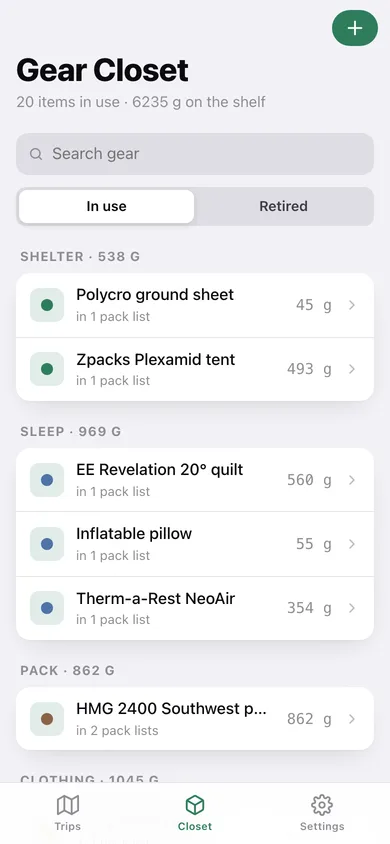
Name, weight, category, notes and a consumable-by-default flag, entered once and reused across every trip — with retired gear kept for history.
The r/Ultralight weight split
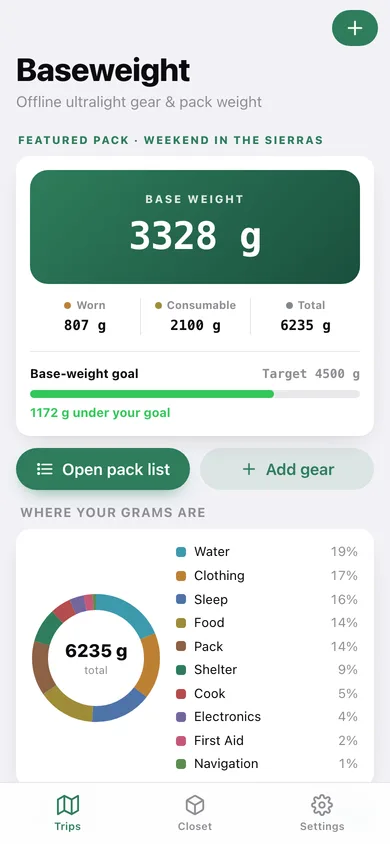
Base weight (packed, not worn, not consumable), worn weight, consumables and total, all recomputed the moment you change a quantity or a toggle.
Worn-vs-packed and consumable toggles
One tap moves an item out of base weight and into worn or consumables — the total never changes, only where the grams land.
Category breakdown chart
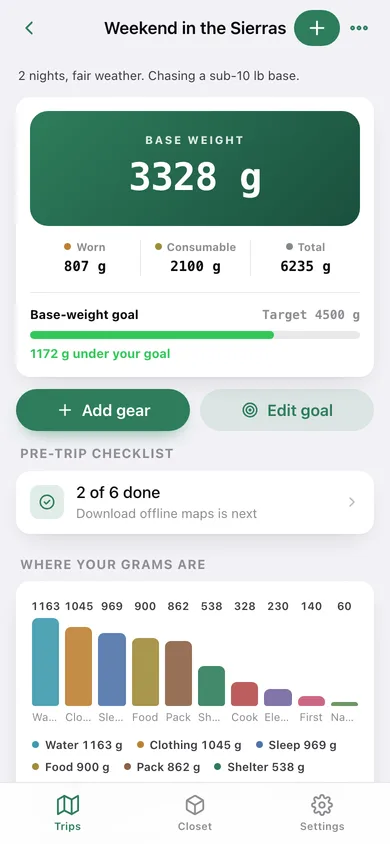
A donut and a bar chart across the eleven gear categories so you can see exactly where your grams are hiding.
Base-weight goals
Set a target — the sub-10 lb base most people chase — and a progress bar shows how far under or over you are as you swap gear.
Grams, ounces or pounds
Everything is stored in grams and converted for display, so switching units never loses precision. Pre-trip checklists and JSON/CSV export included.
Screens
Every screen, rebuilt for the browser
-
1
Trips
Your featured pack's base weight with the worn/consumable/total strip, the goal bar, a category donut and every trip.
-
2
Pack list
The full weight summary, goal, breakdown chart and every item grouped by category with its worn and consumable state.
-
3
Add gear
Search the closet and tap any item to pull it into this pack list.
-
4
Pre-trip checklist
Tasks to tick off before you leave, with a done-count bar.
-
5
Gear closet
Every item by category with its weight, search, and an in-use/retired switch.
-
6
Gear item
Weight, category, consumable default, which pack lists use it, and retire or bring back into use.
-
7
Settings
Display units, JSON backup, closet CSV, sample data and erase.
Try it with sample data: Loads a 20-item ultralight closet — Plexamid, 20° quilt, HMG 2400, Sawyer Squeeze, trail food and fuel — plus a 2-night Sierras trip with a 4.5 kg base goal and a six-task checklist, and a lighter day loop. You can start fresh at any time.
Ready? It's free.
No account, no install, no subscription. Everything you do stays in this browser.
Your say
What should Baseweight do? Tell us before we build it.
Tell us what to build next.
Comments need a free Google sign-in, so every one is from a real person.
Sign in with Google to commentNo comments yet — be the first to say what this app should do next.
Questions
Is the web version of Baseweight free?+
Yes. Every screen is free to use: no subscription, no in-app purchases, no account.
Do I need an account?+
No. Open Baseweight and start using it right away. Sign in with Google only if you want to upvote an app, save it to your list, or leave a comment.
Where is my data stored?+
Only in this browser's local storage. Nothing you enter is sent to our servers, so we can't see it, back it up, or restore it. Clearing site data, a private window, or another device starts empty. Export a backup from the in-app menu to keep it.
Is there a Baseweight app for iPhone or Android?+
Not yet. Baseweight is a community proposal: the browser version is complete, and we build the iPhone and Android app once 100 people upvote it. Upvoters get one email when it ships.