
Web app · Business
Cottage Label
Compliant cottage-food labels and your state sales cap — built in the browser
Type each ingredient with its weight and Cottage Label orders them heaviest-first, flags all nine major allergens (sesame included) for you to confirm, and lays out a print-ready label with the home-kitchen statement. Log sales and watch a gauge toward your state’s annual cap. Free, no install.
Stored in your browser only. Nothing you do in the web version is sent to our servers. Clear your browser data and it's gone — so export a backup from the in-app menu if you want to keep it.
This app is a community proposal.
Try the full browser version now. We build the iPhone and Android app once 100 people upvote it.
We'll email you once, when it ships. Unsubscribe anytime.
In your browser
What you can do in Cottage Label on the web
Ingredients sorted the way the law reads
Enter a weight for each ingredient and the list re-sorts in descending order automatically, exactly as the label must print.
Nine-allergen auto-detection
A pantry map of 100+ keywords catches Milk in ‘unsalted butter’, Sesame in ‘tahini’, Tree Nuts in ‘almond flour’ — with overrides so cocoa butter and buckwheat aren’t false alarms. You confirm every suggestion.
The ‘Contains:’ line in FDA order
Confirmed allergens across all ingredients are merged and ordered Milk, Egg, Fish, Shellfish, Tree Nuts, Peanuts, Wheat, Soybeans, Sesame.
Print-ready label
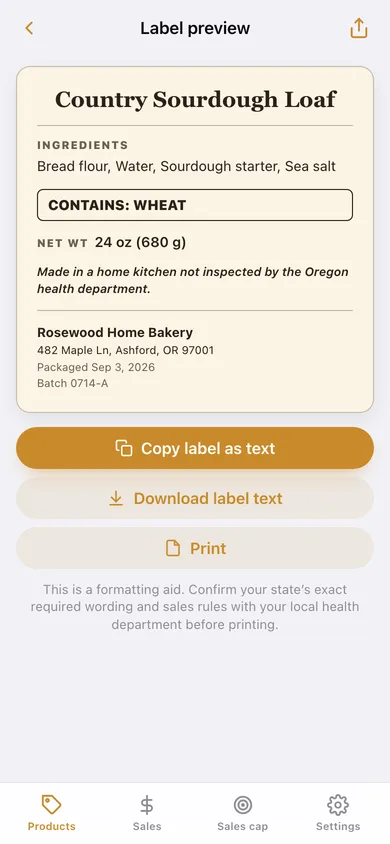
Product name, ingredient list, boxed Contains line, net weight, the ‘made in a home kitchen not inspected by the [state] health department’ statement, business name and address, packaged date and lot note — copy as text, download, or print.
Sales-cap gauge with a warning band
Log each sale; the gauge fills toward your state’s annual gross-sales cap, turns amber at 80% and red when you cross it, and shows what is left.
Sales log by month
Every sale with product and note, a month-by-month chart for the year, and a CSV export for your records.
Screens
Every screen, rebuilt for the browser
-
1
Products
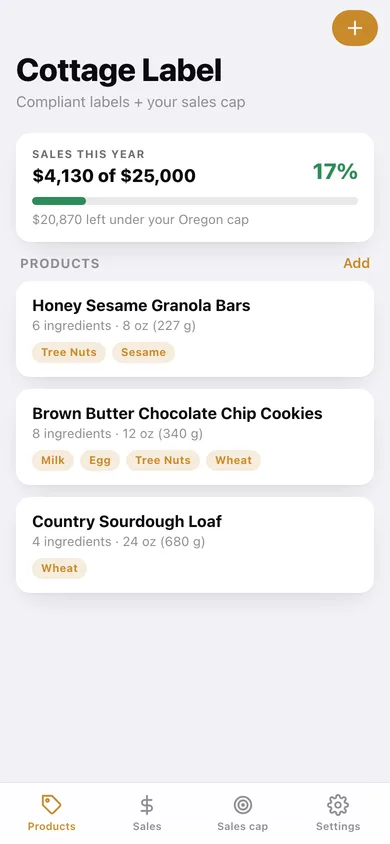
Sales-cap strip and every product with its flagged allergens.
-
2
Product
Name, net weight, business details, weight-sorted ingredients with allergen editing, and the Contains summary.
-
3
Label preview
The compliant label laid out on parchment, with copy, download and print.
-
4
Sales
This year’s total, sales by month, and every logged sale.
-
5
Sales cap
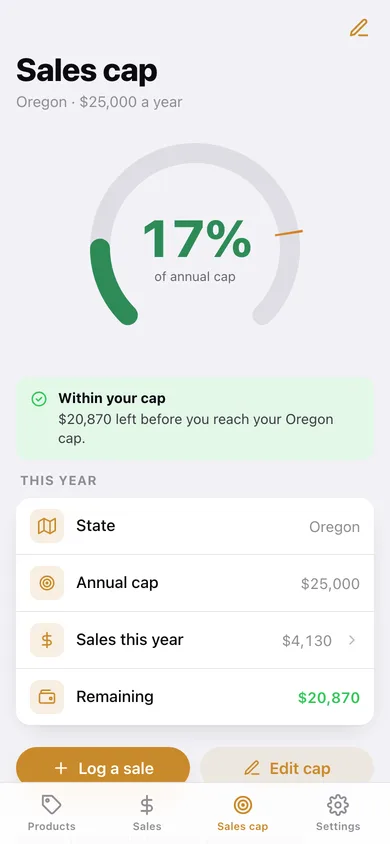
Arc gauge toward your state cap with the 80% warning band, status and remaining room.
-
6
Settings
Business details, state, cap, CSV and JSON export, sample bakery, erase.
Try it with sample data: Adds Rosewood Home Bakery in Oregon with a $25,000 cap, three labeled products (sourdough, brown-butter cookies, sesame granola bars) and seven sales across the year. You can start fresh at any time.
Ready? It's free.
No account, no install, no subscription. Everything you do stays in this browser.
Your say
What should Cottage Label do? Tell us before we build it.
Tell us what to build next.
Comments need a free Google sign-in, so every one is from a real person.
Sign in with Google to commentNo comments yet — be the first to say what this app should do next.
Questions
Is the web version of Cottage Label free?+
Yes. Every screen is free to use: no subscription, no in-app purchases, no account.
Do I need an account?+
No. Open Cottage Label and start using it right away. Sign in with Google only if you want to upvote an app, save it to your list, or leave a comment.
Where is my data stored?+
Only in this browser's local storage. Nothing you enter is sent to our servers, so we can't see it, back it up, or restore it. Clearing site data, a private window, or another device starts empty. Export a backup from the in-app menu to keep it.
Is there a Cottage Label app for iPhone or Android?+
Not yet. Cottage Label is a community proposal: the browser version is complete, and we build the iPhone and Android app once 100 people upvote it. Upvoters get one email when it ships.