
Web app · Business
Bahi
Your shop’s bahi-khata — every customer’s udhaar and payments, balances always right
A page per customer with a running balance, one-tap Credit (You Gave) and Payment (You Got) entries with notes, a total-outstanding dashboard that flags who is overdue, and a statement you can copy or download. No account, no OTP, free in any browser.
Stored in your browser only. Nothing you do in the web version is sent to our servers. Clear your browser data and it's gone — so export a backup from the in-app menu if you want to keep it.
This app is a community proposal.
Try the full browser version now. We build the iPhone and Android app once 100 people upvote it.
We'll email you once, when it ships. Unsubscribe anytime.
In your browser
What you can do in Bahi on the web
A page per customer
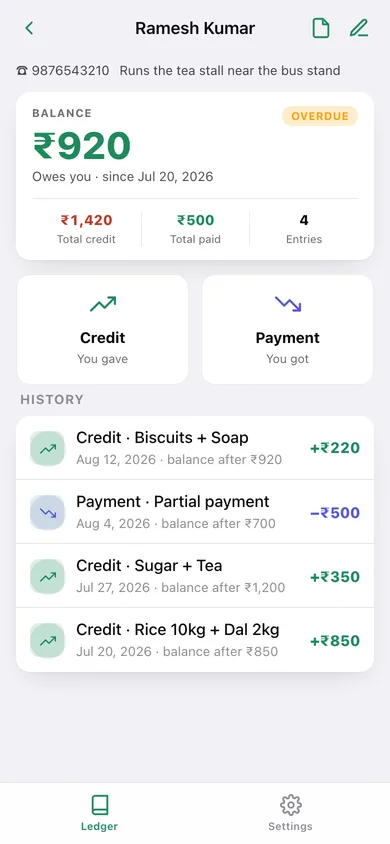
Name, phone and a note, plus every credit and payment with the balance after each one — the paper bahi, minus the arithmetic.
You gave / you got
Record credit (udhaar) or a payment with amount, note and date; a live preview shows the balance before and after you save.
Total outstanding at a glance
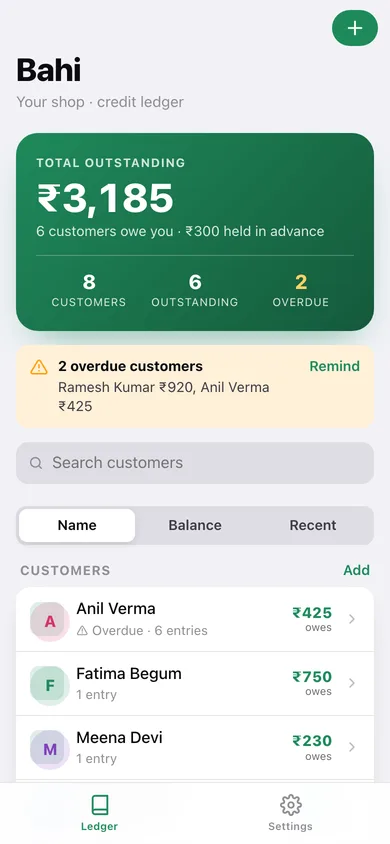
The home screen totals what the shop is owed, counts customers with a balance, and lists who has crossed the overdue rule.
Overdue rule per customer
Default 30 days from the oldest unpaid credit; change it per customer (7–180 days) for regulars who settle monthly.
Statement to share
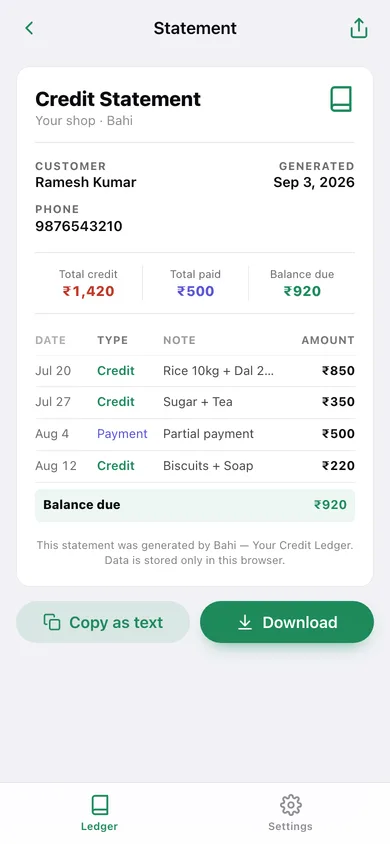
A clean credit statement — entries, total credit, total paid and balance due — copied as text, shared, or downloaded.
Advances handled
A payment larger than the balance becomes an advance, shown separately so nobody is chased for money they have already paid.
Screens
Every screen, rebuilt for the browser
-
1
Ledger
Total outstanding, customers with balances, overdue banner, search and sort, and every customer’s balance.
-
2
Customer
Balance, total credit and paid, Credit / Payment buttons and the full history with balance after each entry.
-
3
Entry
Credit or payment with amount, note, date and a balance preview.
-
4
Customer details
Add or edit a customer, set their overdue rule, delete their page.
-
5
Statement
Printable credit statement with entry table, totals and balance due.
-
6
Settings
Shop name, default overdue rule, CSV and JSON export, sample ledger, erase.
Try it with sample data: Adds eight customers with six weeks of credits and payments — one overdue, two settled, one who paid in advance. You can start fresh at any time.
Ready? It's free.
No account, no install, no subscription. Everything you do stays in this browser.
Your say
What should Bahi do? Tell us before we build it.
Tell us what to build next.
Comments need a free Google sign-in, so every one is from a real person.
Sign in with Google to commentNo comments yet — be the first to say what this app should do next.
Questions
Is the web version of Bahi free?+
Yes. Every screen is free to use: no subscription, no in-app purchases, no account.
Do I need an account?+
No. Open Bahi and start using it right away. Sign in with Google only if you want to upvote an app, save it to your list, or leave a comment.
Where is my data stored?+
Only in this browser's local storage. Nothing you enter is sent to our servers, so we can't see it, back it up, or restore it. Clearing site data, a private window, or another device starts empty. Export a backup from the in-app menu to keep it.
Is there a Bahi app for iPhone or Android?+
Not yet. Bahi is a community proposal: the browser version is complete, and we build the iPhone and Android app once 100 people upvote it. Upvoters get one email when it ships.