
Web app · Finance
Assessr
Build the property-tax appeal packet yourself — and keep all of the savings
Register your parcels, enter three to five comparable sales, log every defect with its repair cost, and Assessr computes the comp-implied value, the suggested target and the reduction to ask for — plus a cover letter and the appeal window for all 50 states. Free, no install, nothing leaves your browser.
Stored in your browser only. Nothing you do in the web version is sent to our servers. Clear your browser data and it's gone — so export a backup from the in-app menu if you want to keep it.
This app is a community proposal.
Try the full browser version now. We build the iPhone and Android app once 100 people upvote it.
We'll email you once, when it ships. Unsubscribe anytime.
In your browser
What you can do in Assessr on the web
The argument, computed
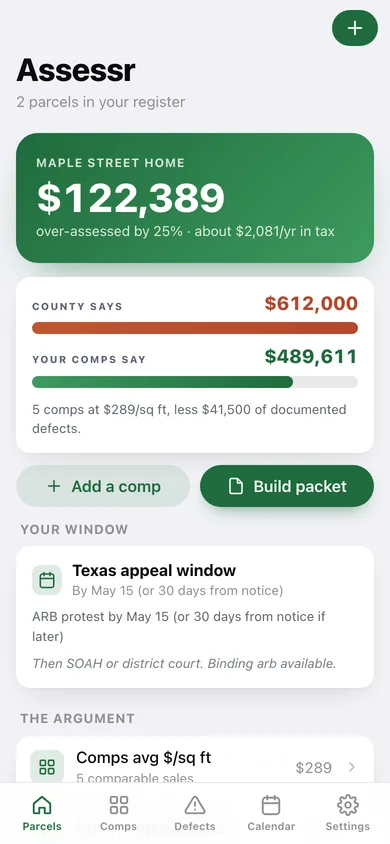
Average comp $/sq ft × your square footage, less every documented defect, gives a suggested target value, the reduction to request, and the annual tax saving at your own effective rate.
Comp grid with automatic $/sq ft
Enter each comparable sale — price, date, square footage, lot, beds, baths, distance — and Assessr ranks them low to high $/sq ft so you lead with the strongest row.
Defect log that subtracts
Foundation, roof, electrical, plumbing, HVAC, exterior, interior, environmental — each with a 1-5 severity, a contractor repair estimate and the evidence it came from.
Appeal calendar for all 50 states and DC
Every appeal window, filing fee and board procedure bundled and searchable — TX May 15, FL 25 days from the TRIM notice, CA Sept 15, NY Grievance Day — with your own states pinned to the top.
Cover letter and four-page packet
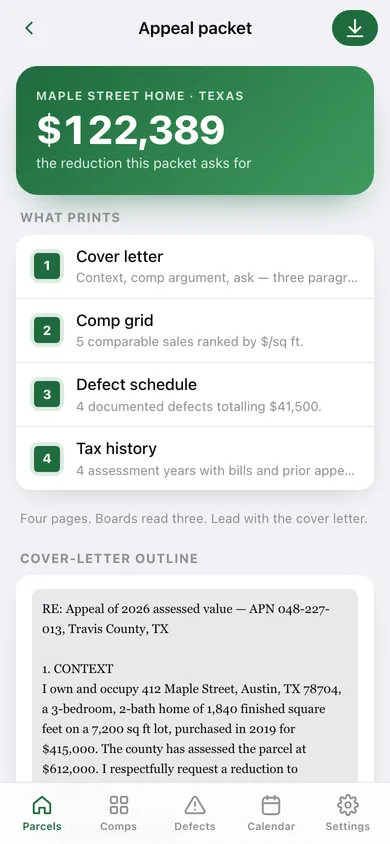
A three-paragraph outline (context, comp argument, ask) written from your real numbers, plus a downloadable packet with the comp grid, defect schedule and tax history.
Multi-year tax journal
Log each year's assessed value, tax bill, whether you appealed and how it went — the pattern that turns a one-off protest into a multi-year argument.
Screens
Every screen, rebuilt for the browser
-
1
Parcels
The case for your active parcel: county value against comp-implied value, the reduction, and your register.
-
2
Parcel detail
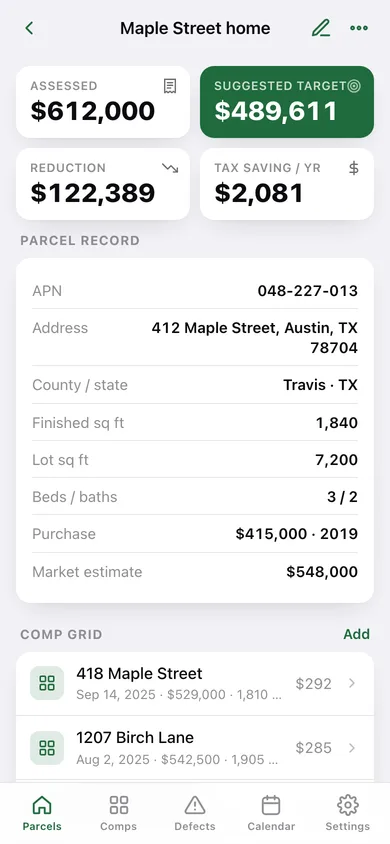
The full record, the argument, the comp grid, the defect log and your state's window.
-
3
Parcel form
APN, address, county, state, square footage, lot, beds, baths, purchase and assessed value.
-
4
Comp grid
Every comparable sale ranked by $/sq ft, filtered by parcel.
-
5
Comp form
Sale price, date, square footage, lot, beds, baths, distance and adjustment notes.
-
6
Defect log
Every documented defect, its severity and repair cost, split by category.
-
7
Defect form
Description, category, severity, estimated repair and the evidence on file.
-
8
Appeal calendar
Searchable appeal windows, filing fees and board procedure for all 50 states and DC.
-
9
Appeal packet
Cover-letter outline, comp grid, defect schedule and tax history — ready to download and print.
-
10
Tax history
Assessed value and tax bill by year with prior appeal results and your effective rate.
-
11
Tax year form
Log a year's assessed value, bill, whether you appealed and the result.
-
12
Settings
Home state, rate assumption, comp ranking, CSV and JSON export, sample data and erase.
Try it with sample data: Loads a worked Travis County, TX appeal — a 1,840 sq ft home assessed at $612,000 with five comparable sales, four defects totalling $41,500 and four years of tax history — plus a second out-of-town rental parcel. You can start fresh at any time.
Ready? It's free.
No account, no install, no subscription. Everything you do stays in this browser.
Your say
What should Assessr do? Tell us before we build it.
Tell us what to build next.
Comments need a free Google sign-in, so every one is from a real person.
Sign in with Google to commentNo comments yet — be the first to say what this app should do next.
Questions
Is the web version of Assessr free?+
Yes. Every screen is free to use: no subscription, no in-app purchases, no account.
Do I need an account?+
No. Open Assessr and start using it right away. Sign in with Google only if you want to upvote an app, save it to your list, or leave a comment.
Where is my data stored?+
Only in this browser's local storage. Nothing you enter is sent to our servers, so we can't see it, back it up, or restore it. Clearing site data, a private window, or another device starts empty. Export a backup from the in-app menu to keep it.
Is there a Assessr app for iPhone or Android?+
Not yet. Assessr is a community proposal: the browser version is complete, and we build the iPhone and Android app once 100 people upvote it. Upvoters get one email when it ships.