
Web app · Education
Apprent
The trade, in the master's voice — your apprenticeship journal in any browser
Record the journeyman next to you explaining the why behind the work: dictate or type the transcript, tag it by mentor, trade, tool and technique category, then find it again with full-text search. Mentor roster, tool log and a bundled trade glossary with code pointers. Free, no install, no account.
Stored in your browser only. Nothing you do in the web version is sent to our servers. Clear your browser data and it's gone — so export a backup from the in-app menu if you want to keep it.
In your browser
What you can do in Apprent on the web
Technique cards with dictation
Tap the mic and your browser transcribes locally as the master talks (or type it). Every card carries title, mentor, trade, tool, category, location, duration and the full transcript.
Full-text search across transcripts
Find every time a mentor said “bonding bushing” or “root pass” — search covers titles, transcripts, tools and categories.
Mentor register
Every journeyman you've worked under: trade, years of experience, shop, location, signature techniques, and all the cards you captured from them.
Tool log
Brand, model, year and trade for every tool you've used or seen used — automatically linked to the technique cards that reference it.
Trade glossary + code corner
33 bundled first-year terms across electrical, plumbing, HVAC, welding, machining, framing and carpentry, plus NEC / UPC / IMC / IRC quick-reference pointers, filterable by trade.
Yours, in this browser
No account, no cloud, no social feed. Export a JSON backup or a CSV of every card with its transcript.
Screens
Every screen, rebuilt for the browser
-
1
Recordings
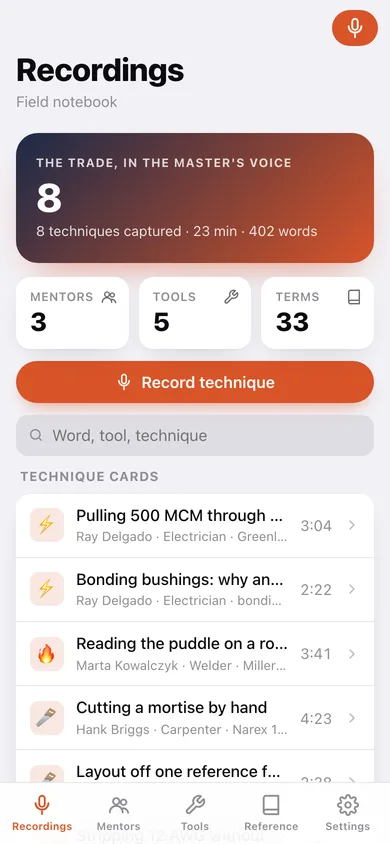
Techniques captured, minutes and words, search, and every technique card.
-
2
Technique card
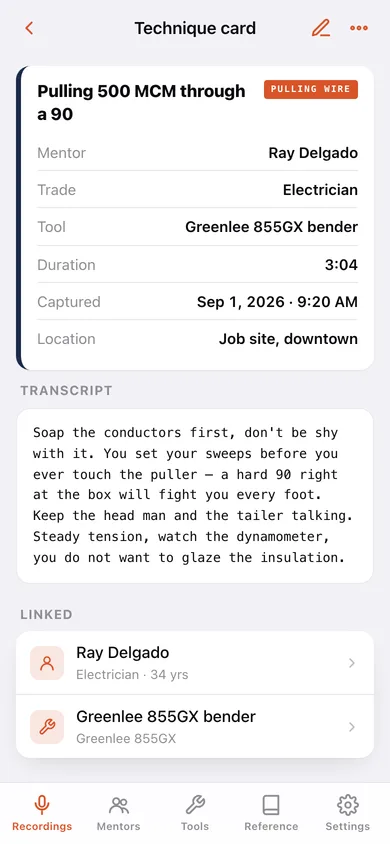
Mentor, trade, tool, category, duration and the monospaced transcript, linked to the mentor and tool.
-
3
Record technique
Dictation clock and mic, transcript, title and context fields with validation.
-
4
Mentors
Your roster of journeymen with card counts and combined years of trade.
-
5
Mentor
One mentor's profile, signature technique categories and every card recorded from them.
-
6
New mentor
Name, trade, years of experience, shop, location and notes.
-
7
Tools
The tool log with brand, model, year and how many cards reference each.
-
8
Tool
One tool's details and the technique cards that use it.
-
9
New tool
Name, brand, model, year, trade and notes.
-
10
Reference
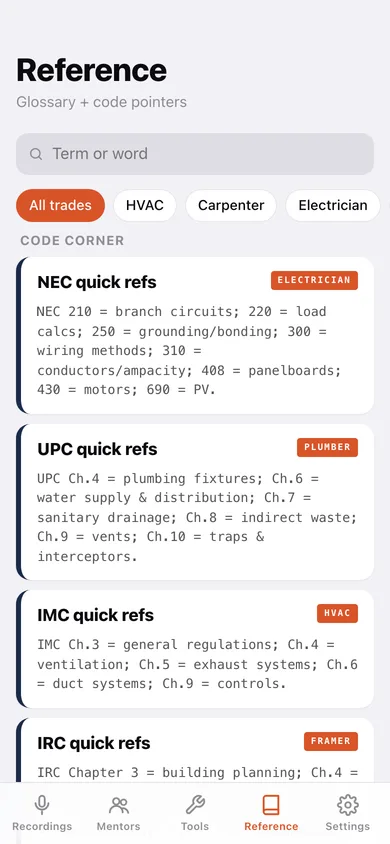
Searchable glossary and code corner filtered by trade.
-
11
Settings
Journal counts, default trade, JSON/CSV export, sample data and reset.
Try it with sample data: Loads three mentors (an electrician, a welder and a timber framer), eight technique cards with full transcripts across five weeks, and five logged tools. You can start fresh at any time.
Ready? It's free.
No account, no install, no subscription. Everything you do stays in this browser.
Your say
Is Apprent useful? Tell us what to build next.
Sign in with Google to vote.
Tell us what to build next.
Comments need a free Google sign-in, so every one is from a real person.
Sign in with Google to commentNo comments yet — be the first to say what this app should do next.
Questions
Is the web version of Apprent free?+
Yes. Every screen is free to use: no subscription, no in-app purchases, no account.
Do I need an account?+
No. Open Apprent and start using it right away. Sign in with Google only if you want to upvote an app, save it to your list, or leave a comment.
Where is my data stored?+
Only in this browser's local storage. Nothing you enter is sent to our servers, so we can't see it, back it up, or restore it. Clearing site data, a private window, or another device starts empty. Export a backup from the in-app menu to keep it.
How is the web version different from the Apprent phone app?+
Dictation uses your browser's built-in speech recognition (Chrome, Edge and Safari support it); the iPhone app transcribes fully on-device and also keeps the audio file. No audio is stored on the web — technique cards keep the transcript, not the recording.