
Web app · Finance
Allowly
Spend, Save and Give jars for every kid — no bank link, no card, no fee
The three-jar allowance ledger: give each child a Spend, Save and Give jar, set a weekly or fortnightly allowance on the payday you choose, pay for chores with one tap, and read back every dollar. Free in your browser, nothing to install.
Stored in your browser only. Nothing you do in the web version is sent to our servers. Clear your browser data and it's gone — so export a backup from the in-app menu if you want to keep it.
This app is a community proposal.
Try the full browser version now. We build the iPhone and Android app once 100 people upvote it.
We'll email you once, when it ships. Unsubscribe anytime.
In your browser
What you can do in Allowly on the web
Three jars per child
Spend, Save and Give balances that add up live, drawn as fill-level jars you can tap to open the history behind them.
Allowance that catches up
Set an amount, weekly or every two weeks, and the payday. Open Allowly any time after payday and it offers every missed payment in one tap — including the two weeks you forgot.
Chores that pay into a jar
List the jobs you actually pay for, pick the jar each one fills, and tick it off. The money moves into that child's jar immediately and the chore lands in their history.
History kids can read
Every allowance, chore payout, deposit and purchase, per jar and per child, with the note attached — editable and deletable, so a miscount takes five seconds to fix.
Family view
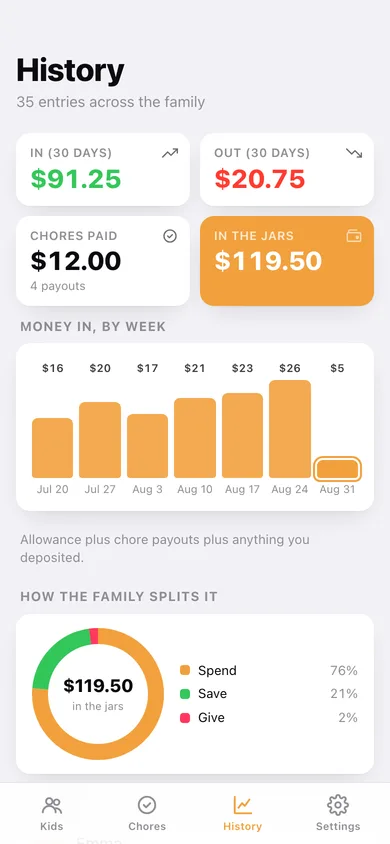
One number for everything the kids hold, money-in by week, a donut of how the family splits spend/save/give, and each child's totals side by side.
Stays on your machine
No account, no bank link, no card for your child. Export a JSON backup or a CSV of the whole ledger whenever you want a copy.
Screens
Every screen, rebuilt for the browser
-
1
Kids
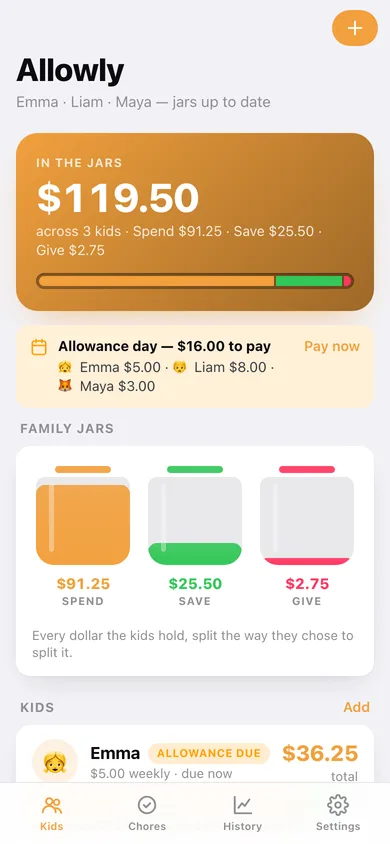
Family total in the jars, an allowance-due banner you can pay in one tap, and a card per child with their three jar balances.
-
2
Child
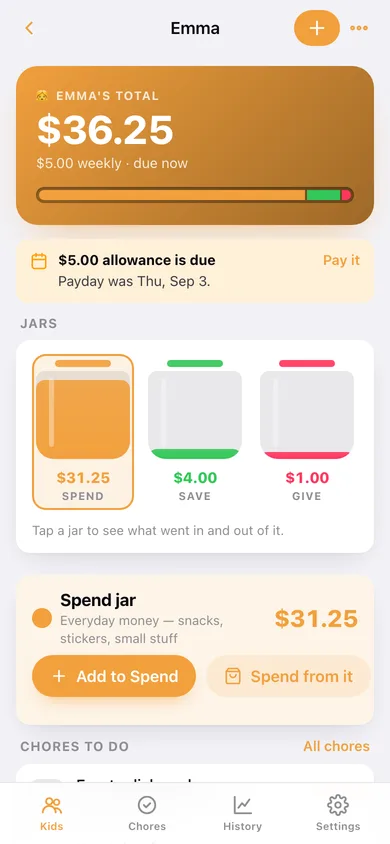
One child's total, their three jars as fill levels, the selected jar's balance and every entry that moved it.
-
3
Add or edit a child
Name, emoji avatar, allowance amount, weekly or fortnightly, and the day of the week you pay.
-
4
Allowance settings
Amount, cadence and payday for one child, with save-and-pay-now and a switch to turn the recurring allowance off.
-
5
Add or spend money
Amount, jar, money in or out, note and date — with a live before-and-after balance for the jar you picked.
-
6
Chores
To-do and done chores across the family or filtered to one child, each showing who it belongs to, which jar it fills and what it pays.
-
7
New chore
Title, payout, target jar and which child the chore belongs to.
-
8
History
Money in by week, the family's spend/save/give donut, per-child totals and the full ledger grouped by day.
-
9
Settings
Which jar the allowance lands in, overdue-allowance prompts, cents on or off, a fresh chore week, CSV and JSON export, sample data and erase.
Try it with sample data: Loads three kids — Emma, Liam and Maya — with six weeks of allowance, chore payouts, deposits and purchases across all three jars, plus eleven chores with some already ticked off. You can start fresh at any time.
Ready? It's free.
No account, no install, no subscription. Everything you do stays in this browser.
Your say
What should Allowly do? Tell us before we build it.
Tell us what to build next.
Comments need a free Google sign-in, so every one is from a real person.
Sign in with Google to commentNo comments yet — be the first to say what this app should do next.
Questions
Is the web version of Allowly free?+
Yes. Every screen is free to use: no subscription, no in-app purchases, no account.
Do I need an account?+
No. Open Allowly and start using it right away. Sign in with Google only if you want to upvote an app, save it to your list, or leave a comment.
Where is my data stored?+
Only in this browser's local storage. Nothing you enter is sent to our servers, so we can't see it, back it up, or restore it. Clearing site data, a private window, or another device starts empty. Export a backup from the in-app menu to keep it.
Is there a Allowly app for iPhone or Android?+
Not yet. Allowly is a community proposal: the browser version is complete, and we build the iPhone and Android app once 100 people upvote it. Upvoters get one email when it ships.