
Web app · Education
Admitly
Your college application season in one private command center — now in the browser
Add every school as reach, match or safety with its EA, ED or RD deadline, move each through researching → applied → decision, tick off essays, recs, transcript, scores and fees on a per-school checklist, see every deadline on one calendar and compare outcomes when decisions land. Free, no install.
Stored in your browser only. Nothing you do in the web version is sent to our servers. Clear your browser data and it's gone — so export a backup from the in-app menu if you want to keep it.
This app is a community proposal.
Try the full browser version now. We build the iPhone and Android app once 100 people upvote it.
We'll email you once, when it ships. Unsubscribe anytime.
In your browser
What you can do in Admitly on the web
School pipeline
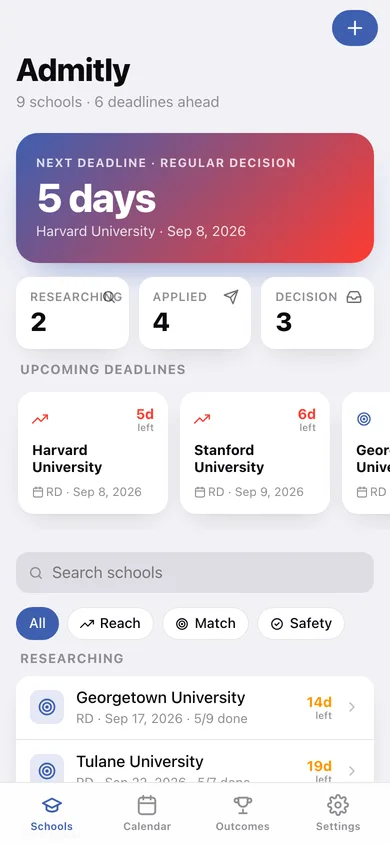
Reach / match / safety tagging, a three-step researching → applied → decision pipeline with a one-tap move, and a home screen that surfaces your next deadline and pipeline counts.
Per-school requirement checklist
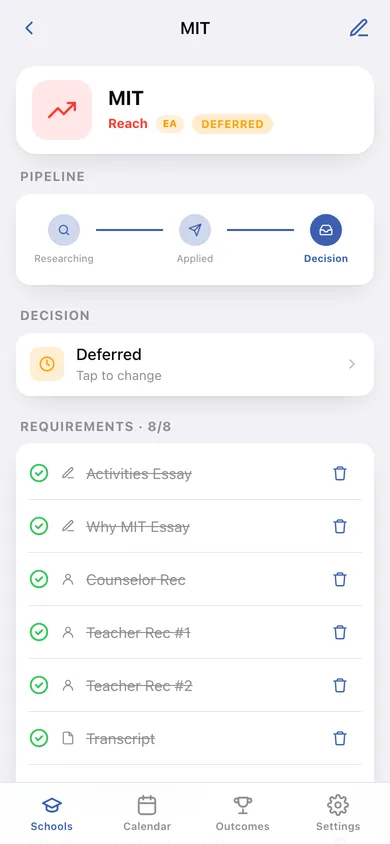
Eight standard requirements pre-filled on every new school — essays, recommendations, transcript, test scores, application fee — plus your own with categories, due dates and notes, and an overall progress bar.
EA / ED / RD deadline calendar
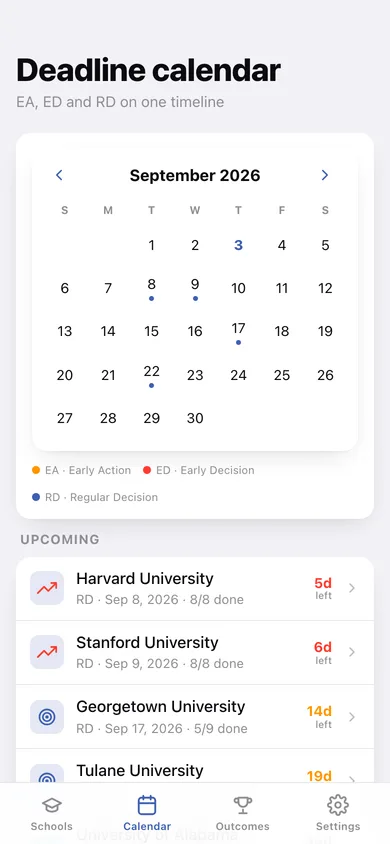
A monthly calendar with colour-coded dots per deadline type so clustering and conflicts show before they happen; tap a day to see what is due.
Outcomes tracker
Log accepted, deferred, waitlisted or rejected on each school and review every decision, who is still waiting and who is not yet applied side by side.
Search and filters
Search by name and filter by school type or pipeline stage without losing the upcoming-deadline cards.
Counselor-ready export
One CSV of every school, deadline, status, outcome and checklist progress for a counselor or parent.
Screens
Every screen, rebuilt for the browser
-
1
Schools
Next-deadline hero, pipeline counts, upcoming deadline cards, search, filters and every school grouped by stage.
-
2
School
Type and deadline header, pipeline with move button, decision logging, the requirement checklist with progress, notes and deadline facts.
-
3
Add / edit school
Name, reach / match / safety, EA / ED / RD, deadline date, pre-fill checklist toggle and notes.
-
4
Deadline calendar
Month grid with EA / ED / RD dots, legend, and the list for the selected day or everything upcoming.
-
5
Outcomes
Accepted / deferred / waitlisted / rejected counts, decisions received, awaiting and not yet applied.
-
6
Settings
CSV export, backup, the standard checklist, sample data and erase.
Try it with sample data: Loads nine schools across a full cycle — three decisions already received (accepted, deferred, rejected), four applied with deadlines in the next two months and two still being researched — each with a realistic requirement checklist. You can start fresh at any time.
Ready? It's free.
No account, no install, no subscription. Everything you do stays in this browser.
Your say
What should Admitly do? Tell us before we build it.
Tell us what to build next.
Comments need a free Google sign-in, so every one is from a real person.
Sign in with Google to commentNo comments yet — be the first to say what this app should do next.
Questions
Is the web version of Admitly free?+
Yes. Every screen is free to use: no subscription, no in-app purchases, no account.
Do I need an account?+
No. Open Admitly and start using it right away. Sign in with Google only if you want to upvote an app, save it to your list, or leave a comment.
Where is my data stored?+
Only in this browser's local storage. Nothing you enter is sent to our servers, so we can't see it, back it up, or restore it. Clearing site data, a private window, or another device starts empty. Export a backup from the in-app menu to keep it.
Is there a Admitly app for iPhone or Android?+
Not yet. Admitly is a community proposal: the browser version is complete, and we build the iPhone and Android app once 100 people upvote it. Upvoters get one email when it ships.