
Web app · Health And Fitness
Yogaflow
Build your own yoga flow, then practise it with a breath-cued player
A 24-pose library with Sanskrit names, hold defaults and breath cues; a builder that sets each hold and side; a full-screen countdown player; and a streak, minutes and history dashboard. Free, no install, no account.
Stored in your browser only. Nothing you do in the web version is sent to our servers. Clear your browser data and it's gone — so export a backup from the in-app menu if you want to keep it.
This app is a community proposal.
Try the full browser version now. We build the iPhone and Android app once 100 people upvote it.
We'll email you once, when it ships. Unsubscribe anytime.
In your browser
What you can do in Yogaflow on the web
24-pose library with Sanskrit names
Every pose from the app — Tadasana to Savasana — grouped by category with its default hold, side and a breath cue like “Inhale to grow tall, exhale to ground”.
Four built-in flows, ready on first open
Morning Energizer, Hip Opener, Evening Wind Down and Balance & Focus are seeded automatically, so you can press play before you build anything.
Flow builder with per-pose hold and side
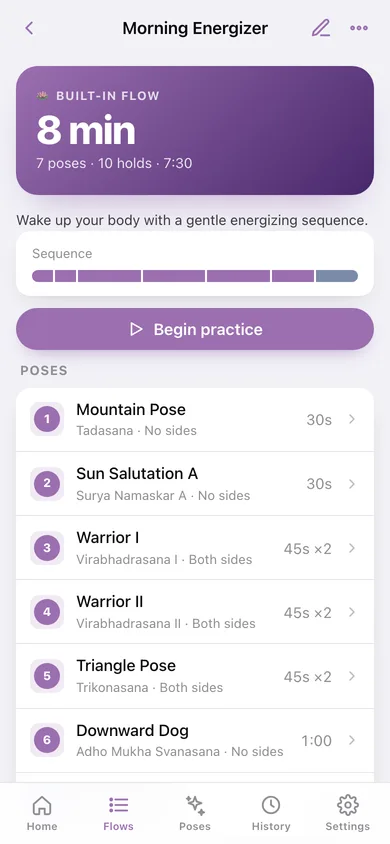
Pick poses from the library, reorder them, set each hold in five-second steps and choose No sides, Both, Left or Right — a Both-sides pose is held twice in the player.
Full-screen guided player
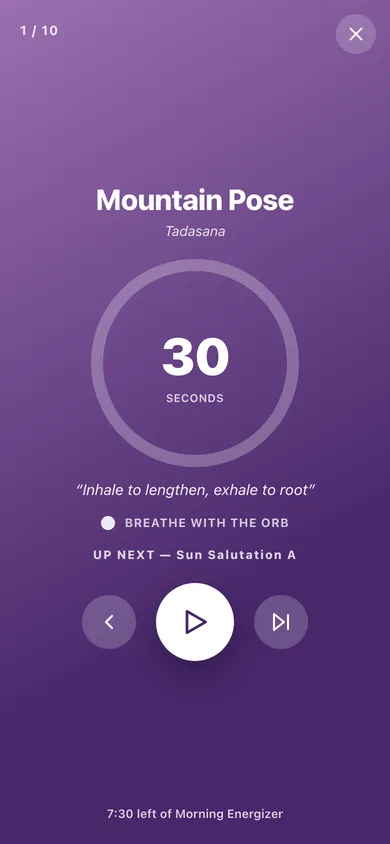
A big countdown ring, the pose name and Sanskrit, the current side, the breath cue, a slow breath orb and an up-next line, with a chime and spoken pose names between holds.
Streak, minutes and session history
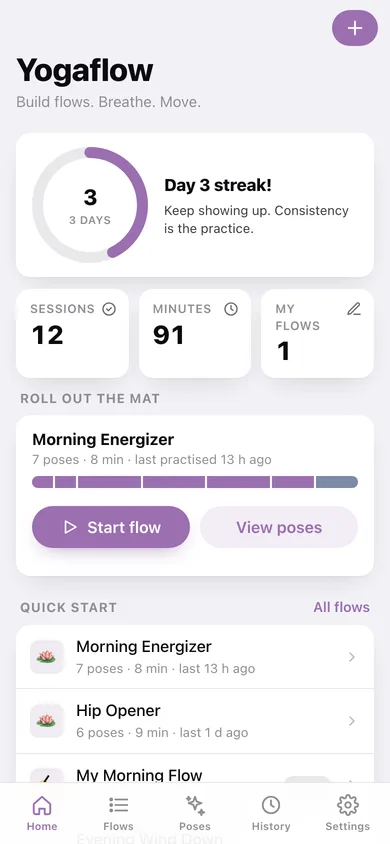
Every finished practice is logged with its flow and minutes, feeding a daily-streak ring, minutes-per-week bars, a 12-week heatmap and a history grouped by day.
Yours alone, exportable
Flows, poses and sessions stay in this browser — export a JSON backup or a CSV of every session whenever you like.
Screens
Every screen, rebuilt for the browser
-
1
Practice dashboard
Streak ring, sessions and minutes, the flow you last practised with a start button, quick-start flows and recent practice.
-
2
Flows
Built-in flows and your own custom sequences with pose counts and durations.
-
3
Flow detail
Duration hero, colour-coded sequence ribbon, every pose with its hold and side, and recent sessions for that flow.
-
4
Flow builder
Name a flow, add poses from a searchable library sheet, reorder them and set each hold and side.
-
5
Guided player
Full-screen countdown ring with pose name, Sanskrit, side, breath cue, breath orb and next-pose preview.
-
6
Session complete
Minutes practised, poses held, and how the session moved your streak and weekly total.
-
7
Pose library
All 24 poses, searchable by English or Sanskrit name and filterable by category.
-
8
Pose detail
Sanskrit name, category, breath cue, how to hold it, default hold and which of your flows use it.
-
9
History
Minutes per week, a 12-week heatmap and every session grouped by day.
-
10
Settings
Chime, spoken pose names, breath orb, default hold, JSON backup, CSV export, restore built-in flows and erase.
Try it with sample data: Adds the custom flow “My Morning Flow” and twelve practice sessions spread over the last three weeks so the streak ring, weekly bars and heatmap are populated. You can start fresh at any time.
Ready? It's free.
No account, no install, no subscription. Everything you do stays in this browser.
Your say
What should Yogaflow do? Tell us before we build it.
Tell us what to build next.
Comments need a free Google sign-in, so every one is from a real person.
Sign in with Google to commentNo comments yet — be the first to say what this app should do next.
Questions
Is the web version of Yogaflow free?+
Yes. Every screen is free to use: no subscription, no in-app purchases, no account.
Do I need an account?+
No. Open Yogaflow and start using it right away. Sign in with Google only if you want to upvote an app, save it to your list, or leave a comment.
Where is my data stored?+
Only in this browser's local storage. Nothing you enter is sent to our servers, so we can't see it, back it up, or restore it. Clearing site data, a private window, or another device starts empty. Export a backup from the in-app menu to keep it.
Is there a Yogaflow app for iPhone or Android?+
Not yet. Yogaflow is a community proposal: the browser version is complete, and we build the iPhone and Android app once 100 people upvote it. Upvoters get one email when it ships.