
Web app · Shopping
Wishvault
Every want, paired with the price you'll actually pay
Save an item with its store, today's price and your target price, then log a quick price check each time you see it. Wishvault draws the trend against your target line and highlights the moment a deal arrives. Free, no install, no account.
Stored in your browser only. Nothing you do in the web version is sent to our servers. Clear your browser data and it's gone — so export a backup from the in-app menu if you want to keep it.
This app is a community proposal.
Try the full browser version now. We build the iPhone and Android app once 100 people upvote it.
We'll email you once, when it ships. Unsubscribe anytime.
In your browser
What you can do in Wishvault on the web
A vault, not a shopping cart
Add wants with store, price today, target price, priority and a note — edit, duplicate, mark bought or remove any of them.
Date-stamped price checks
Log every price you see with the date and where you saw it; the log is the journal that tells you whether waiting is working.
Target line on the sparkline
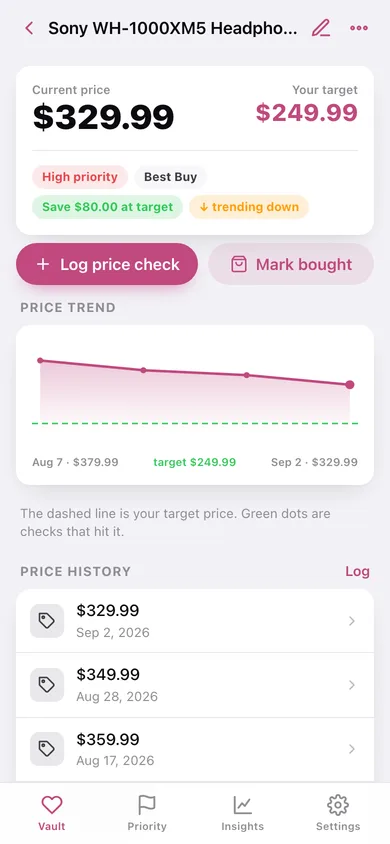
The price trend is drawn against a dashed target line, with the checks that hit your target picked out in green.
At target — buy now
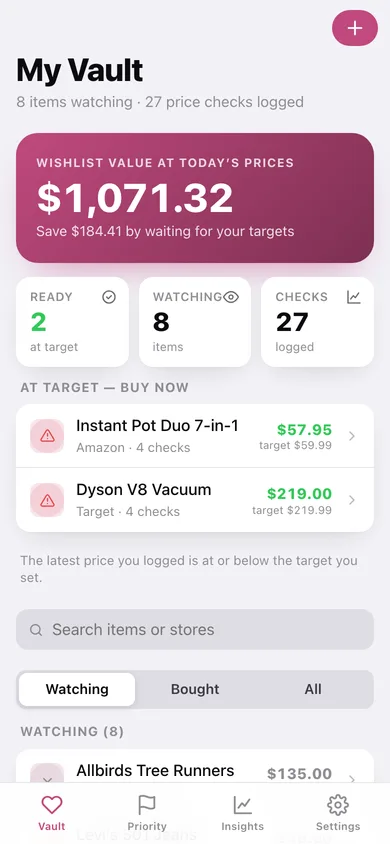
Home surfaces the items whose latest logged price is at or below your target, so a deal never slips past.
Insights on your patience
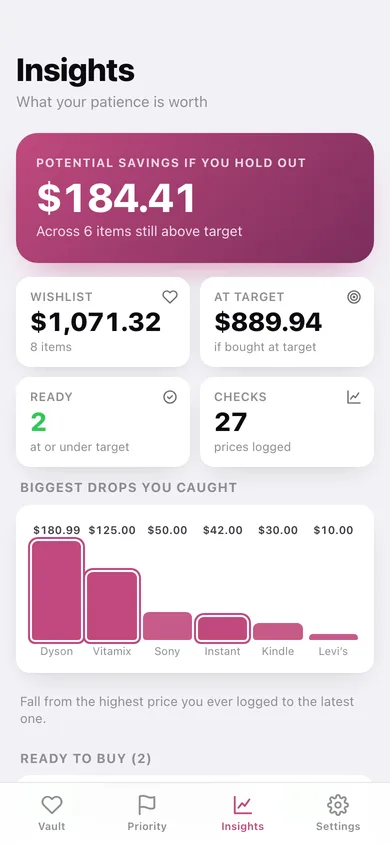
Total wishlist value, value if bought at target, potential savings, biggest drops you caught, value by priority and by store.
Stays in this browser
No account, no price scraping, no sync — export a JSON backup or a CSV of the vault whenever you like.
Screens
Every screen, rebuilt for the browser
-
1
My Vault
Wishlist value, at-target highlights, and every item you're watching with search and a watching/bought filter.
-
2
Item detail
Current price against your target, the price-trend sparkline, the full check history and item details.
-
3
Add / edit item
Name, store, price today, target price, priority and note, with validation on the target.
-
4
By Priority
High, medium and low wants grouped, with the vault value sitting in each band.
-
5
Insights
Potential savings, wishlist vs target value, biggest price drops you caught, value by priority and by store.
-
6
Settings
Currency, default priority, JSON backup, CSV export, sample data and erase.
Try it with sample data: Loads nine real-world wants — headphones, an Instant Pot, a Dyson, a Kindle and more — with two months of dated price checks and one item already bought. You can start fresh at any time.
Ready? It's free.
No account, no install, no subscription. Everything you do stays in this browser.
Your say
What should Wishvault do? Tell us before we build it.
Tell us what to build next.
Comments need a free Google sign-in, so every one is from a real person.
Sign in with Google to commentNo comments yet — be the first to say what this app should do next.
Questions
Is the web version of Wishvault free?+
Yes. Every screen is free to use: no subscription, no in-app purchases, no account.
Do I need an account?+
No. Open Wishvault and start using it right away. Sign in with Google only if you want to upvote an app, save it to your list, or leave a comment.
Where is my data stored?+
Only in this browser's local storage. Nothing you enter is sent to our servers, so we can't see it, back it up, or restore it. Clearing site data, a private window, or another device starts empty. Export a backup from the in-app menu to keep it.
Is there a Wishvault app for iPhone or Android?+
Not yet. Wishvault is a community proposal: the browser version is complete, and we build the iPhone and Android app once 100 people upvote it. Upvoters get one email when it ships.