
Web app · Productivity
WeldBook
Your welder continuity clocks and WPQ wallet, in the browser
Log a weld in ten seconds and it resets the six-month continuity countdown for that process. Every qualification's days remaining on one dashboard, your WPQ cards with code, positions, thickness and lab, and a dated qualification packet to hand a new employer. Free, no company account.
Stored in your browser only. Nothing you do in the web version is sent to our servers. Clear your browser data and it's gone — so export a backup from the in-app menu if you want to keep it.
This app is a community proposal.
Try the full browser version now. We build the iPhone and Android app once 100 people upvote it.
We'll email you once, when it ships. Unsubscribe anytime.
In your browser
What you can do in WeldBook on the web
Continuity dashboard
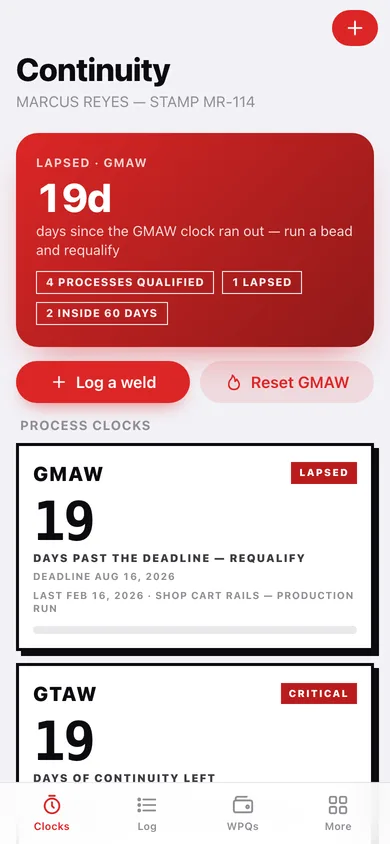
One card per qualified process with a huge days-remaining numeral, sorted most urgent first and banded CURRENT, WATCH, CRITICAL or LAPSED at the same thresholds as the iPhone app.
Ten-second weld log
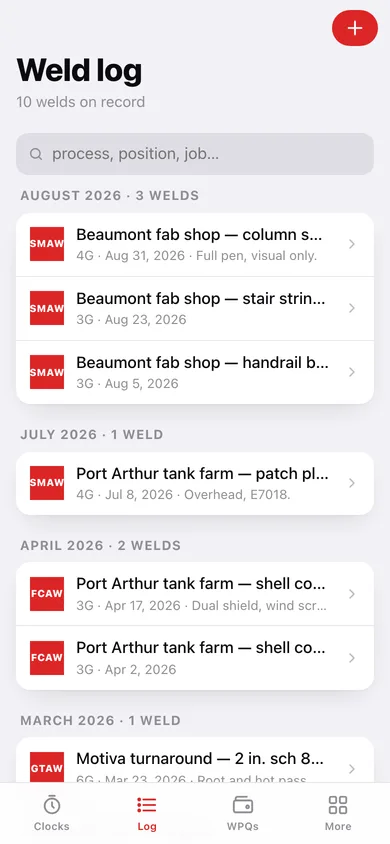
Process, position, job, date — that is the whole entry, and saving it resets that process's clock and tells you the new deadline.
WPQ card wallet
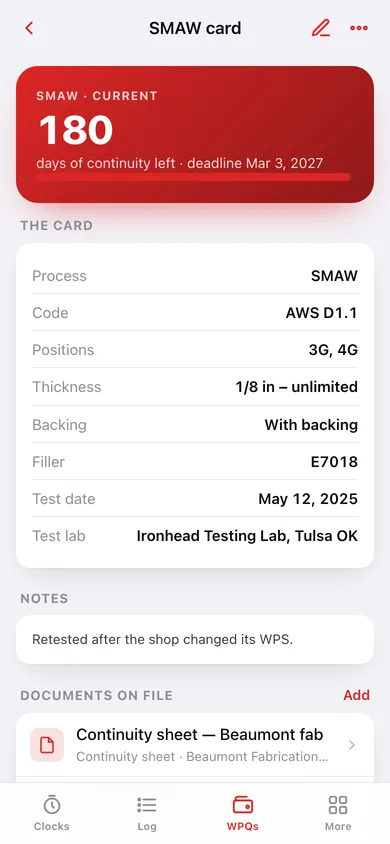
Process, code, positions, thickness range, backing, filler class, test date and testing lab — the details a new QC manager always asks for.
The real continuity engine
The deadline is the last weld with that process plus your window, falling back to the newest WPQ test date when no weld has been logged yet — ported from the iOS engine.
Qualification packet
Builds the dated packet — welder profile, every WPQ card, continuity per process, the whole weld log and the documents on file — to download or print to PDF.
Code reference
Plain-language summaries of ASME IX QW-322, AWS D1.1 Clause 6, ISO 9606-1 and API 1104 on what actually keeps a qualification alive.
Screens
Every screen, rebuilt for the browser
-
1
Clocks
The most urgent clock as a hero number, a card per process with its countdown, and welds per month.
-
2
Process detail
One process: its clock, what reset it, the cards qualified on it and its whole activity history.
-
3
Weld log
Every weld in reverse order, grouped by month and searchable by process, position or job.
-
4
Weld detail
One entry with the job, position and date, and what it did to the continuity clock.
-
5
Log a weld
Process, position, job, date and notes — the ten-second entry, with future dates refused.
-
6
WPQ wallet
Every performance qualification grouped by code, each showing its process clock.
-
7
WPQ card
The full card, its continuity countdown, the documents attached to it and its recent activity.
-
8
WPQ card editor
Process, code, positions, thickness range, backing, filler class, test date and lab.
-
9
Documents
Bend-test reports, WPQ paper and continuity sheets grouped by the card they belong to.
-
10
Document record
What the document is, who issued it, its date, where the paper is held and which card it backs.
-
11
Qual packet
The dated qualification packet previewed in full, ready to download, copy or print to PDF.
-
12
Code reference
ASME IX QW-322, AWS D1.1, ISO 9606-1 and API 1104 on continuity, in plain language.
-
13
More
Welder name and stamp, the continuity window, CSV export, backup, sample data and erase.
Try it with sample data: Loads a traveling welder's record: four WPQ cards (SMAW, GTAW, GMAW, FCAW), ten welds across Beaumont, Port Arthur and a Motiva turnaround, and five document records — leaving one clock current, one on watch, one critical and one already lapsed. You can start fresh at any time.
Ready? It's free.
No account, no install, no subscription. Everything you do stays in this browser.
Your say
What should WeldBook do? Tell us before we build it.
Tell us what to build next.
Comments need a free Google sign-in, so every one is from a real person.
Sign in with Google to commentNo comments yet — be the first to say what this app should do next.
Questions
Is the web version of WeldBook free?+
Yes. Every screen is free to use: no subscription, no in-app purchases, no account.
Do I need an account?+
No. Open WeldBook and start using it right away. Sign in with Google only if you want to upvote an app, save it to your list, or leave a comment.
Where is my data stored?+
Only in this browser's local storage. Nothing you enter is sent to our servers, so we can't see it, back it up, or restore it. Clearing site data, a private window, or another device starts empty. Export a backup from the in-app menu to keep it.
Is there a WeldBook app for iPhone or Android?+
Not yet. WeldBook is a community proposal: the browser version is complete, and we build the iPhone and Android app once 100 people upvote it. Upvoters get one email when it ships.