
Web app · Travel
Wayfare
Your whole trip, day by day — with every confirmation number in one place
Plan a trip, get one tab per day, and drop flights, hotel check-ins, dinners and activities onto a timeline with the time, the address and the booking reference. A departure countdown and a packing checklist come with it. Free, no account, no install.
Stored in your browser only. Nothing you do in the web version is sent to our servers. Clear your browser data and it's gone — so export a backup from the in-app menu if you want to keep it.
This app is a community proposal.
Try the full browser version now. We build the iPhone and Android app once 100 people upvote it.
We'll email you once, when it ships. Unsubscribe anytime.
In your browser
What you can do in Wayfare on the web
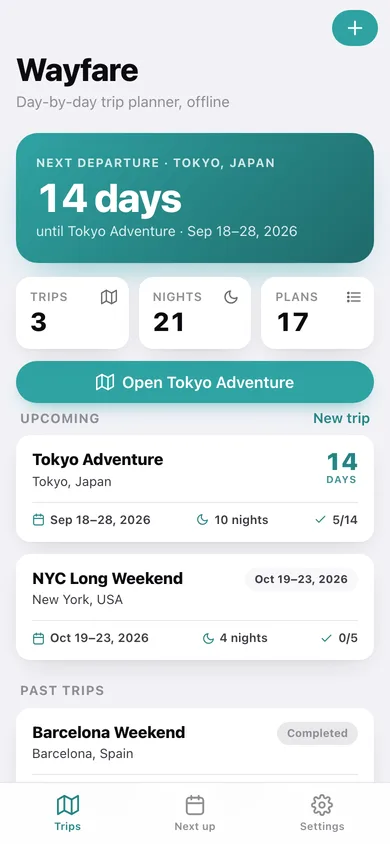
Departure countdown
The home screen leads with the days until your next flight — or, once you land, which day of the trip you are on.
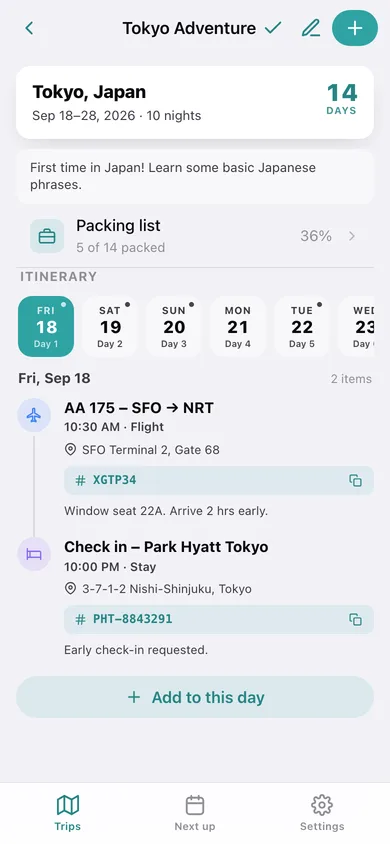
Day-by-day timeline
Each trip gets one tab per calendar day and a chronological timeline of flights, stays, food and activities with a colour and icon per type.
Confirmation numbers you can actually find
Every plan item holds a location note, a booking reference and free notes — one tap copies the reference, no email archaeology.
Packing checklist per trip
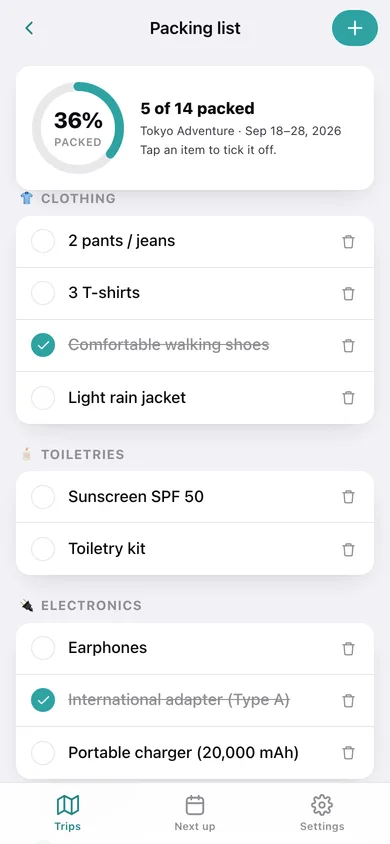
Items grouped into Clothing, Toiletries, Electronics, Documents and Other, with a packed-percentage ring and a one-tap copy of last trip's list.
What's next across every trip
One chronological feed of every upcoming plan across all your trips, plus a donut of your plan mix.
Export the itinerary
Download the whole itinerary as CSV, or a full JSON backup of trips, plans and packing lists.
Screens
Every screen, rebuilt for the browser
-
1
Trips
Countdown to the next departure, trip cards with dates, nights and packing progress, grouped upcoming / in progress / past.
-
2
Itinerary
Day tabs across the trip and a colour-coded timeline of every flight, stay, meal and activity for the chosen day.
-
3
Packing list
Packed-percentage ring and a category-grouped checklist you tick off as the bags fill.
-
4
Plan item
One flight, stay, meal or activity: time, location, confirmation number and notes.
-
5
Add plan item
Pick a type, title, day and time, then add the location, booking reference and notes.
-
6
New trip
Name, destination, start and end dates and notes — Wayfare builds a day tab for every date in between.
-
7
What's next
Every upcoming plan across all trips in order, grouped by day, with a plan-mix donut.
-
8
Settings
Timeline options, copy a packing list between trips, CSV and JSON export, sample trips and erase.
Try it with sample data: Loads three trips — a Tokyo Adventure two weeks out with eleven plan items and a fourteen-item packing list, an NYC long weekend six weeks out, and a finished Barcelona weekend. You can start fresh at any time.
Ready? It's free.
No account, no install, no subscription. Everything you do stays in this browser.
Your say
What should Wayfare do? Tell us before we build it.
Tell us what to build next.
Comments need a free Google sign-in, so every one is from a real person.
Sign in with Google to commentNo comments yet — be the first to say what this app should do next.
Questions
Is the web version of Wayfare free?+
Yes. Every screen is free to use: no subscription, no in-app purchases, no account.
Do I need an account?+
No. Open Wayfare and start using it right away. Sign in with Google only if you want to upvote an app, save it to your list, or leave a comment.
Where is my data stored?+
Only in this browser's local storage. Nothing you enter is sent to our servers, so we can't see it, back it up, or restore it. Clearing site data, a private window, or another device starts empty. Export a backup from the in-app menu to keep it.
Is there a Wayfare app for iPhone or Android?+
Not yet. Wayfare is a community proposal: the browser version is complete, and we build the iPhone and Android app once 100 people upvote it. Upvoters get one email when it ships.