
Web app · Music
WaxStack
Your crates, your pressings, your spins — not just a list of titles
Log the copy you actually own: label, catalog number, pressing year, variant and the matrix in the runout, with separate Goldmine grades for media and sleeve. Tap once when the needle drops. Free, no account.
Stored in your browser only. Nothing you do in the web version is sent to our servers. Clear your browser data and it's gone — so export a backup from the in-app menu if you want to keep it.
This app is a community proposal.
Try the full browser version now. We build the iPhone and Android app once 100 people upvote it.
We'll email you once, when it ships. Unsubscribe anytime.
In your browser
What you can do in WaxStack on the web
Crates you name yourself
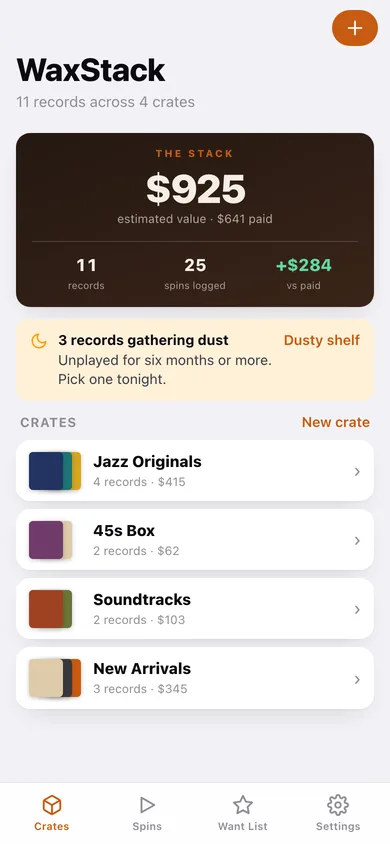
New Arrivals, Jazz Originals, the 45s box under the turntable — each crate shows its record count and what it is worth, sorted by artist, recency or play count.
Pressing detail that identifies your copy
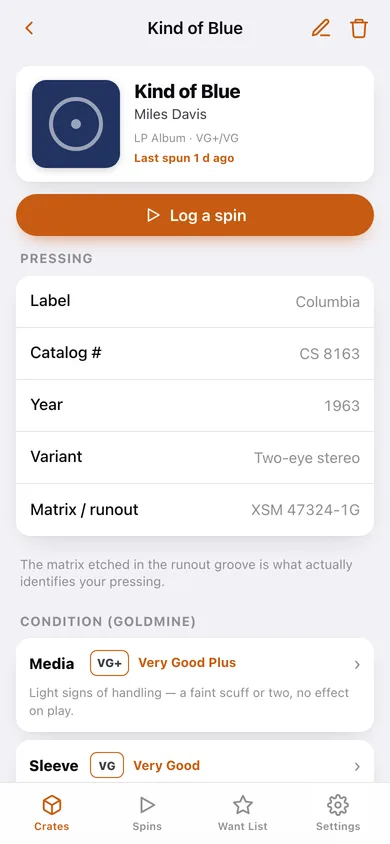
Label, catalog number, pressing year, colour or sleeve variant, and the matrix etched in the runout groove — the field that actually tells one pressing from another.
Goldmine grades, media and sleeve apart
The full seven-point scale (M, NM, VG+, VG, G+, G, P) with the blurb for each, graded separately, because VG+/VG is not the same record as NM/NM.
One-tap spin logging
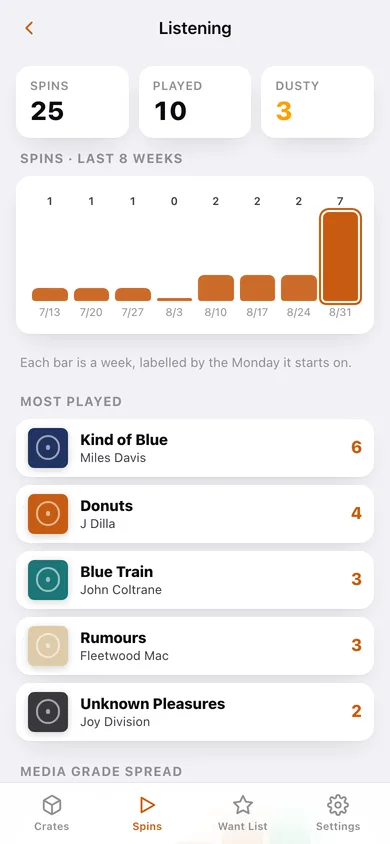
Drop the needle, tap once. WaxStack builds a real listening history: spins per week, your five most played, and a dusty shelf of everything unplayed for six months.
Want list with grade targets and price caps
Every grail carries a minimum grade and a ceiling, adding up to a budget cap for the fair — and Found It turns a want straight into a shelved record with the price you actually paid.
Paid versus worth
Purchase price and your own estimated value per record, totalled across the collection so you can see the stack's swing, plus a CSV export.
Screens
Every screen, rebuilt for the browser
-
1
Crates
The stack's estimated value against what you paid, the dusty warning, and every crate.
-
2
Crate
One crate's records sorted by artist, recency or play count, with its value and spin count.
-
3
Record
Pressing facts, both Goldmine grades with their blurbs, paid versus worth, the crate and every spin.
-
4
Add a record
Artist, title, format, sleeve colour, crate, label, catalog number, year, variant, matrix, both grades and money.
-
5
Spins
Your listening history grouped by day, newest first.
-
6
Listening
Spins over the last eight weeks, your most played, the media-grade spread and the dusty shelf.
-
7
Want List
Grails with target grade, max price and a running budget cap.
-
8
Grail
Add or edit a wanted record with its minimum grade and price ceiling.
-
9
Found it
Turn a want into a shelved record — the copy you found, its grades, what you paid and which crate it goes in.
-
10
Settings
Collection totals, the full Goldmine reference, CSV and JSON export, sample data and erase.
Try it with sample data: Loads four crates and eleven records — Kind of Blue, Blue Train, Unknown Pleasures, Donuts, a Tamla 45 and more — each with real label, catalog, matrix and grade detail, plus a year of spins and five want-list grails. You can start fresh at any time.
Ready? It's free.
No account, no install, no subscription. Everything you do stays in this browser.
Your say
What should WaxStack do? Tell us before we build it.
Tell us what to build next.
Comments need a free Google sign-in, so every one is from a real person.
Sign in with Google to commentNo comments yet — be the first to say what this app should do next.
Questions
Is the web version of WaxStack free?+
Yes. Every screen is free to use: no subscription, no in-app purchases, no account.
Do I need an account?+
No. Open WaxStack and start using it right away. Sign in with Google only if you want to upvote an app, save it to your list, or leave a comment.
Where is my data stored?+
Only in this browser's local storage. Nothing you enter is sent to our servers, so we can't see it, back it up, or restore it. Clearing site data, a private window, or another device starts empty. Export a backup from the in-app menu to keep it.
Is there a WaxStack app for iPhone or Android?+
Not yet. WaxStack is a community proposal: the browser version is complete, and we build the iPhone and Android app once 100 people upvote it. Upvoters get one email when it ships.