
Web app · Lifestyle
Watchwind
Know which watch has stopped before you reach for it
Catalog every piece with its movement, reference and power reserve, and Watchwind counts the hours since you last wore each one — so the automatics that have run down rise to the top. Full service log, collection stats, CSV export, all in the browser.
Stored in your browser only. Nothing you do in the web version is sent to our servers. Clear your browser data and it's gone — so export a backup from the in-app menu if you want to keep it.
This app is a community proposal.
Try the full browser version now. We build the iPhone and Android app once 100 people upvote it.
We'll email you once, when it ships. Unsubscribe anytime.
In your browser
What you can do in Watchwind on the web
Power-reserve tracking that actually computes
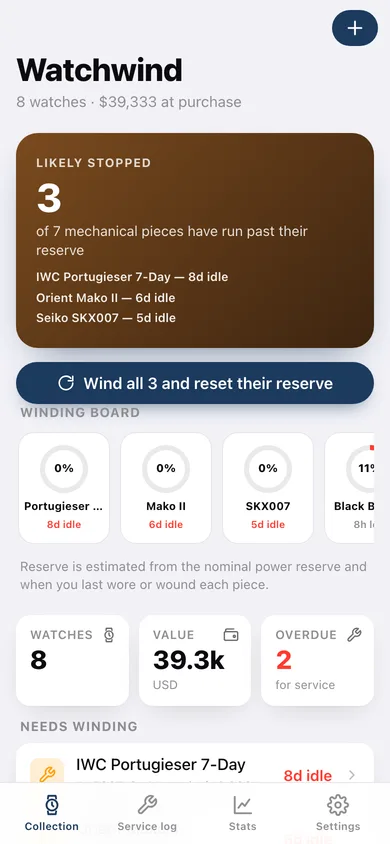
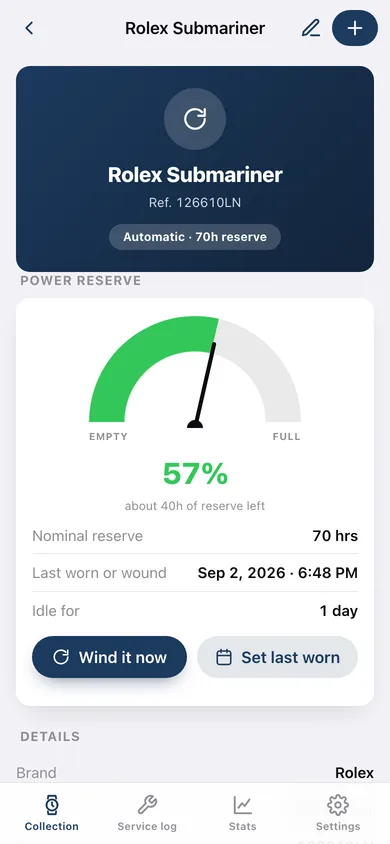
Hours since you last wore or wound a watch against its nominal reserve, drawn as a real power-reserve subdial with a needle — and a winding board of every mechanical piece at a glance.
The whole catalog
Brand, model, reference number, movement (automatic, manual, quartz), reserve in hours, purchase date, price and free-text notes, with an archive for pieces you have sold or put away.
Service log per watch and across the collection
Overhaul, regulation, cleaning, repair or other, with date, technician, cost and what was done — plus a ledger of every record, filterable by type, with spend per year.
Service-interval reminders
Set your own interval (five years by default) and any mechanical watch past it is flagged on the home screen and on its own page.
Collection stats
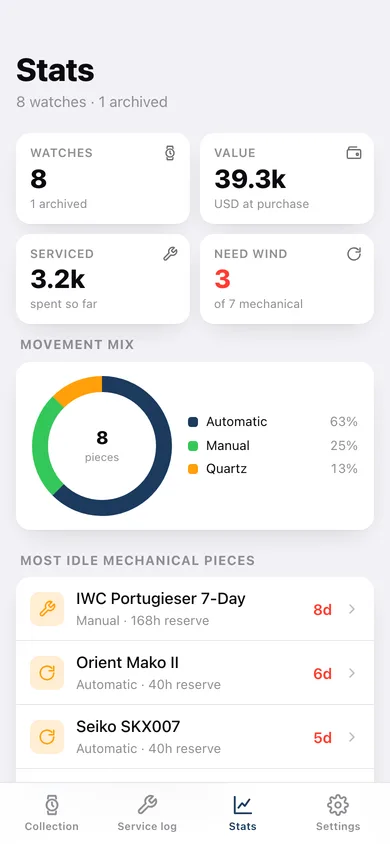
Total value at purchase, total spent on service, movement mix as a donut, value by watch, the most-serviced pieces and a most-idle ranking that tells you what to wear tomorrow.
Your currency, your data
Show amounts in any of nine currencies, export the collection or the service log as CSV, back everything up as JSON — and nothing ever leaves this browser.
Screens
Every screen, rebuilt for the browser
-
1
Collection
What has run down, the winding board of every mechanical piece, and the full catalog with each watch's remaining reserve.
-
2
Watch detail
The power-reserve subdial, full details, the service-interval verdict and this watch's service history.
-
3
Stats
Collection value, service spend, movement mix, value by watch, most idle and most serviced.
-
4
Service log
Every service record in one ledger, filterable by type, with spend per year and a CSV export.
-
5
Add or edit a watch
Brand, model, reference, movement, power reserve, purchase date and price, plus the last-worn controls.
-
6
Archive
Pieces you have sold or put away — out of the totals, history intact.
-
7
Settings
Currency, service interval, collection counts, JSON backup, CSV exports, sample data and erase.
Try it with sample data: Loads a nine-watch collection — a Submariner, a Speedmaster, a Snowflake, a Black Bay, an SKX007, a Portugieser, a Mako II, a G-Shock and one archived Hamilton — with fourteen service records spanning several years, a few pieces deliberately run past their reserve. You can start fresh at any time.
Ready? It's free.
No account, no install, no subscription. Everything you do stays in this browser.
Your say
What should Watchwind do? Tell us before we build it.
Tell us what to build next.
Comments need a free Google sign-in, so every one is from a real person.
Sign in with Google to commentNo comments yet — be the first to say what this app should do next.
Questions
Is the web version of Watchwind free?+
Yes. Every screen is free to use: no subscription, no in-app purchases, no account.
Do I need an account?+
No. Open Watchwind and start using it right away. Sign in with Google only if you want to upvote an app, save it to your list, or leave a comment.
Where is my data stored?+
Only in this browser's local storage. Nothing you enter is sent to our servers, so we can't see it, back it up, or restore it. Clearing site data, a private window, or another device starts empty. Export a backup from the in-app menu to keep it.
Is there a Watchwind app for iPhone or Android?+
Not yet. Watchwind is a community proposal: the browser version is complete, and we build the iPhone and Android app once 100 people upvote it. Upvoters get one email when it ships.