
Web app · Lifestyle
Waqt
Prayer times and the Qibla, worked out in your browser — no ads, no account
Fajr, Dhuhr, Asr, Maghrib and Isha computed on the spot from the sun's position for any of 27 cities or your own coordinates, with six calculation methods, both Asr madhabs, a Qibla bearing, a month timetable and a quiet completion tracker.
Stored in your browser only. Nothing you do in the web version is sent to our servers. Clear your browser data and it's gone — so export a backup from the in-app menu if you want to keep it.
This app is a community proposal.
Try the full browser version now. We build the iPhone and Android app once 100 people upvote it.
We'll email you once, when it ships. Unsubscribe anytime.
In your browser
What you can do in Waqt on the web
Times computed here, not fetched
The same astronomical engine as the iPhone app — solar declination and the equation of time — runs in the page. Nothing is requested from a server, so it works with the network off.
Six methods, two madhabs
Muslim World League, ISNA, Egyptian Authority, Karachi, Umm al-Qura (90-minute Isha) and Dubai, with the Shafi or Hanafi shadow rule for Asr.
27 cities or your own location
Pick a city and it sets the calculation method that region normally uses, or let the browser share your coordinates — permission-gated, and they never leave the page.
Qibla bearing and distance
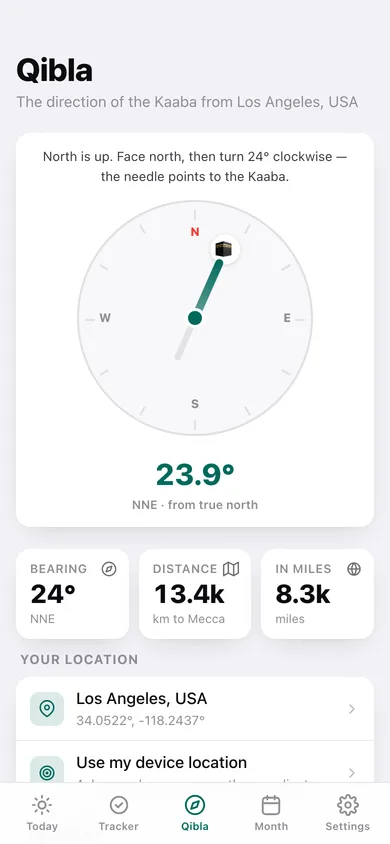
The great-circle bearing to the Kaaba on a fixed north-up dial, with the compass point and the distance to Mecca in km and miles.
Month timetable, exportable
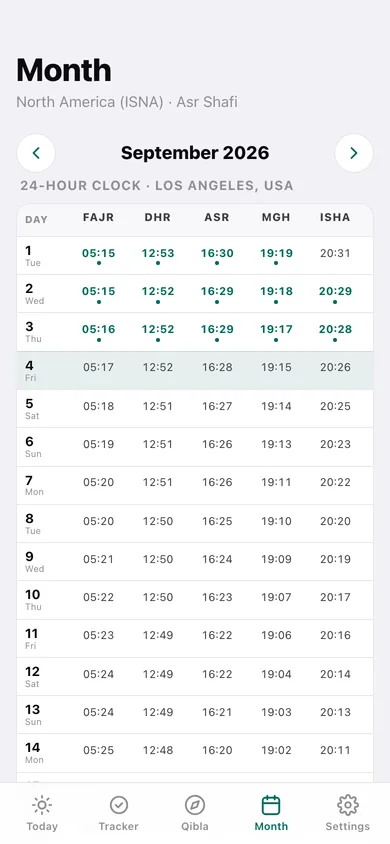
Every day of any month in one table with the days you marked, and a CSV download of the whole month.
A quiet tracker
Tap to mark each prayer, see 7 / 14 / 30-day totals, a per-day bar chart against the five-a-day line, and a complete-day streak. Nothing is scored or shared.
Screens
Every screen, rebuilt for the browser
-
1
Today
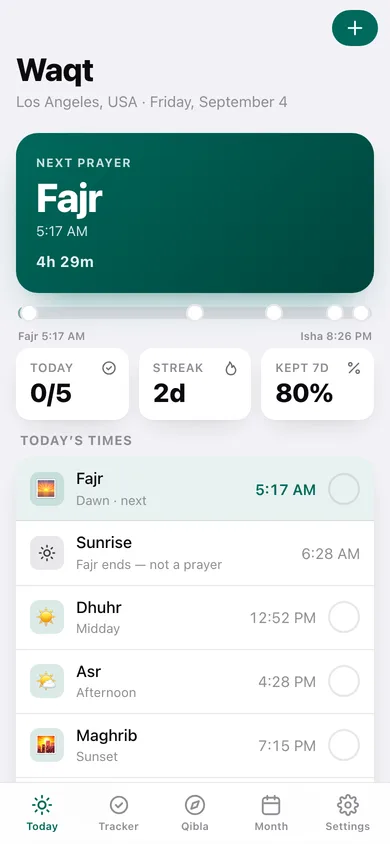
The next prayer with a live countdown, a day arc from Fajr to Isha, and all five times with a tick for each.
-
2
Qibla
A north-up dial with the needle and Kaaba marker at the true bearing, plus distance to Mecca.
-
3
Month timetable
One row per day with all five times in 24-hour clock, today highlighted and a dot on every prayer you marked.
-
4
Tracker
7 / 14 / 30-day totals, a tap-anywhere grid of the last week, prayers per day against the five-a-day line and the full log history.
-
5
One day
A single day's five times plus sunrise, daylight and night length, with ticks and previous / next day.
-
6
Choose location
Search the 27 city presets or hand over your device coordinates.
-
7
Settings
Calculation method, Asr madhab, location, 12- or 24-hour clock, the pre-prayer chime, backup and erase.
Try it with sample data: Adds two weeks of a realistic, imperfect record — some complete days, some with only two or three prayers marked — so the tracker, the streak and the per-day chart have something honest to show. You can start fresh at any time.
Ready? It's free.
No account, no install, no subscription. Everything you do stays in this browser.
Your say
What should Waqt do? Tell us before we build it.
Tell us what to build next.
Comments need a free Google sign-in, so every one is from a real person.
Sign in with Google to commentNo comments yet — be the first to say what this app should do next.
Questions
Is the web version of Waqt free?+
Yes. Every screen is free to use: no subscription, no in-app purchases, no account.
Do I need an account?+
No. Open Waqt and start using it right away. Sign in with Google only if you want to upvote an app, save it to your list, or leave a comment.
Where is my data stored?+
Only in this browser's local storage. Nothing you enter is sent to our servers, so we can't see it, back it up, or restore it. Clearing site data, a private window, or another device starts empty. Export a backup from the in-app menu to keep it.
Is there a Waqt app for iPhone or Android?+
Not yet. Waqt is a community proposal: the browser version is complete, and we build the iPhone and Android app once 100 people upvote it. Upvoters get one email when it ships.