
Web app · Lifestyle
Vivarium Keeper
The reptile husbandry logbook your spreadsheet was pretending to be
A profile per animal, then log feedings with feed response, shed cycles, weights with a growth curve, and enclosure temps and humidity scored against 16 bundled species care sheets. Everything unlocked, nothing installed.
Stored in your browser only. Nothing you do in the web version is sent to our servers. Clear your browser data and it's gone — so export a backup from the in-app menu if you want to keep it.
This app is a community proposal.
Try the full browser version now. We build the iPhone and Android app once 100 people upvote it.
We'll email you once, when it ships. Unsubscribe anytime.
In your browser
What you can do in Vivarium Keeper on the web
A profile for every animal
Name, species, morph, sex and acquired date for each ball python, leopard gecko, crested gecko, tortoise or custom species — no two-animal limit.
Feeding log with feed response
Prey type, item, size and whether it ate, refused or regurgitated. Two refusals in a row and the animal is flagged on the home screen and its feeding log.
Shed cycles, start to finish
Mark the day it goes opaque, mark the shed complete later, and see the average cycle length and shed quality (complete, patchy, retained eye cap).
Weights and a growth curve
Log weights in g, kg or oz; the curve, total change and per-weigh-in delta build themselves so a quiet weight loss is obvious.
Enclosure readings vs care-sheet targets
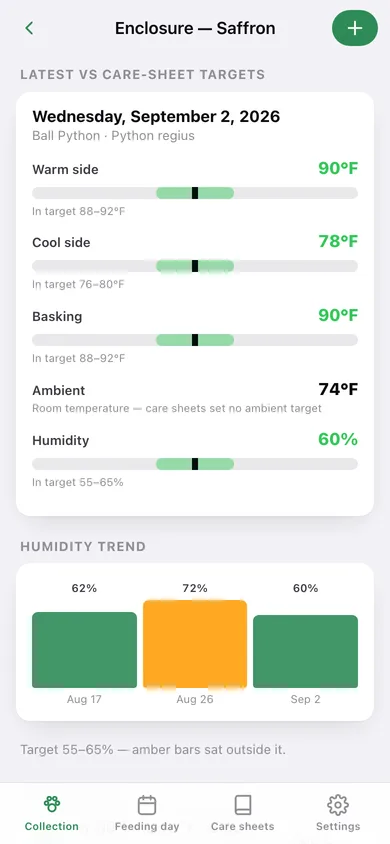
Warm side, cool side, basking, ambient and humidity are drawn on a target-band gauge from the species care sheet, with a humidity trend chart.
16 bundled care sheets
Temps, humidity, diet, feeding cadence, enclosure size and keeper notes for the common pet species — searchable, and wired to every animal you keep.
Breeding and clutch records
Pairing, ovulation and lay dates with clutch size, fertile, slug and hatched counts, plus a hatch rate across every clutch.
Screens
Every screen, rebuilt for the browser
-
1
Collection
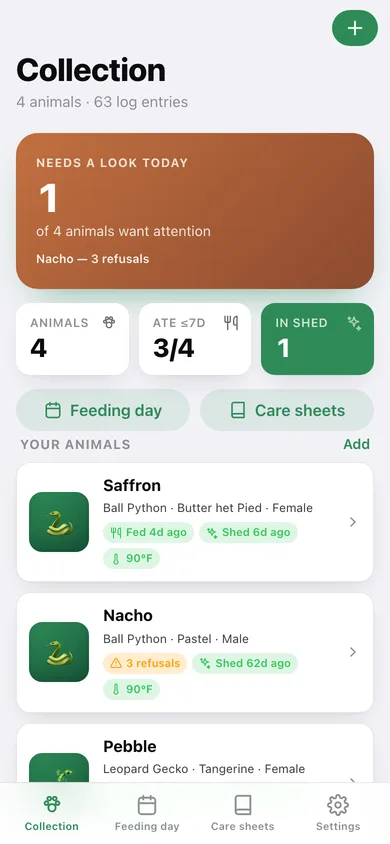
Who needs a look today, then a card per animal with its last feed, shed status and warm-side temperature.
-
2
Animal profile
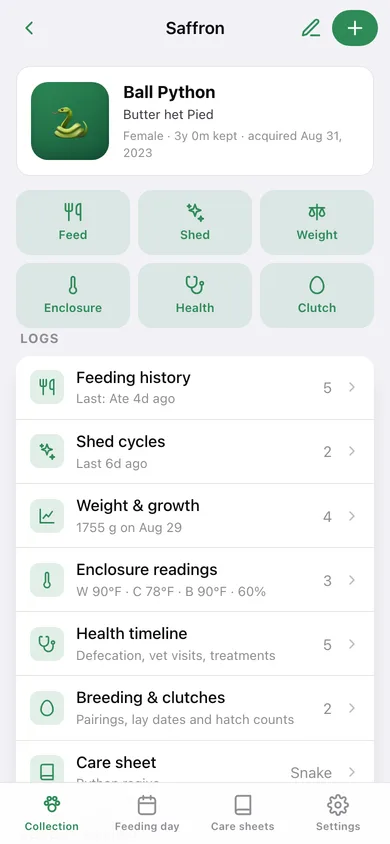
One animal's hub: refusal and off-target banners, six quick-log buttons, every log and a recent-activity timeline.
-
3
Enclosure readings
Latest warm side, cool side, basking and humidity drawn on target-band gauges, plus a humidity trend and the full reading log.
-
4
Feeding history
Every offer with its response, the average gap between feeds and the care sheet's feeding schedule.
-
5
Shed cycles
In-shed banner, average cycle length and each shed from opaque to complete.
-
6
Weight & growth
Latest weight, total change and the growth curve, with a per-weigh-in delta on every entry.
-
7
Health timeline
Defecation, vet visits, treatments, regurgitation and free-text notes grouped by day.
-
8
Breeding & clutches
Pairing, ovulation and lay dates with fertile, slug and hatched counts and an overall hatch rate.
-
9
Add or edit an animal
Name, species from the care-sheet list or a custom one, morph, sex and acquired date.
-
10
Feeding day
The whole collection at once: who is on a refusal streak, who has gone 10+ days, and the care-sheet schedule per species.
-
11
Care sheet library
All 16 bundled species grouped by snake, lizard, tortoise, turtle and amphibian, searchable by name.
-
12
Care sheet
Target warm, cool, basking and humidity ranges plus diet, feeding, enclosure and keeper notes for one species.
-
13
Settings
Weight and temperature units, a count of everything logged, JSON backup, feeding CSV, sample data and erase.
Try it with sample data: Loads four animals — a proven breeder ball python, a male mid feeding-strike, a leopard gecko with a clean growth curve and a crested gecko currently in shed — with about six weeks of feedings, sheds, weights, enclosure readings, health notes and two clutch records. You can start fresh at any time.
Ready? It's free.
No account, no install, no subscription. Everything you do stays in this browser.
Your say
What should Vivarium Keeper do? Tell us before we build it.
Tell us what to build next.
Comments need a free Google sign-in, so every one is from a real person.
Sign in with Google to commentNo comments yet — be the first to say what this app should do next.
Questions
Is the web version of Vivarium Keeper free?+
Yes. Every screen is free to use: no subscription, no in-app purchases, no account.
Do I need an account?+
No. Open Vivarium Keeper and start using it right away. Sign in with Google only if you want to upvote an app, save it to your list, or leave a comment.
Where is my data stored?+
Only in this browser's local storage. Nothing you enter is sent to our servers, so we can't see it, back it up, or restore it. Clearing site data, a private window, or another device starts empty. Export a backup from the in-app menu to keep it.
Is there a Vivarium Keeper app for iPhone or Android?+
Not yet. Vivarium Keeper is a community proposal: the browser version is complete, and we build the iPhone and Android app once 100 people upvote it. Upvoters get one email when it ships.