
Web app · Travel
Visawise
Your US visa file — checklist, DS-160 and interview — ready in the browser
Make a case for your exact visa type (B1/B2 first-time or dropbox, F-1, H-1B, J-1) and get its real document checklist, a 10-section DS-160 tracker with your AA confirmation number, biometrics and interview countdowns, and the interview questions to rehearse. Free, no account, nothing leaves your browser.
Stored in your browser only. Nothing you do in the web version is sent to our servers. Clear your browser data and it's gone — so export a backup from the in-app menu if you want to keep it.
This app is a community proposal.
Try the full browser version now. We build the iPhone and Android app once 100 people upvote it.
We'll email you once, when it ships. Unsubscribe anytime.
In your browser
What you can do in Visawise on the web
A checklist built for your visa type
The five documents everyone needs plus the ones your category actually needs — bank statements and ties evidence for B1/B2, the previous passport and dropbox letter for a renewal, I-20 and SEVIS receipt for F-1, I-797 and LCA for H-1B, DS-2019 for J-1 — each with what it is, a done toggle and your own note.
DS-160 section tracker
All ten sections of the form from Personal Information to Security & Background, each not started / in progress / done, with a note of the exact answers you gave and a vault for the AA confirmation number you need to retrieve or re-file.
Biometrics and interview countdowns
Log the VAC/OFC biometrics stop and the consular interview separately — or a single dropbox drop-off — on one timeline with days-to-go, the address, the MRV fee receipt and a what-to-carry reminder written for that stop.
Interview prep deck you rehearse
The question bank officers ask for your visa type — purpose, ties to home, sponsor and funding, prior refusals, plus program or employment questions — with your own written answer under each and a confident / needs-work rating.
Card-by-card rehearsal
Flip through the deck one card at a time, tap to reveal your answer, and mark each card confident or needs work; a readiness bar shows how much of every case's deck is actually ready.
Unlimited cases, fully unlocked
Track your own file plus your spouse's, your parents' and your children's — every visa type, every deck, CSV and JSON export, all free with no account.
Screens
Every screen, rebuilt for the browser
-
1
Cases
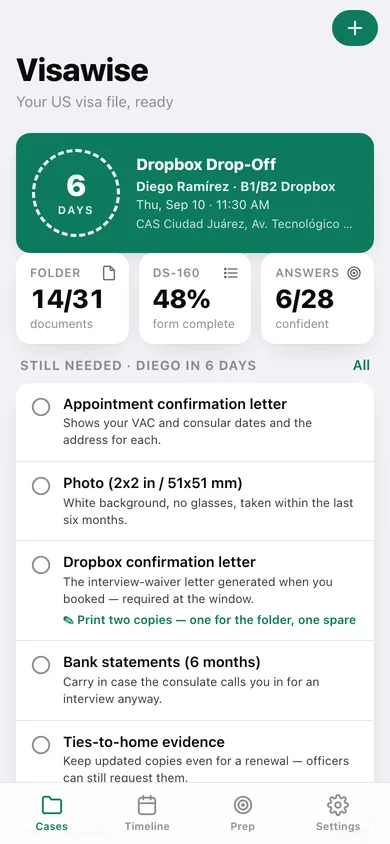
Days to your next stop on a passport-stamp countdown, documents ready, DS-160 percent and confident answers, the documents still missing before that date, and every case with its progress.
-
2
Document checklist
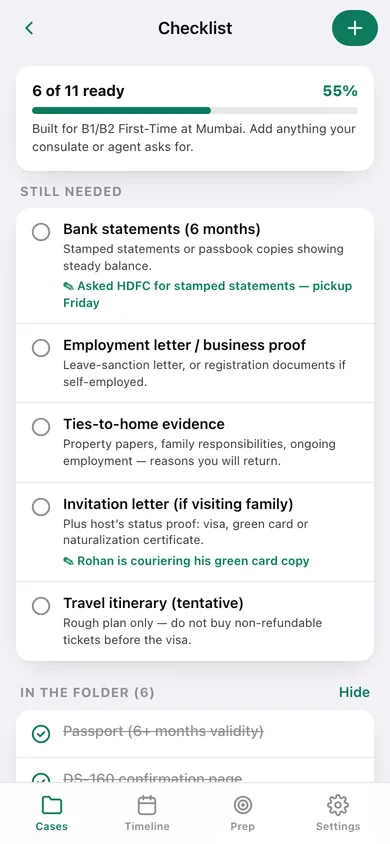
Still needed and in-the-folder documents for one case with a progress bar, what each document is, your notes, and a plus to add whatever your consulate or agent asked for.
-
3
Document
One document: in-the-folder toggle, what it is, and your note about where it is or what is missing.
-
4
Case
Visa type, consulate, next stop, the three preparation tracks with progress, appointments, AA confirmation number and case notes.
-
5
DS-160 tracker
Section progress, the AA confirmation number vault and all ten form sections with their status and noted answers.
-
6
DS-160 section
Set a section to not started, in progress or done and note the exact spellings, dates, trips and refusals you entered.
-
7
New case
Applicant, visa type, consulate city with suggested posts, and notes — creating the case loads its checklist, tracker and deck.
-
8
Timeline
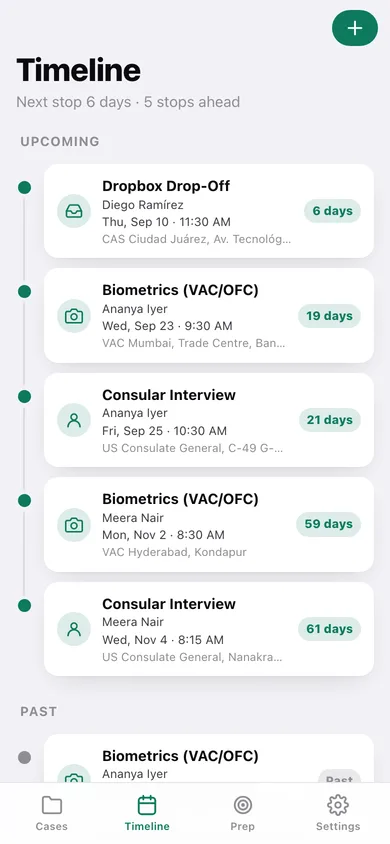
Every biometrics, interview and dropbox stop on one rail with countdowns, split into upcoming and past.
-
9
Appointment
Big countdown, type, date and time, address, MRV fee receipt, the what-to-carry reminder for that stop, and notes.
-
10
New appointment
Add a biometrics, interview or dropbox stop to a case with date, time, location and fee receipt.
-
11
Interview prep
Confident and needs-work totals across every deck, plus a readiness bar per case.
-
12
Prep deck
One case's questions grouped by category with your answers and ratings, and the button into rehearsal.
-
13
Question
Write the answer you would actually say and rate it unrated, needs work or confident.
-
14
Rehearse
Flip-through cards with tap-to-reveal answers, progress dots coloured by rating, and needs-work / confident buttons.
-
15
Settings
Collapse finished documents, auto-reveal answers, default consulate city, official DS-160 and wait-time links, CSV and JSON export, sample data and erase.
Try it with sample data: Loads three worked cases — Ananya's first-time B1/B2 in Mumbai with both dates booked in three weeks, Diego's dropbox renewal in Ciudad Juárez dropping off this week, and Meera's F-1 in Hyderabad two months out — each with a partly ticked checklist, DS-160 notes, appointments and rehearsed answers. You can start fresh at any time.
Ready? It's free.
No account, no install, no subscription. Everything you do stays in this browser.
Your say
What should Visawise do? Tell us before we build it.
Tell us what to build next.
Comments need a free Google sign-in, so every one is from a real person.
Sign in with Google to commentNo comments yet — be the first to say what this app should do next.
Questions
Is the web version of Visawise free?+
Yes. Every screen is free to use: no subscription, no in-app purchases, no account.
Do I need an account?+
No. Open Visawise and start using it right away. Sign in with Google only if you want to upvote an app, save it to your list, or leave a comment.
Where is my data stored?+
Only in this browser's local storage. Nothing you enter is sent to our servers, so we can't see it, back it up, or restore it. Clearing site data, a private window, or another device starts empty. Export a backup from the in-app menu to keep it.
Is there a Visawise app for iPhone or Android?+
Not yet. Visawise is a community proposal: the browser version is complete, and we build the iPhone and Android app once 100 people upvote it. Upvoters get one email when it ships.