
Web app · Medical
Vertigo Cue
Stop spinning. Eyes closed. Just listen.
The audio-first BPPV guide: pick Epley, Brandt-Daroff or the Half-Somersault, pick the affected ear, then close your eyes while a calm voice calls every head position and counts each 30-second hold. Plus drawn positions for whoever is helping. Free, no install.
Stored in your browser only. Nothing you do in the web version is sent to our servers. Clear your browser data and it's gone — so export a backup from the in-app menu if you want to keep it.
This app is a community proposal.
Try the full browser version now. We build the iPhone and Android app once 100 people upvote it.
We'll email you once, when it ships. Unsubscribe anytime.
In your browser
What you can do in Vertigo Cue on the web
Three complete maneuvers, step by step
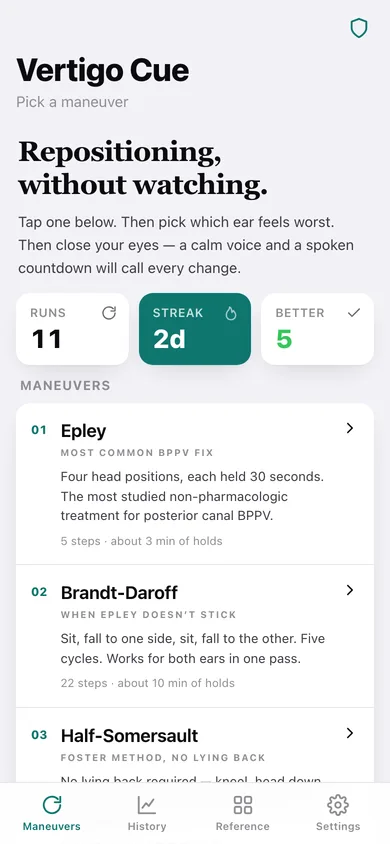
Epley (5 positions, three 30-second holds), Brandt-Daroff (22 steps — five full cycles, both sides) and the Half-Somersault / Foster method (5 positions, no lying back). Every step is the real wording, not a summary.
Left or right ear flips the instructions
Pick the affected ear and Epley and the Half-Somersault rewrite themselves — turn 45° to the left, then 90° to the right, roll onto the right side. Brandt-Daroff alternates both sides for you and never asks.
Eyes-closed narration and countdown
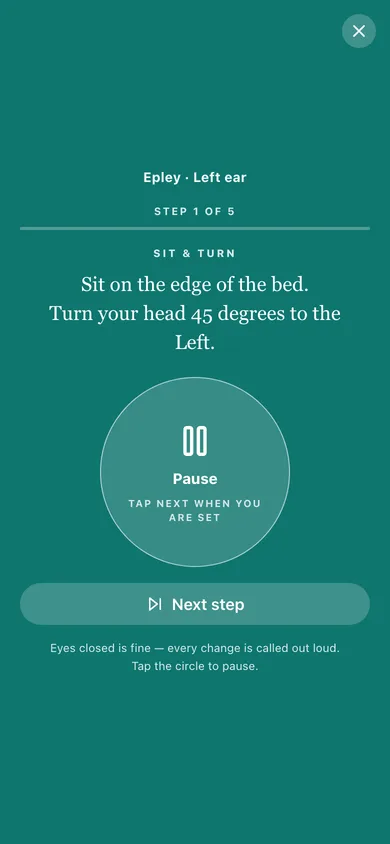
Your browser's speech voice reads each position aloud, then calls 30, 20, 10 and the last five seconds, and vibrates at every change where the device allows it — so the screen can stay face-down.
One giant pause button
The whole middle of the guide screen is a pause target, with the step title, the full instruction and the seconds remaining in type you can read across a room.
Drawn positions for a helper
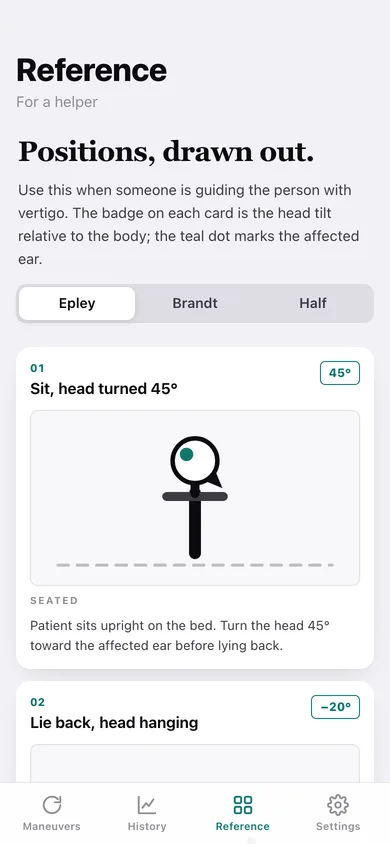
Every position of every maneuver as a head-and-spine diagram with the head-tilt angle and the affected-ear marker, plus notes on where to stand and what nystagmus looks like.
A log of whether it is working
Each run is saved with how you felt afterwards — better, no change or worse — so a day streak, a 12-week heatmap and a straight count tell you whether to repeat or go back to the clinician.
Screens
Every screen, rebuilt for the browser
-
1
Maneuvers
The three maneuvers with step counts and hold times, your streak, and the read-this-first disclaimer prompt.
-
2
Affected ear
Pick the ear that feels worst, read the pre-flight checklist, and preview the exact steps you are about to do.
-
3
Guided maneuver
The eyes-closed run: step title, the full instruction in large type, the seconds remaining and a giant pause circle.
-
4
Maneuver complete
Stay seated, the when-to-see-a-doctor line, and the better / no change / worse question that builds the history.
-
5
History
Day streak, which maneuver you reach for, a 12-week heatmap and every session grouped by day.
-
6
One session
A single run: maneuver, ear, steps completed, time and how you felt — with every step of that run listed.
-
7
Reference
Drawn positions for each maneuver with head-tilt angles, orientation labels and helper notes.
-
8
Medical disclaimer
What this app is not, the six symptoms that mean see a doctor instead, and where the maneuvers come from.
-
9
Settings
Voice narration, spoken countdown, vibration cues, speaking rate, default ear, a voice sample, export, sample data and erase.
Try it with sample data: Loads eleven sessions across the last three weeks of a real BPPV episode — nightly Epley on the left ear, one stopped early when the spinning got bad, a Brandt-Daroff pass when Epley did not stick, a Half-Somersault try, and the relief ratings settling from worse to better. You can start fresh at any time.
Ready? It's free.
No account, no install, no subscription. Everything you do stays in this browser.
Your say
What should Vertigo Cue do? Tell us before we build it.
Tell us what to build next.
Comments need a free Google sign-in, so every one is from a real person.
Sign in with Google to commentNo comments yet — be the first to say what this app should do next.
Questions
Is the web version of Vertigo Cue free?+
Yes. Every screen is free to use: no subscription, no in-app purchases, no account.
Do I need an account?+
No. Open Vertigo Cue and start using it right away. Sign in with Google only if you want to upvote an app, save it to your list, or leave a comment.
Where is my data stored?+
Only in this browser's local storage. Nothing you enter is sent to our servers, so we can't see it, back it up, or restore it. Clearing site data, a private window, or another device starts empty. Export a backup from the in-app menu to keep it.
Is there a Vertigo Cue app for iPhone or Android?+
Not yet. Vertigo Cue is a community proposal: the browser version is complete, and we build the iPhone and Android app once 100 people upvote it. Upvoters get one email when it ships.