
Web app · Utilities
UnitLog
Turn meter day into a sixty-second routine, not a thirty-minute argument
One submeter per tenant or room: type the reading and UnitLog computes units × rate + fixed charge, tracks paid, partial and due with running balances, charts consumption month by month, and hands you a plain-text bill slip for WhatsApp. Free, offline, no account.
Stored in your browser only. Nothing you do in the web version is sent to our servers. Clear your browser data and it's gone — so export a backup from the in-app menu if you want to keep it.
This app is a community proposal.
Try the full browser version now. We build the iPhone and Android app once 100 people upvote it.
We'll email you once, when it ships. Unsubscribe anytime.
In your browser
What you can do in UnitLog on the web
A meter per tenant or room
Name, submeter label, opening reading, the per-unit rate you both agreed, an optional fixed monthly charge and ₹ or Rs — written down once so nobody argues about it later.
Reading in, bill out
Type the current reading and the bill builds itself line by line: units consumed shown as current − previous, energy charge as units × rate, plus the fixed charge, with a warning if the meter reads backwards.
Payment ledger
Record cash, UPI or bank payments against a bill — full or partial — and see the running balance per tenant plus billed, collected and outstanding across every meter with a collection bar.
Consumption history
Units consumed per month as a bar chart with the peak month flagged, bill amounts over time as a line, and the average, peak and total units for each submeter.
Shareable bill slip
Every bill exports as a clean plain-text slip — readings, units, rate, energy charge, total and status — to copy into WhatsApp or SMS, share, or download as a file.
Ledger exports
Download the whole ledger as CSV for a spreadsheet or an accountant, copy a one-message due list for everyone with an outstanding balance, or take a JSON backup.
Screens
Every screen, rebuilt for the browser
-
1
Meters
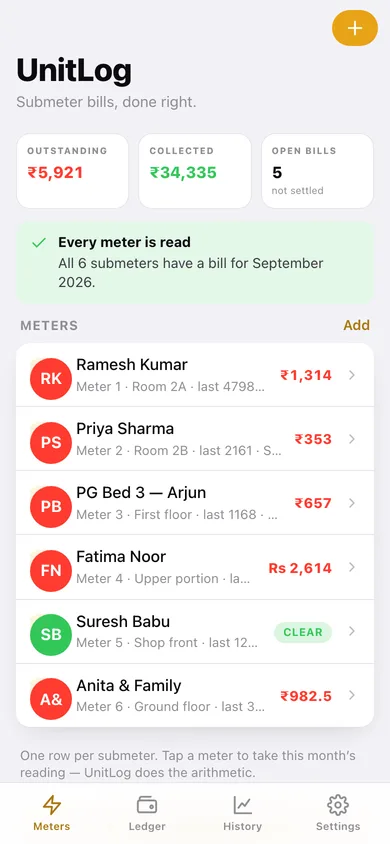
Outstanding, collected and open bills across every submeter, plus each meter with its latest reading and balance.
-
2
Meter
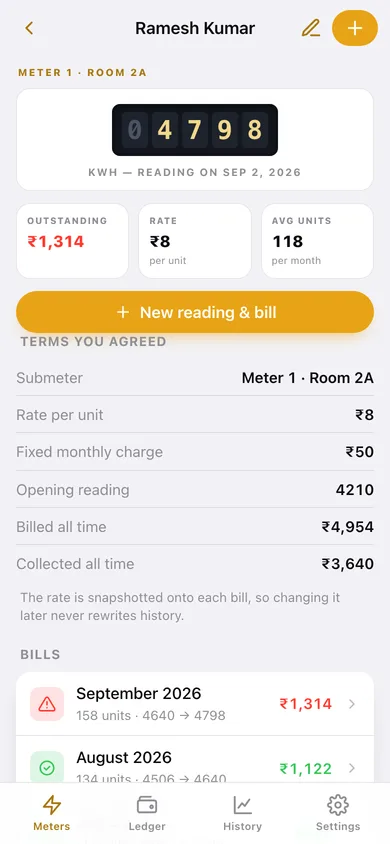
The submeter dial, outstanding balance, agreed rate, and every bill raised on this meter.
-
3
Tenant and rate
Name, submeter label, opening reading, per-unit rate, fixed charge, currency and notes.
-
4
New reading
The previous reading on the dial, this month's reading typed in, and the bill computed live line by line.
-
5
Bill
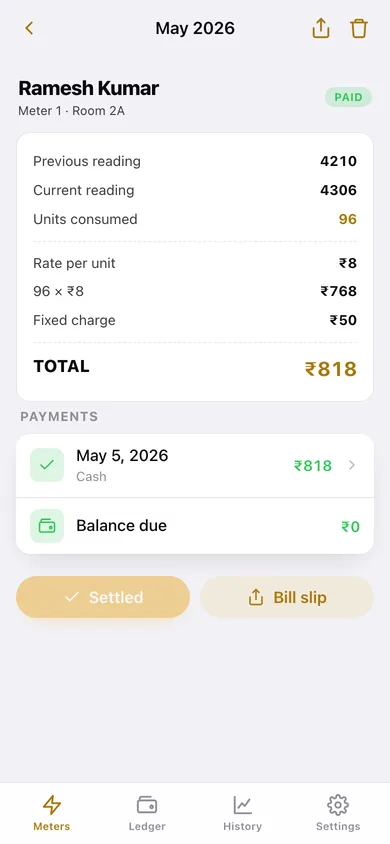
The full arithmetic on one slip, every payment received, the balance due, and record payment.
-
6
Bill slip
The plain-text slip to copy into WhatsApp, share or download.
-
7
Ledger
Billed, collected and outstanding, a collection bar, and every bill filtered to open, paid or all, grouped by month.
-
8
History
Pick a submeter and see units per month, bill amounts over time, and the average, peak and total.
-
9
Settings
Default currency and rate for new meters, CSV ledger export, due-list message, JSON backup and erase.
Try it with sample data: Loads six submeters — rooms, a PG bed, an upper portion billed in Rs and a shop front — with two to five months of readings each, a mix of full, partial and unpaid bills, and the payments already recorded against them. You can start fresh at any time.
Ready? It's free.
No account, no install, no subscription. Everything you do stays in this browser.
Your say
What should UnitLog do? Tell us before we build it.
Tell us what to build next.
Comments need a free Google sign-in, so every one is from a real person.
Sign in with Google to commentNo comments yet — be the first to say what this app should do next.
Questions
Is the web version of UnitLog free?+
Yes. Every screen is free to use: no subscription, no in-app purchases, no account.
Do I need an account?+
No. Open UnitLog and start using it right away. Sign in with Google only if you want to upvote an app, save it to your list, or leave a comment.
Where is my data stored?+
Only in this browser's local storage. Nothing you enter is sent to our servers, so we can't see it, back it up, or restore it. Clearing site data, a private window, or another device starts empty. Export a backup from the in-app menu to keep it.
Is there a UnitLog app for iPhone or Android?+
Not yet. UnitLog is a community proposal: the browser version is complete, and we build the iPhone and Android app once 100 people upvote it. Upvoters get one email when it ships.