
Web app · Productivity
Tooltrail
A personal audit log of every tool your AI agents call
Which agent, which tool, what data flowed where — journalled by hand or parsed straight out of a pasted MCP log, then scored so you can see how far your data actually travelled. Free, offline, nothing leaves this browser.
Stored in your browser only. Nothing you do in the web version is sent to our servers. Clear your browser data and it's gone — so export a backup from the in-app menu if you want to keep it.
This app is a community proposal.
Try the full browser version now. We build the iPhone and Android app once 100 people upvote it.
We'll email you once, when it ships. Unsubscribe anytime.
In your browser
What you can do in Tooltrail on the web
Journal any tool call
Agent, tool name, what flowed where, destination, date — plus a direction (read, search, write, execute, send, delete) and a data class (public through credentials).
Paste an MCP log and it parses
JSON objects, key=value traces and plain 'agent · tool — summary' lines all become dated entries, with the direction and data class guessed from the tool name.
Exposure scoring
Every call scores how far the data went times how much that data matters — 1 for reading something public, 25 for deleting credentials — banded low, watch, high, critical.
Per-agent accountability
See which agent racked up the most exposure, which tools it reached for, what data classes it touched and how much of it left your device.
Filters that matter
Unreviewed, left the device, high exposure, by agent, or free-text across tool, summary and destination.
Export the trail
Download the whole audit log as CSV — date, agent, tool, direction, class, destination and exposure — or a full JSON backup.
Screens
Every screen, rebuilt for the browser
-
1
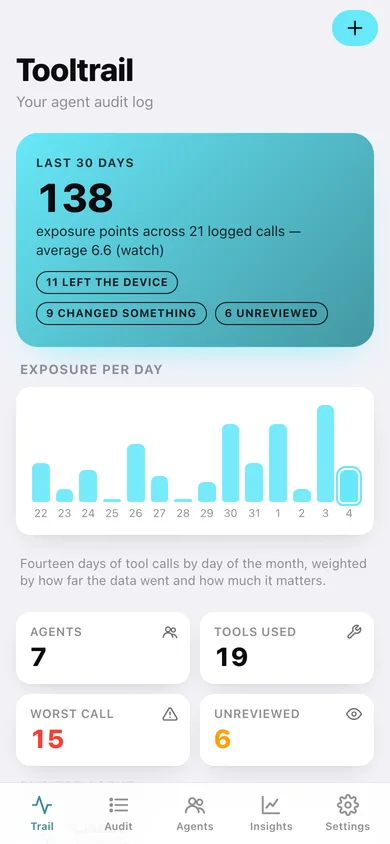
Trail
Exposure over the last 30 days, a 14-day chart, the busiest agent and your latest calls.
-
2
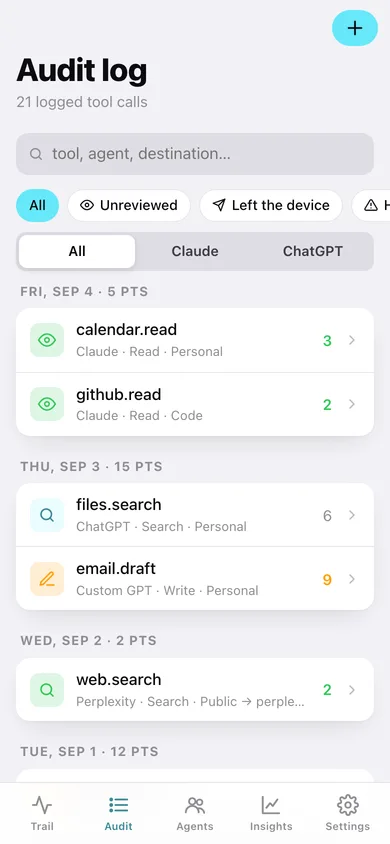
Audit log
Every call grouped by day with per-day exposure, searchable and filtered by agent, review state or exposure.
-
3
Tool call detail
One call: the exposure maths behind its score, what happened, where it went, and other calls to the same tool.
-
4
Log a tool call
Agent, tool, summary, direction, data class, destination and date — with the direction and class guessed as you type the tool name.
-
5
Paste a log
Paste raw MCP tool-call lines, preview what was parsed, drop what you don't want, then journal the rest.
-
6
Agents
Exposure by agent with a chart and a bar per agent showing its share of the trail.
-
7
Agent detail
One agent's exposure, off-device calls, data classes as a donut, tools it reached for and everything it did.
-
8
Tools
Every distinct tool journalled, ranked by use, with total exposure and how many agents called it.
-
9
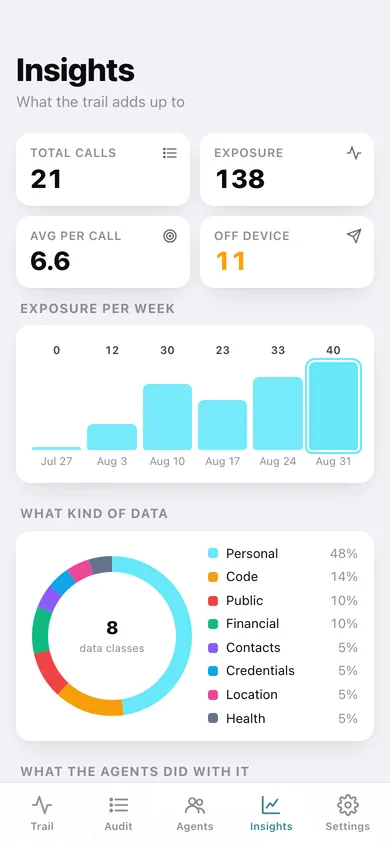
Insights
Weekly exposure, data classes as a donut, what the agents actually did, where data went and how scoring works.
-
10
Settings
Home window, journalling defaults, CSV and JSON export, sample data and erase.
Try it with sample data: Loads four weeks of agent tool calls — 21 entries across Claude, ChatGPT, Gemini, Perplexity, Copilot, a Custom GPT and a local agent, including a keychain read, a Slack post with customer names and a maps route that put your home address on the wire. You can start fresh at any time.
Ready? It's free.
No account, no install, no subscription. Everything you do stays in this browser.
Your say
What should Tooltrail do? Tell us before we build it.
Tell us what to build next.
Comments need a free Google sign-in, so every one is from a real person.
Sign in with Google to commentNo comments yet — be the first to say what this app should do next.
Questions
Is the web version of Tooltrail free?+
Yes. Every screen is free to use: no subscription, no in-app purchases, no account.
Do I need an account?+
No. Open Tooltrail and start using it right away. Sign in with Google only if you want to upvote an app, save it to your list, or leave a comment.
Where is my data stored?+
Only in this browser's local storage. Nothing you enter is sent to our servers, so we can't see it, back it up, or restore it. Clearing site data, a private window, or another device starts empty. Export a backup from the in-app menu to keep it.
Is there a Tooltrail app for iPhone or Android?+
Not yet. Tooltrail is a community proposal: the browser version is complete, and we build the iPhone and Android app once 100 people upvote it. Upvoters get one email when it ships.