
Web app · Photo And Video
Throughline: You Over Time
Turn a decade of selfies into one smooth morph of you
Build a timeline of the selfies you already have, let Throughline register every face onto one eye-and-nose anchor, then play the cross-dissolve with the year ticking by — scrub it, trim the blinks, export the filmstrip. Free, nothing leaves your browser.
Stored in your browser only. Nothing you do in the web version is sent to our servers. Clear your browser data and it's gone — so export a backup from the in-app menu if you want to keep it.
This app is a community proposal.
Try the full browser version now. We build the iPhone and Android app once 100 people upvote it.
We'll email you once, when it ships. Unsubscribe anytime.
In your browser
What you can do in Throughline: You Over Time on the web
Real eye-anchor registration
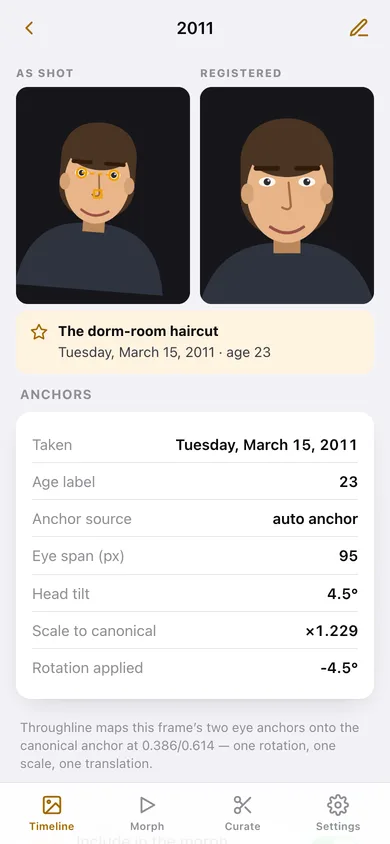
The same similarity transform the iPhone app uses: each frame's two eye anchors are rotated, scaled and translated onto the canonical anchor at 0.386/0.614, so a pile of hand-held shots snaps into a steady stack.
Play, scrub and speed the morph
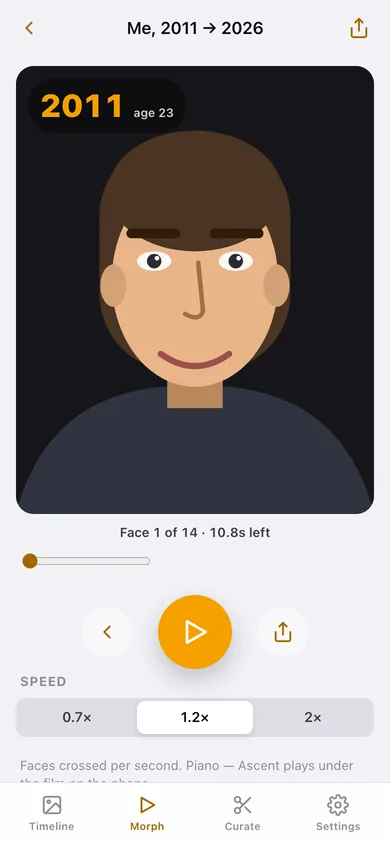
A cross-dissolve between consecutive registered faces with the year and your age ticking in the corner, a full scrubber, and 0.7× / 1.2× / 2× playback.
As shot vs registered, side by side
Every frame shows its raw framing with the amber eye anchors drawn on, next to the registered version — plus its eye span, head tilt and the exact scale and rotation applied.
Curate the film
Name the film, pick a music bed, and toggle any selfie out of the morph when it was a blink, a bad angle or the wrong expression.
Export the filmstrip
Render the film, then download a five-frame poster as an SVG, a CSV of every frame with its anchors and tilt, or copy a one-line film summary.
No account, no upload
Frames, look settings and film options are saved in this browser only; export a JSON backup whenever you want.
Screens
Every screen, rebuilt for the browser
-
1
Timeline
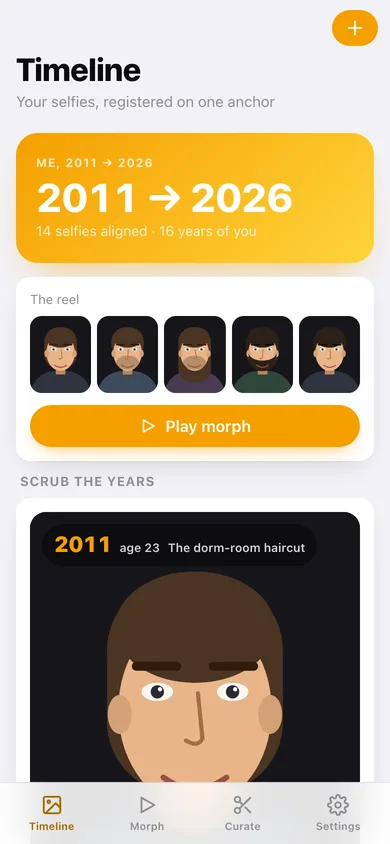
Your years-wide hero, the reel of registered faces, a scrubber for the years and every selfie in a grid.
-
2
Morph
The cross-dissolve stage with the year ticking, a scrubber, transport controls and playback speed.
-
3
Selfie detail
As shot versus registered, the eye anchors, head tilt, and the scale and rotation the transform applied.
-
4
Add or edit a selfie
Date, age, caption, how the shot was framed (eye spacing, tilt, position) and how you looked that year.
-
5
Curate
Film title, range, crossings and length, the music bed, and an include toggle on every selfie.
-
6
Export film
Poster filmstrip, frame count, duration and format, then render and download the poster or frame list.
-
7
Settings
Morph speed, the age ticker, the anchor markers, backup, sample data and erase.
Try it with sample data: Loads fourteen selfies from 2011 to 2026 — hair growing out and cut back, a beard, a moustache year, glasses, the first grey — each with its own hand-held framing, plus the film "Me, 2011 → 2026" with a piano bed. You can start fresh at any time.
Ready? It's free.
No account, no install, no subscription. Everything you do stays in this browser.
Your say
What should Throughline: You Over Time do? Tell us before we build it.
Tell us what to build next.
Comments need a free Google sign-in, so every one is from a real person.
Sign in with Google to commentNo comments yet — be the first to say what this app should do next.
Questions
Is the web version of Throughline: You Over Time free?+
Yes. Every screen is free to use: no subscription, no in-app purchases, no account.
Do I need an account?+
No. Open Throughline: You Over Time and start using it right away. Sign in with Google only if you want to upvote an app, save it to your list, or leave a comment.
Where is my data stored?+
Only in this browser's local storage. Nothing you enter is sent to our servers, so we can't see it, back it up, or restore it. Clearing site data, a private window, or another device starts empty. Export a backup from the in-app menu to keep it.
Is there a Throughline: You Over Time app for iPhone or Android?+
Not yet. Throughline: You Over Time is a community proposal: the browser version is complete, and we build the iPhone and Android app once 100 people upvote it. Upvoters get one email when it ships.