
Web app · News
The Daily
Your own morning anchor — the show you write, read back by your browser
Pick from 14 briefing modules, put them in the order you want to hear them, write each chapter in your own words, and press play: your browser reads the whole show with chapter marks you can skip between. Plus a saved-article queue with an on-device summary, and the six-minute Tonight recap. Free, no install.
Stored in your browser only. Nothing you do in the web version is sent to our servers. Clear your browser data and it's gone — so export a backup from the in-app menu if you want to keep it.
This app is a community proposal.
Try the full browser version now. We build the iPhone and Android app once 100 people upvote it.
We'll email you once, when it ships. Unsubscribe anytime.
In your browser
What you can do in The Daily on the web
Build the show from 14 modules
Markets open, tech moves, sports recap, politics in two paragraphs, science, health, climate, weather, calendar, reminders, a poem, a book passage, a saved article and a morning sentence — add any, reorder them, switch any off.
You write the words
Each chapter has its own script box with a live word count and a runtime estimate at 165 words a minute. Blank chapters are skipped in the read-through.
Chapter-by-chapter playback
One big play button, skip forward and back, a progress bar and the live chapter highlighted in the running order — narrated by your browser's own speech voice, with your rate and pause between chapters.
Saved articles, summarised here
Paste a long read and The Daily scores its sentences by length, position and attribution, keeps the best four in their original order, and queues it for the “A saved article” chapter.
Public-domain poems included
Leave the poem chapter blank and the show reads Dickinson, Frost, Teasdale or Blake, rotating by the day of the month.
Tonight, the other half of the day
Two questions in the evening — what would you keep, what would you change — with a streak, a run of prior evenings, and yesterday's keep opening tomorrow's show.
Screens
Every screen, rebuilt for the browser
-
1
Today
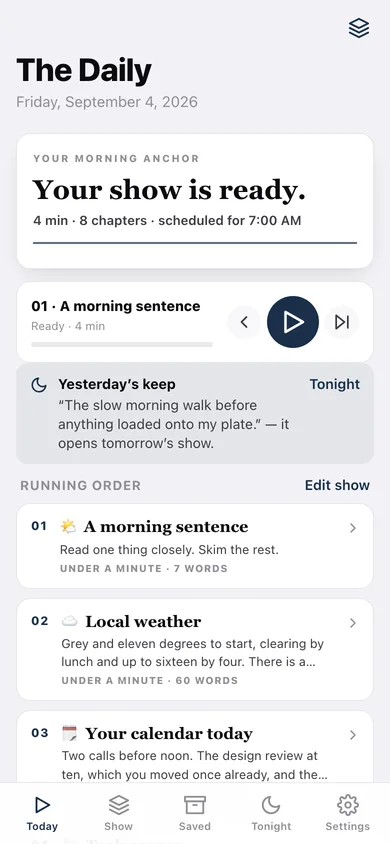
Your show as a masthead, the player, and the whole running order with a preview of every chapter.
-
2
Chapter
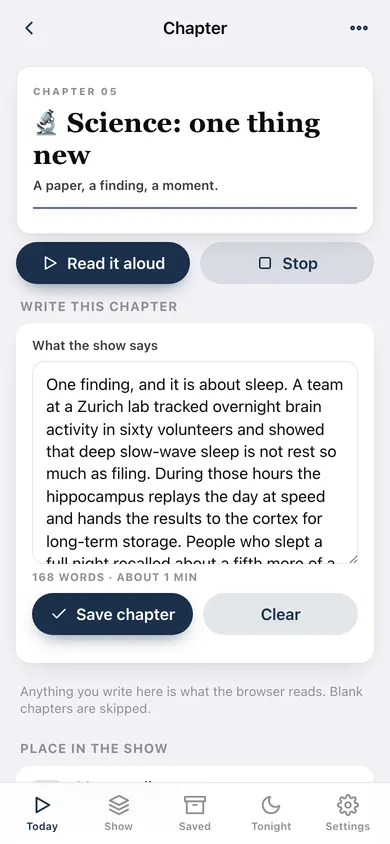
One chapter: what it reads today, the script box, read-aloud, and its place in the running order.
-
3
Show
The running order with reorder arrows and on/off switches, plus the rest of the 14-module catalog to add.
-
4
Saved
The read-me-tomorrow queue with listening time, what is up next, and every article's summary.
-
5
Article
One long read: the four-paragraph extract, the full text you pasted, and read-aloud.
-
6
Tonight
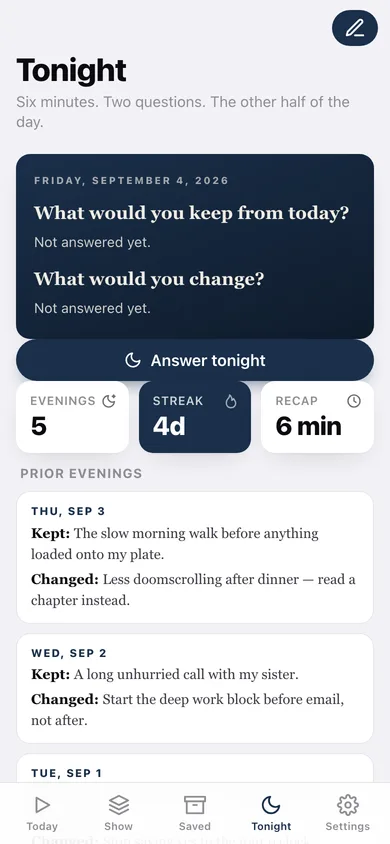
The evening card with tonight's two questions, your streak and every prior evening.
-
7
Settings
Show time, reading rate, pause between chapters, script download and export / sample / erase.
Try it with sample data: Loads a seven-chapter show with the weather, calendar, tech and science chapters already written, four long reads summarised on the spot (two still in the queue), and five evenings of Tonight answers. You can start fresh at any time.
Ready? It's free.
No account, no install, no subscription. Everything you do stays in this browser.
Your say
What should The Daily do? Tell us before we build it.
Tell us what to build next.
Comments need a free Google sign-in, so every one is from a real person.
Sign in with Google to commentNo comments yet — be the first to say what this app should do next.
Questions
Is the web version of The Daily free?+
Yes. Every screen is free to use: no subscription, no in-app purchases, no account.
Do I need an account?+
No. Open The Daily and start using it right away. Sign in with Google only if you want to upvote an app, save it to your list, or leave a comment.
Where is my data stored?+
Only in this browser's local storage. Nothing you enter is sent to our servers, so we can't see it, back it up, or restore it. Clearing site data, a private window, or another device starts empty. Export a backup from the in-app menu to keep it.
Is there a The Daily app for iPhone or Android?+
Not yet. The Daily is a community proposal: the browser version is complete, and we build the iPhone and Android app once 100 people upvote it. Upvoters get one email when it ships.