
Web app · Productivity
Tenantfolio
The renter's binder: lease, photos log, repairs, rent and your state's rules
Your landlord has a property-management system; you have a shoebox. Tenantfolio gives you the dated paper trail — condition log, repair ledger with a habitability clock, rent journal, 51-jurisdiction rights table and a deposit-return calculator. Free, no account.
Stored in your browser only. Nothing you do in the web version is sent to our servers. Clear your browser data and it's gone — so export a backup from the in-app menu if you want to keep it.
This app is a community proposal.
Try the full browser version now. We build the iPhone and Android app once 100 people upvote it.
We'll email you once, when it ships. Unsubscribe anytime.
In your browser
What you can do in Tenantfolio on the web
Tenancy register
Every place you have rented: address, unit, landlord and property manager, lease dates, rent, security deposit, pet deposit and last month prepaid.
Move-in / move-out condition log
Room by room, item by item, phase by phase — every defect written down and dated on the day you found it. The record that wins deposit disputes.
Repair ledger with a habitability clock
Every request with its date, channel, category and severity — and a running count of how many days past a reasonable reply the landlord's silence has gone.
Rent journal
Rent, late fees, utility splits and the deposit itself, with method and reference, totalled and charted across the last six 30-day windows.
51-jurisdiction rights table
All 50 states plus DC: deposit cap, deposit return deadline, notice to enter, late-fee cap, retaliation, habitability and eviction notice — bundled offline.
Deposit-return calculator
Line-item what the landlord claims, mark what you dispute, and see the balance owed — with your state's return deadline counted from move-out and a demand-letter outline you can download.
Screens
Every screen, rebuilt for the browser
-
1
Binder
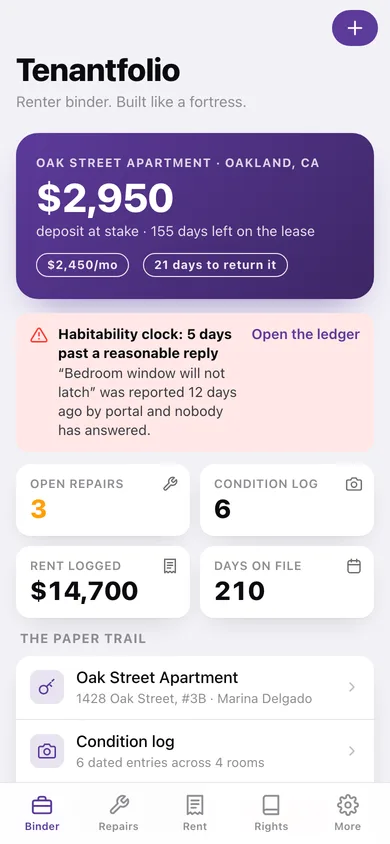
Deposit at stake, days left on the lease, the habitability clock, and every part of the paper trail in one place.
-
2
Tenancies
Every place you have rented, current and past, with rent and state.
-
3
Tenancy detail
Lease facts, landlord contact, money held, notes and the evidence filed against this address.
-
4
Add or edit a tenancy
The seventeen fields every dispute turns on, with lease-date validation.
-
5
Condition log
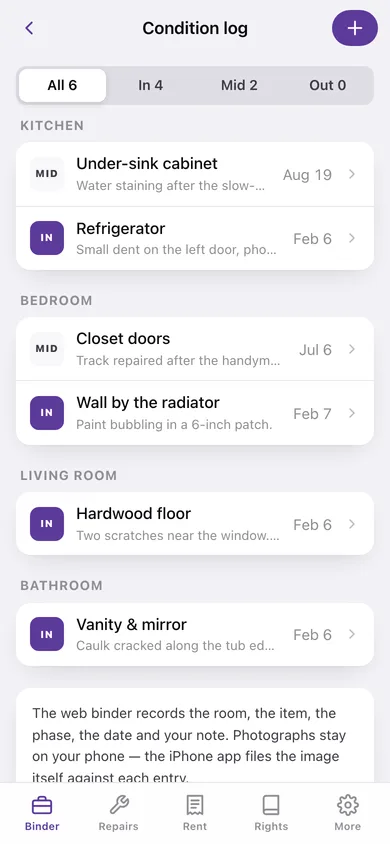
Move-in, mid-tenancy and move-out entries grouped by room, each one dated.
-
6
Condition entry
Phase, room, item, date and the condition note.
-
7
Repair ledger
Open, unanswered and closed requests with days open, a category chart and the response clock.
-
8
Repair request
Summary, category, severity, how you asked, and the requested / replied / fixed dates.
-
9
Rent journal
Rent, late fees and utilities totalled, charted by 30-day window and grouped by month.
-
10
Payment
Amount, date, method and reference for a rent payment, fee, utility split or the deposit.
-
11
Deposit calculator
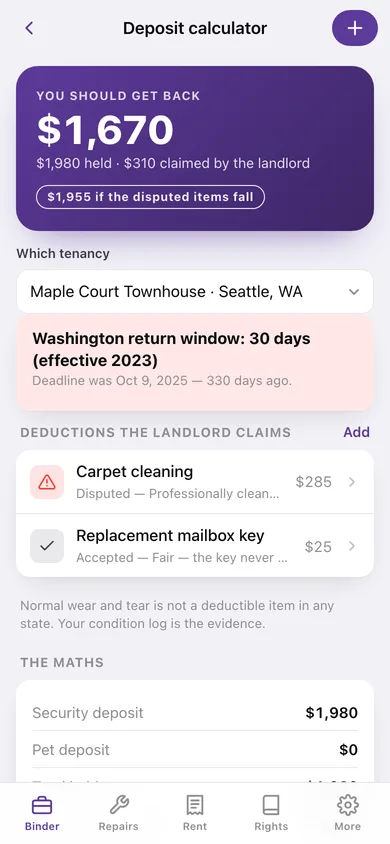
What you should get back, your state's return deadline, the disputed line items and a demand-letter outline.
-
12
Renter rights
Searchable table of all 50 states and DC, with your own states flagged.
-
13
State rights card
One jurisdiction's deposit cap, return window, notice to enter, late-fee cap, retaliation and eviction notice.
-
14
More
Your name, active tenancy, the repair clock windows, backup, sample data and erase.
Try it with sample data: Loads two tenancies — a current Oakland apartment and a past Seattle townhouse — with eight condition entries, six repair requests (two still unanswered), ten rent journal entries and two claimed deposit deductions. You can start fresh at any time.
Ready? It's free.
No account, no install, no subscription. Everything you do stays in this browser.
Your say
What should Tenantfolio do? Tell us before we build it.
Tell us what to build next.
Comments need a free Google sign-in, so every one is from a real person.
Sign in with Google to commentNo comments yet — be the first to say what this app should do next.
Questions
Is the web version of Tenantfolio free?+
Yes. Every screen is free to use: no subscription, no in-app purchases, no account.
Do I need an account?+
No. Open Tenantfolio and start using it right away. Sign in with Google only if you want to upvote an app, save it to your list, or leave a comment.
Where is my data stored?+
Only in this browser's local storage. Nothing you enter is sent to our servers, so we can't see it, back it up, or restore it. Clearing site data, a private window, or another device starts empty. Export a backup from the in-app menu to keep it.
Is there a Tenantfolio app for iPhone or Android?+
Not yet. Tenantfolio is a community proposal: the browser version is complete, and we build the iPhone and Android app once 100 people upvote it. Upvoters get one email when it ships.