
Web app · Lifestyle
Tankbook
Reef-grade water chemistry, kept in your browser
Log calcium, alkalinity, magnesium, nitrate, phosphate, salinity, pH and temperature across every tank you keep, watch each parameter trend against its healthy band, and catch a slow alkalinity slide before it crashes a coral. Free, no account.
Stored in your browser only. Nothing you do in the web version is sent to our servers. Clear your browser data and it's gone — so export a backup from the in-app menu if you want to keep it.
This app is a community proposal.
Try the full browser version now. We build the iPhone and Android app once 100 people upvote it.
We'll email you once, when it ships. Unsubscribe anytime.
In your browser
What you can do in Tankbook on the web
Four tank profiles, the real parameter lists
Reef and frag tanks test the full eight-parameter suite; freshwater swaps in GH, KH, nitrite and ammonia; quarantine keeps it to five. Each tank keeps its own log, livestock and reminders.
Ten-second entry sheet
One row per parameter with its healthy band and your last value as the placeholder. Leave a row blank and it is skipped — log only what you actually tested tonight.
Trend charts with the healthy band drawn in
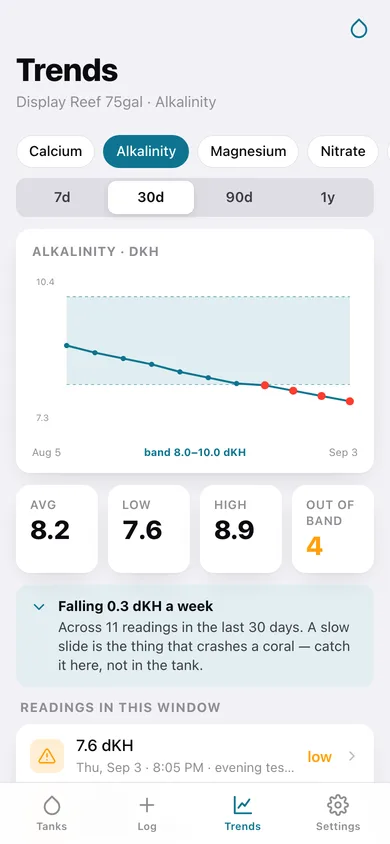
7, 30, 90 or 365 days per parameter, with the band shaded behind the line, out-of-band readings flagged, and average, low, high and drift-per-week underneath.
Out-of-band flags on the home screen
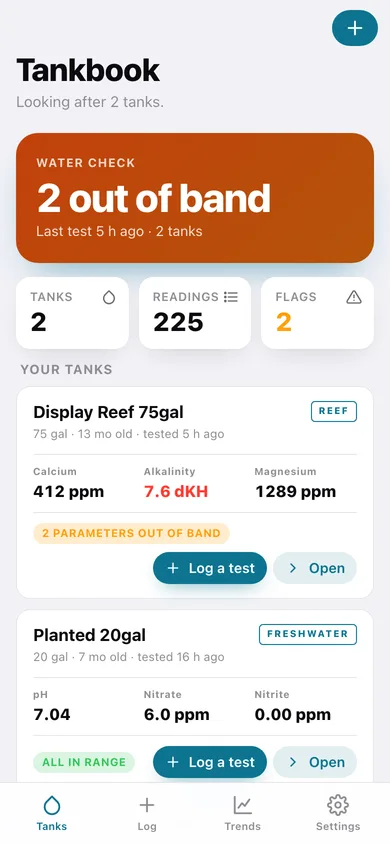
Every tank card shows its latest snapshot and how many parameters are outside their band right now, so a phosphate creep is visible the second you open the page.
Test-kit reminders and livestock
Calcium on Tuesday, alkalinity on Friday — with overdue tests surfaced as a banner. Plus a per-tank fish, coral and invert inventory with add dates.
Chemistry report you can hand over
Averages and every reading over 30, 90 or 365 days, copied to the clipboard or downloaded as CSV or text for your local fish store or reef-club mentor.
Screens
Every screen, rebuilt for the browser
-
1
Tanks
Every tank with its latest snapshot, out-of-band count, overdue tests and the water-check headline.
-
2
Tank dashboard
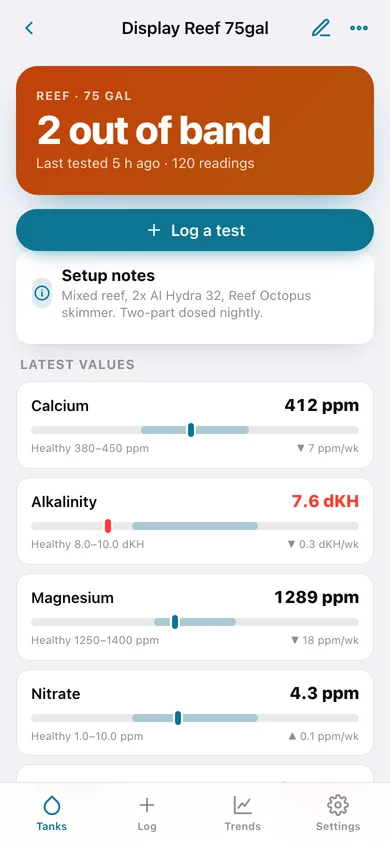
Latest value for every parameter with a band gauge and weekly drift, the last test sessions, livestock and reminders.
-
3
Log a test
The ten-second sheet: one row per parameter with its healthy band and your last value.
-
4
Trends
Per-parameter trend with the healthy band shaded in, average, low, high, out-of-band count and drift per week.
-
5
Livestock
Fish, coral and inverts for one tank, grouped and dated.
-
6
Test reminders
The per-parameter test schedule, what is next and what is overdue.
-
7
Chemistry report
Averages and every reading in the range, copyable or downloadable as CSV or text.
-
8
Add a tank
Name, profile, volume, setup date and notes — plus what each profile tests.
-
9
Settings
Gallons or litres, °F or °C, default chart window, backup, sample data and erase.
Try it with sample data: Adds a 75-gallon mixed reef and a 20-gallon planted tank with six weeks of tests every third day (including a slow alkalinity slide and a phosphate creep), ten livestock entries and five test-kit reminders. You can start fresh at any time.
Ready? It's free.
No account, no install, no subscription. Everything you do stays in this browser.
Your say
What should Tankbook do? Tell us before we build it.
Tell us what to build next.
Comments need a free Google sign-in, so every one is from a real person.
Sign in with Google to commentNo comments yet — be the first to say what this app should do next.
Questions
Is the web version of Tankbook free?+
Yes. Every screen is free to use: no subscription, no in-app purchases, no account.
Do I need an account?+
No. Open Tankbook and start using it right away. Sign in with Google only if you want to upvote an app, save it to your list, or leave a comment.
Where is my data stored?+
Only in this browser's local storage. Nothing you enter is sent to our servers, so we can't see it, back it up, or restore it. Clearing site data, a private window, or another device starts empty. Export a backup from the in-app menu to keep it.
Is there a Tankbook app for iPhone or Android?+
Not yet. Tankbook is a community proposal: the browser version is complete, and we build the iPhone and Android app once 100 people upvote it. Upvoters get one email when it ships.