
Web app · Productivity
Stowed
The read-later list that outlives the company that hosted it
Save an article, read it in a sepia serif reader, listen to it read aloud, highlight the lines that matter and tag them flat. Import your Pocket ril_export.html, export everything as Markdown. Free, no account, stored in this browser.
Stored in your browser only. Nothing you do in the web version is sent to our servers. Clear your browser data and it's gone — so export a backup from the in-app menu if you want to keep it.
This app is a community proposal.
Try the full browser version now. We build the iPhone and Android app once 100 people upvote it.
We'll email you once, when it ships. Unsubscribe anytime.
In your browser
What you can do in Stowed on the web
A real reader, not a preview
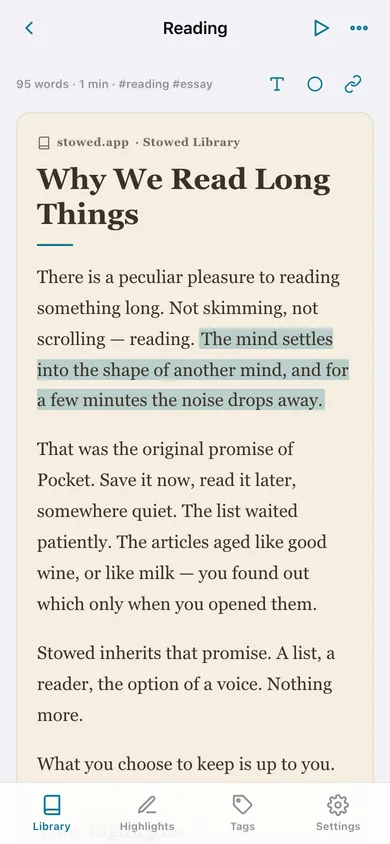
Sepia, light or dark; serif, sans or mono; 14 to 26pt — the same defaults as the iPhone app, applied to every article you open.
Highlight by tapping a paragraph
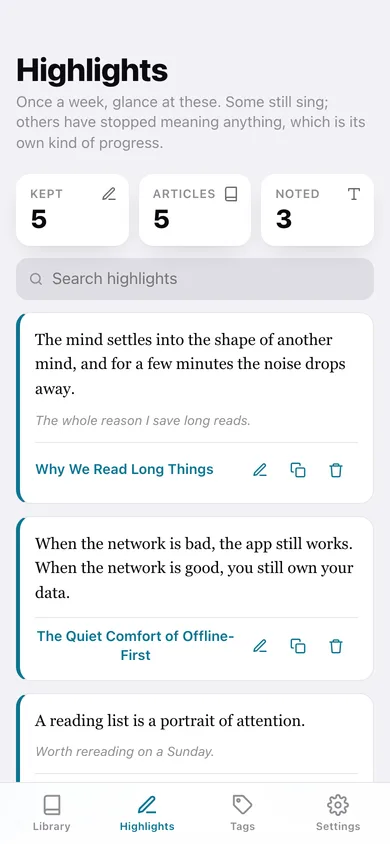
Tap any paragraph to keep it, attach a note later, and see it marked inside the article forever. The Highlights tab searches the line, the note and the article it came from.
Read aloud, paragraph by paragraph
The browser's speech voice reads the article with a speed control, a progress bar and skip-back/skip-forward through the paragraphs; finishing it marks the article read.
Real Pocket import
Pick your unzipped ril_export.html and Stowed parses every save — title, URL, tags and the date you saved it — right here in the browser, sending Read Archive entries to your archive and skipping duplicates.
Flat tags and full-text search
No folder hell: a word is a tag. Rename one and it rewrites across every article, and search reads titles, hosts, tags and the whole body.
Markdown export, always
One article or the whole library, with YAML front matter, the body and every highlight and note — the file belongs to you, for Obsidian, Notion or anywhere else.
Screens
Every screen, rebuilt for the browser
-
1
Library
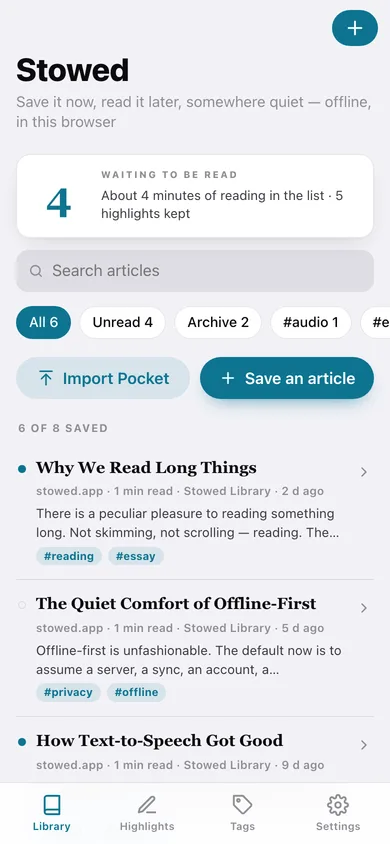
Unread count and minutes waiting, search, All/Unread/Archive/tag filters, and every save with its host and reading time.
-
2
Reader
The sepia serif reader with tap-to-highlight paragraphs and your highlights collected underneath.
-
3
Listen
Read aloud with a speed control, a paragraph counter and skip controls.
-
4
Save an article
URL, title, author, tags and the article text — typed, pasted or loaded from a local .txt/.md file.
-
5
Import
Parse a Pocket ril_export.html in this browser, or paste a list of links.
-
6
Highlights
Every kept line as a quote card with its note, searchable, with a jump back to the article.
-
7
Tags
Every tag with its article count, plus rename, remove across the whole library, and an untagged list.
-
8
Settings
Reader defaults, Markdown export of the whole library, Pocket import, JSON backup, sample articles and erase.
Try it with sample data: Loads the six Stowed Library essays with their tags, two read and one archived, five highlights with notes, and two link-only saves of the kind a Pocket import leaves behind — spread across the last five weeks. You can start fresh at any time.
Ready? It's free.
No account, no install, no subscription. Everything you do stays in this browser.
Your say
What should Stowed do? Tell us before we build it.
Tell us what to build next.
Comments need a free Google sign-in, so every one is from a real person.
Sign in with Google to commentNo comments yet — be the first to say what this app should do next.
Questions
Is the web version of Stowed free?+
Yes. Every screen is free to use: no subscription, no in-app purchases, no account.
Do I need an account?+
No. Open Stowed and start using it right away. Sign in with Google only if you want to upvote an app, save it to your list, or leave a comment.
Where is my data stored?+
Only in this browser's local storage. Nothing you enter is sent to our servers, so we can't see it, back it up, or restore it. Clearing site data, a private window, or another device starts empty. Export a backup from the in-app menu to keep it.
Is there a Stowed app for iPhone or Android?+
Not yet. Stowed is a community proposal: the browser version is complete, and we build the iPhone and Android app once 100 people upvote it. Upvoters get one email when it ships.