
Web app · Health And Fitness
StomaFlow
How much came out, how much went in — the ostomy ledger your follow-up actually asks for
Log every pouch empty in mL with a four-point consistency scale, log every drink with one-tap presets, and StomaFlow rolls both sides into a daily in-and-out balance, a pouch and skin log, a weight trend and a summary you can hand to your ostomy nurse. Vendor-neutral, offline, free.
Stored in your browser only. Nothing you do in the web version is sent to our servers. Clear your browser data and it's gone — so export a backup from the in-app menu if you want to keep it.
This app is a community proposal.
Try the full browser version now. We build the iPhone and Android app once 100 people upvote it.
We'll email you once, when it ships. Unsubscribe anytime.
In your browser
What you can do in StomaFlow on the web
Output ledger in seconds
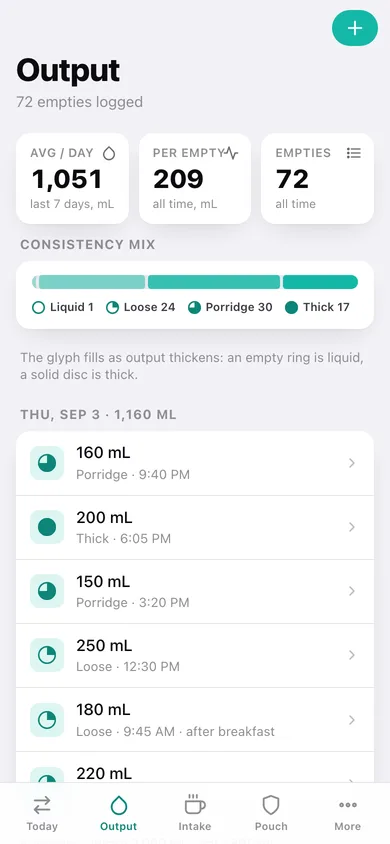
A 25 mL quick-dial with 100/150/200/300 presets, a four-point consistency scale drawn as a filling glyph, the time, and a note — every entry backfillable to any moment.
Hydration log with quick-add drinks
One tap logs water, ORS mix, electrolyte drink, coffee or juice at your own preset volumes, and you can add, rename or re-size presets yourself.
Daily in-and-out balance
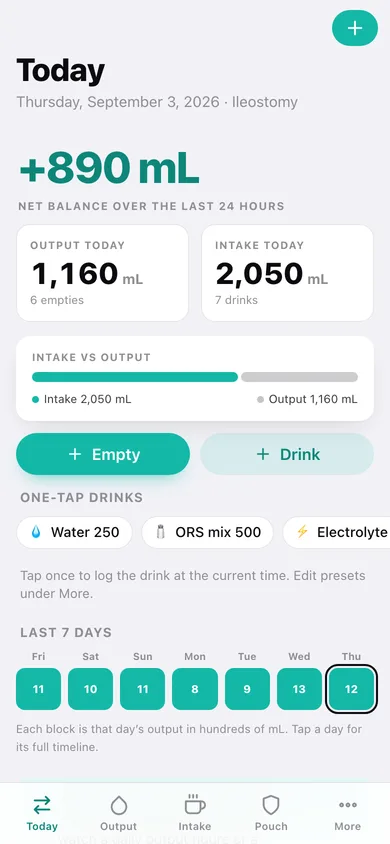
Net balance as the headline number, output and intake side by side, an intake-vs-output proportion bar and a tappable seven-day strip into any day's full timeline.
Your own attention numbers
Enter the daily output figure or minimum fluid intake your care team asked you to watch and StomaFlow quietly marks the days that cross them. It ships no clinical values and never advises.
Pouch and peristomal skin log
Wear time, why you changed it (routine, leak, skin), a four-point skin scale and a marker you can add after the fact — plus average wear time and a chart of every change.
Clinician summary
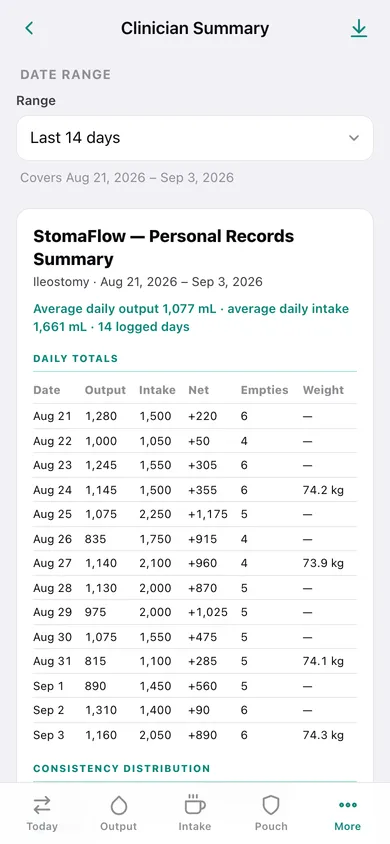
Pick a range — last 7, 14, 30 days, since surgery or custom — choose the sections, and get daily totals, averages, consistency distribution, weight and pouch history as a tidy page you can copy, download as CSV, or print to PDF.
Screens
Every screen, rebuilt for the browser
-
1
Today
Net balance, output and intake totals, the intake-vs-output bar, one-tap drinks and the last seven days.
-
2
Output ledger
Every pouch empty grouped by day with volume, consistency glyph and time, plus daily averages and the consistency mix.
-
3
Hydration log
Quick-add drink presets, where your fluid comes from, and every drink grouped by day.
-
4
Pouch & skin log
Average wear time, leaks, a wear-time chart and the full change log with skin condition.
-
5
Weight
Latest weight, the change since your first entry, a trend line and every entry in kg or lb.
-
6
Day detail
Any single day: output, intake and net totals with the merged chronological timeline of empties and drinks, plus weight and pouch changes.
-
7
Clinician summary
A date-range summary with a daily totals table, averages, consistency distribution, weight and pouch history, ready to copy, export or print.
-
8
More
Thresholds, weight log, clinician summary, drink presets, stoma details, units, CSV and JSON export, sample data and erase.
Try it with sample data: Loads a fortnight of a real-looking ileostomy record — around 70 pouch empties with volumes and consistency, 55 drinks, five drink presets, four pouch changes with wear time and skin condition, and five weights. Thresholds are deliberately left blank, exactly as the iPhone app ships them. You can start fresh at any time.
Ready? It's free.
No account, no install, no subscription. Everything you do stays in this browser.
Your say
What should StomaFlow do? Tell us before we build it.
Tell us what to build next.
Comments need a free Google sign-in, so every one is from a real person.
Sign in with Google to commentNo comments yet — be the first to say what this app should do next.
Questions
Is the web version of StomaFlow free?+
Yes. Every screen is free to use: no subscription, no in-app purchases, no account.
Do I need an account?+
No. Open StomaFlow and start using it right away. Sign in with Google only if you want to upvote an app, save it to your list, or leave a comment.
Where is my data stored?+
Only in this browser's local storage. Nothing you enter is sent to our servers, so we can't see it, back it up, or restore it. Clearing site data, a private window, or another device starts empty. Export a backup from the in-app menu to keep it.
Is there a StomaFlow app for iPhone or Android?+
Not yet. StomaFlow is a community proposal: the browser version is complete, and we build the iPhone and Android app once 100 people upvote it. Upvoters get one email when it ships.