
Web app · Utilities
Standby
The family preparedness binder that never leaves this browser
Per-child profiles, a named standby guardian, a document vault, the live ILRC/CLINIC completeness checklist, and a printable “If I’m Not Here” caregiver card. Free, no account, nothing sent to a server.
Stored in your browser only. Nothing you do in the web version is sent to our servers. Clear your browser data and it's gone — so export a backup from the in-app menu if you want to keep it.
This app is a community proposal.
Try the full browser version now. We build the iPhone and Android app once 100 people upvote it.
We'll email you once, when it ships. Unsubscribe anytime.
In your browser
What you can do in Standby on the web
One profile per child
Medications and doses, allergies, school and grade, insurance, pediatrician and phone, and the daily routine a stand-in needs on day one.
Standby-guardian nomination
Record who steps in — relationship, both phones, email, address, the authority they’d exercise, whether they’ve agreed, and whether the signed form exists — then link a guardian to each child.
Document vault, on this device
Birth certificates, passports, ID cards, A-number records, insurance cards, medical and legal papers: what it is, whose it is, its reference number and exactly where the paper is kept.
“If I’m Not Here” caregiver card
Assembles a formatted, printable page — call the guardian first, every child’s essentials, where the documents are — which you can copy or download as text, with an optional Spanish opening.
Live completeness checklist
Ten lines mirroring the ILRC / CLINIC Family Preparedness Plan, each computed from your binder rather than a checkbox, so it can never drift out of sync.
Offline by design
Everything stays in this browser’s local storage — no account, no cloud, no analytics — with a JSON backup you can export whenever you want.
Screens
Every screen, rebuilt for the browser
-
1
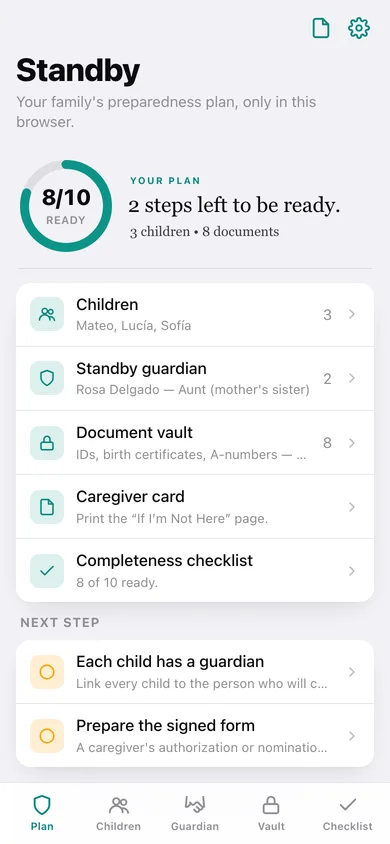
Your plan
How ready the binder is, the four sections, and the next steps still missing.
-
2
Children
Every child with age, school, and whether a standby guardian is named.
-
3
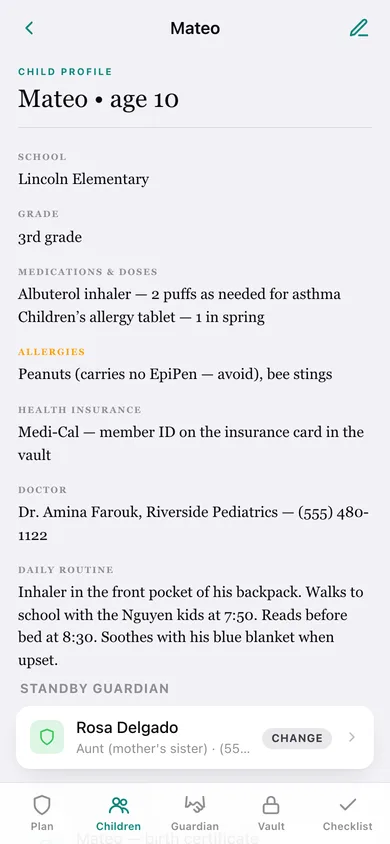
Child profile
Medications, allergies, insurance, doctor and routine, plus that child’s guardian and documents.
-
4
Edit a child
Name, date of birth, school, meds, allergies, insurance, doctor, routine and guardian.
-
5
Standby guardian
Everyone nominated, whether they’ve agreed, and which children they cover.
-
6
Guardian record
Contact details, authority notes, consent and signed-form status for one guardian.
-
7
Edit a guardian
Relationship, phones, email, address, authority notes and the two readiness switches.
-
8
Document vault
Every filed record grouped by kind, with where the paper is actually kept.
-
9
Document
One record: kind, whose it is, reference number, location and notes.
-
10
Edit a document
File a birth certificate, passport, ID, A-number, insurance card or legal paper.
-
11
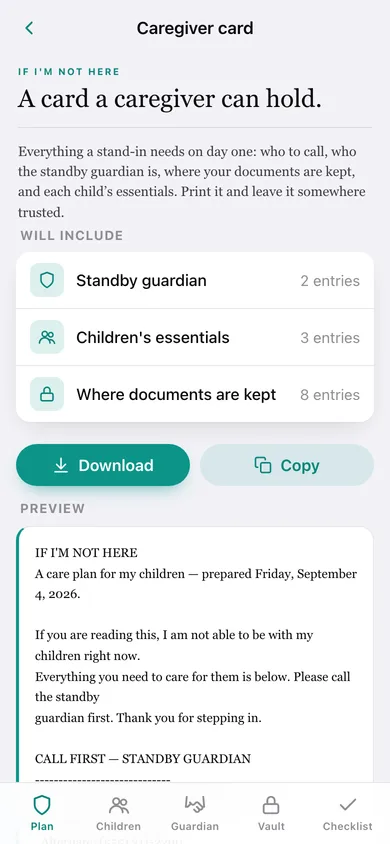
Caregiver card
The full “If I’m Not Here” page, previewed as printed text, ready to copy or download.
-
12
Checklist
The ten ILRC/CLINIC preparedness lines, each ticked live from your own records.
-
13
Settings
Spanish line on the card, gap warnings, backup, sample family and erase.
Try it with sample data: Loads a fictional Riverside family: three children with meds, allergies, school and doctor, an aunt nominated as standby guardian plus a neighbour as backup, and eight vault records including birth certificates and an A-number. You can start fresh at any time.
Ready? It's free.
No account, no install, no subscription. Everything you do stays in this browser.
Your say
What should Standby do? Tell us before we build it.
Tell us what to build next.
Comments need a free Google sign-in, so every one is from a real person.
Sign in with Google to commentNo comments yet — be the first to say what this app should do next.
Questions
Is the web version of Standby free?+
Yes. Every screen is free to use: no subscription, no in-app purchases, no account.
Do I need an account?+
No. Open Standby and start using it right away. Sign in with Google only if you want to upvote an app, save it to your list, or leave a comment.
Where is my data stored?+
Only in this browser's local storage. Nothing you enter is sent to our servers, so we can't see it, back it up, or restore it. Clearing site data, a private window, or another device starts empty. Export a backup from the in-app menu to keep it.
Is there a Standby app for iPhone or Android?+
Not yet. Standby is a community proposal: the browser version is complete, and we build the iPhone and Android app once 100 people upvote it. Upvoters get one email when it ships.