
Web app · Travel
Stampr
A digital passport for all 63 US National Parks — stamp it in your browser
A grid of 63 stamps that stay grey until you log a visit, then press into colour with the cancellation date. Park detail with hours, fees, dogs and Junior Ranger, Discover by region and biome, and a stats dashboard with the five-year month heatmap. Free, offline, no account.
Stored in your browser only. Nothing you do in the web version is sent to our servers. Clear your browser data and it's gone — so export a backup from the in-app menu if you want to keep it.
In your browser
What you can do in Stampr on the web
The passport grid
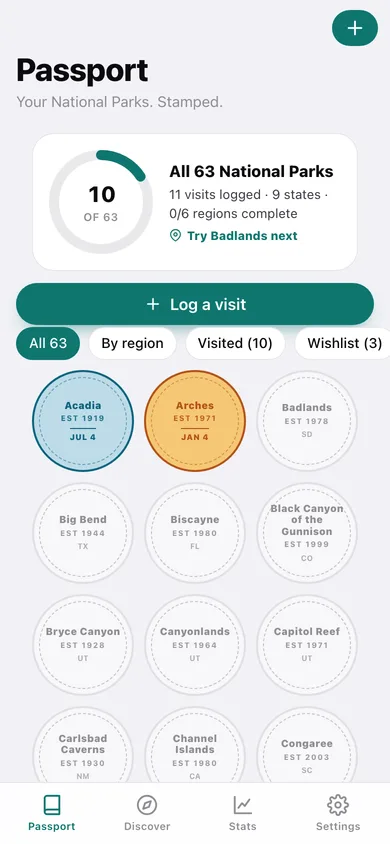
All 63 parks as circular cancellation stamps — grey silhouettes until you visit, then full colour in that park's own biome ink with the date on the band.
Log a visit in three fields
Which park, when you went, who was with you and a note. Submitting presses the stamp into the page with a real stamping animation.
Every park's detail page
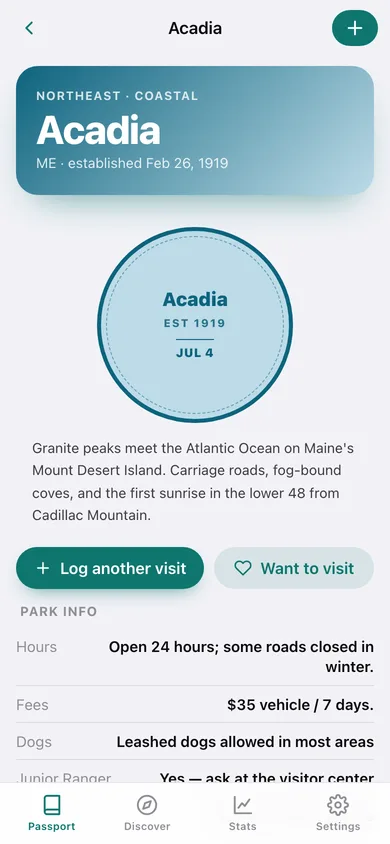
The bundled 63-park dataset: description, established date, states, region, biome, hours, fees, whether dogs are allowed and whether there is a Junior Ranger programme.
Discover by region, biome and programme
All 63, Junior Ranger eligible, dog friendly, still to stamp, the six NPS regions, and seven biomes from alpine to tropical.
Stats dashboard
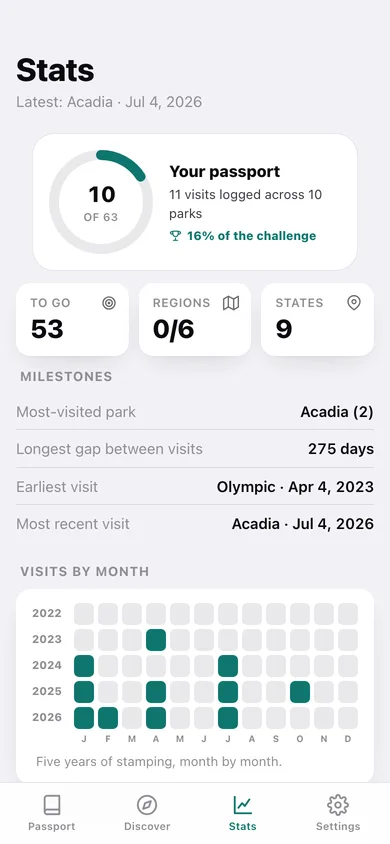
Progress ring, parks to go, regions completed, states visited, most-visited park, longest gap between visits, a five-year visits-by-month heatmap and a states grid.
Take the passport with you
Download all 63 pages as text with your stamps written in, your visits as CSV, or a full JSON backup — everything stays on this device.
Screens
Every screen, rebuilt for the browser
-
1
Passport
The progress ring, the next park to try, and the 3-column grid of all 63 stamps with All / By region / Visited / Wishlist filters.
-
2
Park
One park: biome hero, its stamp, description, hours, fees, dogs, Junior Ranger, your visits and the wishlist toggle.
-
3
Log a visit
Pick the park, the date, who came along and a note, then stamp the passport.
-
4
Visit
One stamped visit with its cancellation date, companions, notes and how many times you have been.
-
5
Discover
Browse by All 63, Junior Ranger, dog friendly, still to stamp, the six regions and the seven biomes.
-
6
Parks
A filtered park list with a stamped marker on every row.
-
7
Stats
Progress, regions completed, states visited, milestones, the five-year month heatmap and the states grid.
-
8
Settings
Traveler name, wishlist, passport and CSV export, JSON backup, sample data and erase.
Try it with sample data: Loads eleven visits across Acadia (twice), Arches, Grand Canyon, Yellowstone, Yosemite, Zion, Glacier, Rocky Mountain, Olympic and Sequoia over the last three and a half years, plus a Denali/Everglades/Smokies wishlist. You can start fresh at any time.
Ready? It's free.
No account, no install, no subscription. Everything you do stays in this browser.
Your say
Is Stampr useful? Tell us what to build next.
Sign in with Google to vote.
Tell us what to build next.
Comments need a free Google sign-in, so every one is from a real person.
Sign in with Google to commentNo comments yet — be the first to say what this app should do next.
Questions
Is the web version of Stampr free?+
Yes. Every screen is free to use: no subscription, no in-app purchases, no account.
Do I need an account?+
No. Open Stampr and start using it right away. Sign in with Google only if you want to upvote an app, save it to your list, or leave a comment.
Where is my data stored?+
Only in this browser's local storage. Nothing you enter is sent to our servers, so we can't see it, back it up, or restore it. Clearing site data, a private window, or another device starts empty. Export a backup from the in-app menu to keep it.
How is the web version different from the Stampr phone app?+
The iPhone app attaches photos from your library to each visit and can spot a visit automatically with iOS's visit detection. In the browser you type the date and there are no photos. There is no map view here — each park links out to Apple Maps instead of drawing annotations. The iPhone app exports a printable PDF passport book; the browser version gives you the same passport as a text file plus a CSV of visits. Visits are stored in this browser only — no iCloud, no account, no sync with the phone.