
Web app · Health And Fitness
Stacklog
Did I already take my creatine? Stacklog answers that — and tells you when the tub runs dry
A one-tap daily checklist with morning, pre-workout and evening slots, a servings countdown tied to your actual check-offs, run-out and reorder-by dates, and what your stack really costs per serving and per month. Free, no install, no account.
Stored in your browser only. Nothing you do in the web version is sent to our servers. Clear your browser data and it's gone — so export a backup from the in-app menu if you want to keep it.
This app is a community proposal.
Try the full browser version now. We build the iPhone and Android app once 100 people upvote it.
We'll email you once, when it ships. Unsubscribe anytime.
In your browser
What you can do in Stacklog on the web
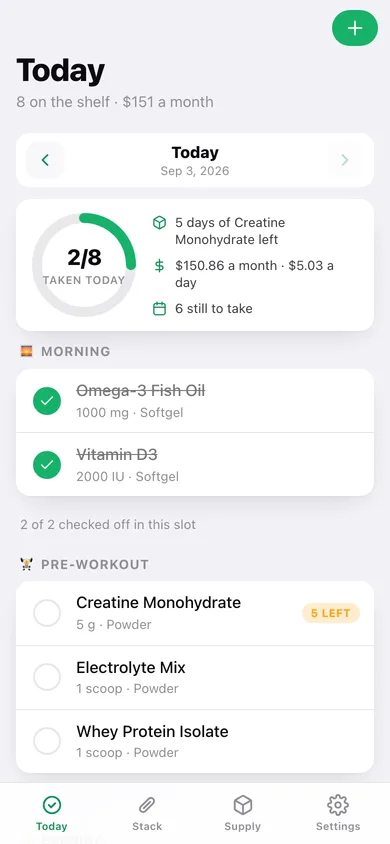
Today checklist by time-of-day slot
Morning, pre-workout and evening sections with one-tap check-offs, a done ring, and arrows back to any previous day — so yesterday's answer is always one glance away.
The shelf, with stock gauges
Every supplement with its dose, form, slot, servings per container and price paid, each with a fill bar showing how much of the current container is left.
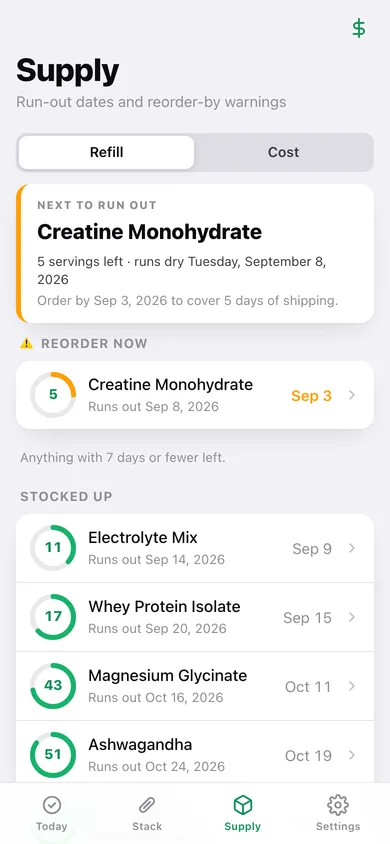
Refill forecast
Servings count down with every check-off, and Stacklog projects the exact day each tub runs dry, sorted by soonest reorder-by date with a low-stock list on top.
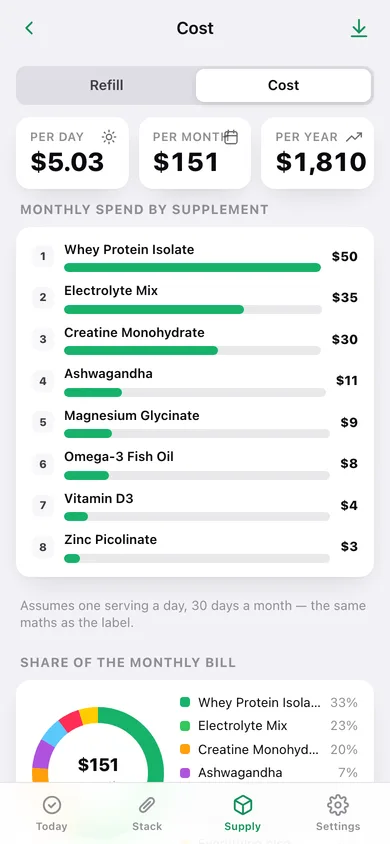
Cost dashboard
Cost per serving, per day, per month and per year, a ranked spend bar per supplement, and each one's share of the monthly bill.
Your own thresholds
Set the shipping lead time and the low-stock warning level and both the reorder-by dates and the “Reorder now” list follow them.
Stays in this browser
No account and no server — export a JSON backup or a CSV of every check-off whenever you want.
Screens
Every screen, rebuilt for the browser
-
1
Today
The daily checklist: done ring, next tub to run out, monthly spend, and every supplement grouped into its slot.
-
2
Stack
The shelf — every supplement with dose, cost per serving and a stock bar for its current container.
-
3
Supplement detail
One tub: servings left, run-out and reorder-by dates, refill button, cost math, notes and a 12-week check-off heatmap.
-
4
Add or edit
Name, form, slot, dose and unit, servings per container, price paid, the date the container was opened, and notes.
-
5
Refill forecast
The next tub to run out, a reorder-now list and everything that is still stocked up, each with a days-left gauge.
-
6
Cost dashboard
Per day, per month and per year totals, monthly spend ranked by supplement, share of the bill and cost per serving.
-
7
Settings
Shipping lead time, low-stock threshold, refill everything, CSV and JSON export, sample data and erase.
Try it with sample data: Loads an eight-supplement stack — creatine, whey, vitamin D3, omega-3, electrolytes, magnesium glycinate, ashwagandha and zinc — with prices, container sizes and up to a month of check-offs behind each one. You can start fresh at any time.
Ready? It's free.
No account, no install, no subscription. Everything you do stays in this browser.
Your say
What should Stacklog do? Tell us before we build it.
Tell us what to build next.
Comments need a free Google sign-in, so every one is from a real person.
Sign in with Google to commentNo comments yet — be the first to say what this app should do next.
Questions
Is the web version of Stacklog free?+
Yes. Every screen is free to use: no subscription, no in-app purchases, no account.
Do I need an account?+
No. Open Stacklog and start using it right away. Sign in with Google only if you want to upvote an app, save it to your list, or leave a comment.
Where is my data stored?+
Only in this browser's local storage. Nothing you enter is sent to our servers, so we can't see it, back it up, or restore it. Clearing site data, a private window, or another device starts empty. Export a backup from the in-app menu to keep it.
Is there a Stacklog app for iPhone or Android?+
Not yet. Stacklog is a community proposal: the browser version is complete, and we build the iPhone and Android app once 100 people upvote it. Upvoters get one email when it ships.