
Web app · Lifestyle
Sprout
Watering and feeding schedules you set yourself — now in any browser
Give every plant its own watering and fertilizing rhythm, see exactly what needs water today, tap Water or Feed, and keep a care log per plant. 48 species with starter schedules, rooms, CSV export. Free, no account, nothing leaves your browser.
Stored in your browser only. Nothing you do in the web version is sent to our servers. Clear your browser data and it's gone — so export a backup from the in-app menu if you want to keep it.
This app is a community proposal.
Try the full browser version now. We build the iPhone and Android app once 100 people upvote it.
We'll email you once, when it ships. Unsubscribe anytime.
In your browser
What you can do in Sprout on the web
Water today, in one place
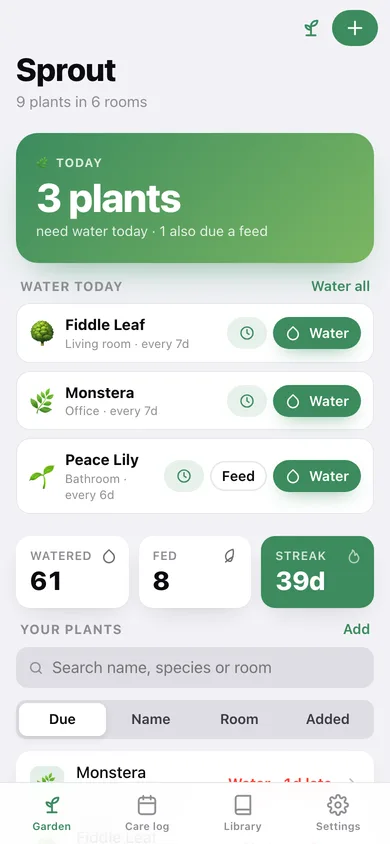
The home screen leads with how many plants are due right now, with Water, Feed and Snooze on each row and a Water all button when several are thirsty.
Every interval is yours
Set watering and fertilizing intervals per plant and edit them any time. No AI quietly deciding your ficus needs a drink.
Optional lighter winter cadence
A toggle — not a hidden rule — that stretches every watering interval by half again through November to February.
Species library of 48 plants
Pothos to Meyer lemon, with botanical name, light, starter water and feed intervals, pet toxicity and a real care note. Tap one to add it to your garden.
Care log per plant
Waterings, feeds, mistings, prunings and repottings land in a 12-week heatmap, a waterings-per-week chart and a full history you can prune.
Rooms and CSV export
Group plants by room, rename a room and every plant moves with it, and export the whole register as a spreadsheet.
Screens
Every screen, rebuilt for the browser
-
1
Garden
How many plants need water today, the due list with Water / Feed / Snooze, and your whole register sorted by due date, name, room or when you added it.
-
2
Plant
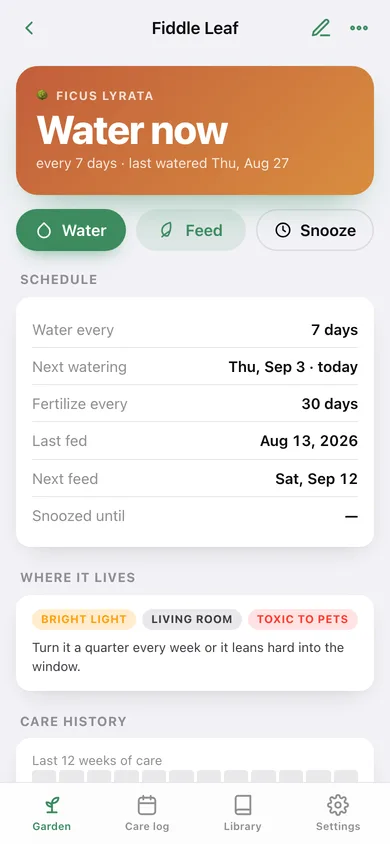
Next watering, the full schedule, light and room tags, care notes and a 12-week heatmap of everything you have done for it.
-
3
Add or edit a plant
Icon, name, species, room, light, watering interval, fertilizing interval, last watered, last fed and care notes.
-
4
Care log
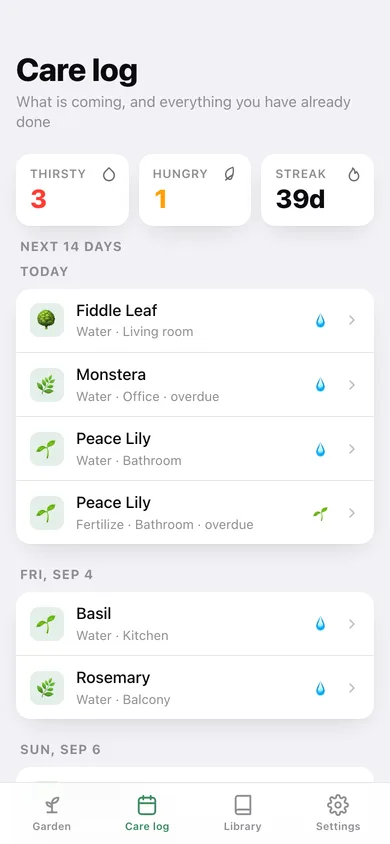
The next fortnight of watering and feeding grouped by day, waterings per week, a 12-week heatmap and every entry you have logged.
-
5
Species library
48 common houseplants, herbs and small-yard species grouped by type, each with a starter schedule you can override.
-
6
Rooms
Add, rename and delete rooms; renaming moves every plant in that room with it.
-
7
Settings
Default watering interval, snooze length, winter cadence, sort order, CSV export, backup, sample garden and erase.
Try it with sample data: Loads a nine-plant garden — fiddle leaf, snake plant, monstera, pothos, peace lily, basil, rosemary, aloe and a moth orchid — across six rooms with five weeks of watering, feeding, misting, pruning and repotting already logged. You can start fresh at any time.
Ready? It's free.
No account, no install, no subscription. Everything you do stays in this browser.
Your say
What should Sprout do? Tell us before we build it.
Tell us what to build next.
Comments need a free Google sign-in, so every one is from a real person.
Sign in with Google to commentNo comments yet — be the first to say what this app should do next.
Questions
Is the web version of Sprout free?+
Yes. Every screen is free to use: no subscription, no in-app purchases, no account.
Do I need an account?+
No. Open Sprout and start using it right away. Sign in with Google only if you want to upvote an app, save it to your list, or leave a comment.
Where is my data stored?+
Only in this browser's local storage. Nothing you enter is sent to our servers, so we can't see it, back it up, or restore it. Clearing site data, a private window, or another device starts empty. Export a backup from the in-app menu to keep it.
Is there a Sprout app for iPhone or Android?+
Not yet. Sprout is a community proposal: the browser version is complete, and we build the iPhone and Android app once 100 people upvote it. Upvoters get one email when it ships.