
Web app · Lifestyle
Spraybook
Are the peaches safe to pick yet? Spraybook counts it down for you
The backyard orchard spray logbook: log an application in seconds and get live REI (safe to re-enter) and PHI (safe to pick) countdowns per tree, plus a mix calculator that turns label rates into an exact backpack dose. Free, offline, no account.
Stored in your browser only. Nothing you do in the web version is sent to our servers. Clear your browser data and it's gone — so export a backup from the in-app menu if you want to keep it.
This app is a community proposal.
Try the full browser version now. We build the iPhone and Android app once 100 people upvote it.
We'll email you once, when it ships. Unsubscribe anytime.
In your browser
What you can do in Spraybook on the web
Per-tree spray logbook
Product from your shelf, the trees or the whole block you covered, date, growth stage, tank size, amount mixed and a weather note — grouped by month and searchable by tree, product, ingredient or stage.
REI and PHI countdowns
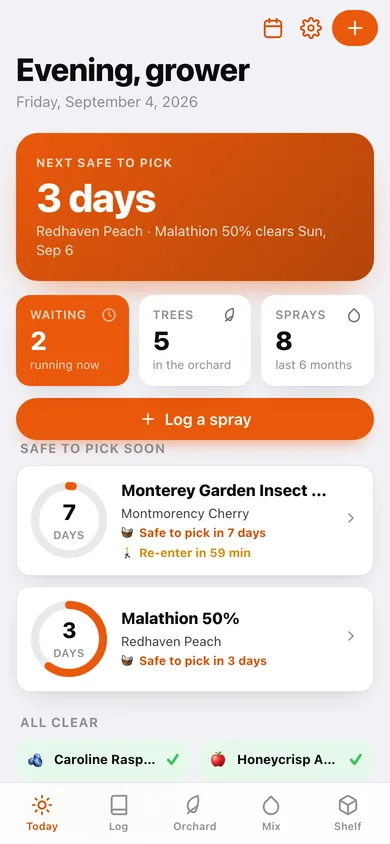
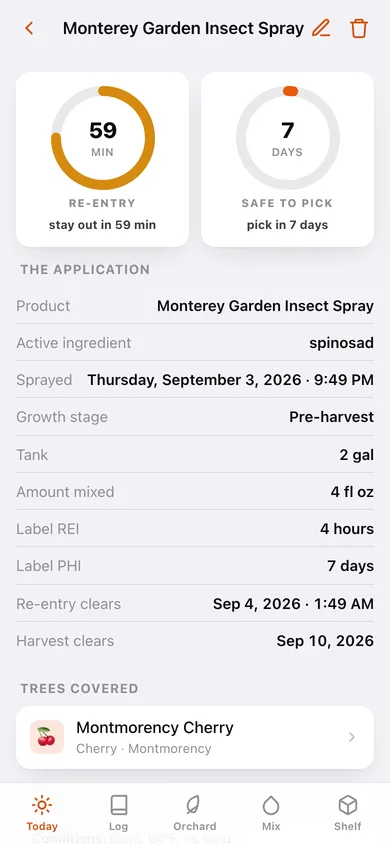
Every logged spray produces two live progress rings straight from the label numbers: when it is safe to work under those trees again, and when the fruit is safe to pick.
Backpack mix calculator
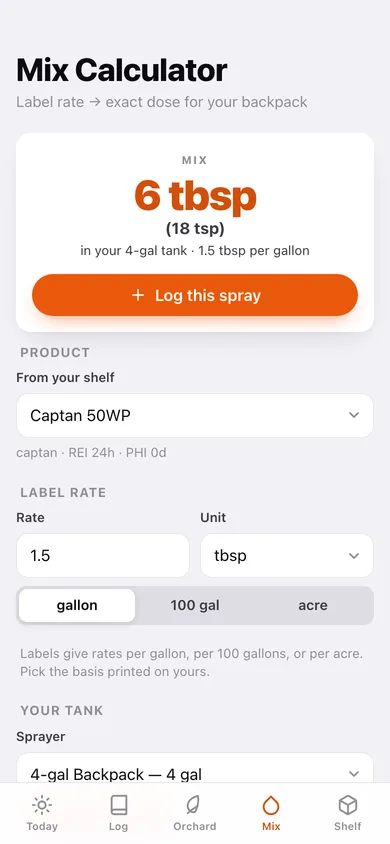
Converts a label rate given per gallon, per 100 gallons or per acre into exact ounces, tablespoons, teaspoons, grams or millilitres for your actual tank — with saved sprayer profiles and a friendly second unit.
Orchard and blocks
Your trees organised into blocks (Front Yard, Back Slope, Berry Row), each with crop, variety, year planted, live countdowns and full spray history.
Product shelf
Type a product once — name, active ingredient, REI hours, PHI days, default label rate and basis — and every future log entry, countdown and mix reuses it.
Season schedule for six crops
The full bundled growth-stage timeline for apple, peach, pear, cherry, grape and berry — dormant, green tip, pink, petal fall, cover sprays, pre-harvest — with what to watch for at each stage. Timing guidance only, never product recommendations.
Season record export
The whole logbook as a CSV spray record for a market stand or your own memory, plus a full JSON backup.
Screens
Every screen, rebuilt for the browser
-
1
Today
The safe-to-pick headline, live countdown cards with REI/PHI rings, and every tree that is all clear.
-
2
Spray Log
Every application grouped by month, searchable by product, tree, ingredient, stage or note.
-
3
Spray detail
Both countdown rings, the full application record, trees covered, and the conditions you sprayed in.
-
4
Log a spray
Pick the product, tick the trees or take the whole block, set date, stage, tank and amount — with the computed REI and PHI shown live.
-
5
Orchard
Trees grouped into blocks, each showing crop, variety, planting year and whether a countdown is running.
-
6
Tree detail
One tree's crop, variety, age, active countdowns and its whole spray history.
-
7
Mix Calculator
Label rate and basis in, exact dose for your tank out, with a friendly second unit and a one-tap jump to logging it.
-
8
Product Shelf
Every product with its REI, PHI and default label rate on a pill card.
-
9
Product editor
Name, active ingredient, REI hours, PHI days, default rate and basis for one product.
-
10
Season Schedule
Growth-stage timeline per crop with what to watch for and the typical spray window at each stage.
-
11
Sprayers
Saved sprayer profiles with capacities and a default, so the mix calculator is one tap.
-
12
Settings
Default tank and per-acre spray volume, season counts, CSV and JSON export, sample data and erase.
Try it with sample data: Loads a five-tree home orchard in three blocks, four products on the shelf, two sprayers, and eight applications across the season — two of them still counting down. You can start fresh at any time.
Ready? It's free.
No account, no install, no subscription. Everything you do stays in this browser.
Your say
What should Spraybook do? Tell us before we build it.
Tell us what to build next.
Comments need a free Google sign-in, so every one is from a real person.
Sign in with Google to commentNo comments yet — be the first to say what this app should do next.
Questions
Is the web version of Spraybook free?+
Yes. Every screen is free to use: no subscription, no in-app purchases, no account.
Do I need an account?+
No. Open Spraybook and start using it right away. Sign in with Google only if you want to upvote an app, save it to your list, or leave a comment.
Where is my data stored?+
Only in this browser's local storage. Nothing you enter is sent to our servers, so we can't see it, back it up, or restore it. Clearing site data, a private window, or another device starts empty. Export a backup from the in-app menu to keep it.
Is there a Spraybook app for iPhone or Android?+
Not yet. Spraybook is a community proposal: the browser version is complete, and we build the iPhone and Android app once 100 people upvote it. Upvoters get one email when it ships.