
Web app · Utilities
SpoilSafe
The power is out — here is what to keep, what to toss, and what to claim
Start the outage clock (or backdate it honestly), get a cited USDA keep / use-now / discard verdict for every item in your fridge, freezer and chest freezer, then turn the discard pile into an itemized spoilage report for your adjuster. Free, offline, no install.
Stored in your browser only. Nothing you do in the web version is sent to our servers. Clear your browser data and it's gone — so export a backup from the in-app menu if you want to keep it.
This app is a community proposal.
Try the full browser version now. We build the iPhone and Android app once 100 people upvote it.
We'll email you once, when it ships. Unsubscribe anytime.
In your browser
What you can do in SpoilSafe on the web
Outage clock with honest backdating
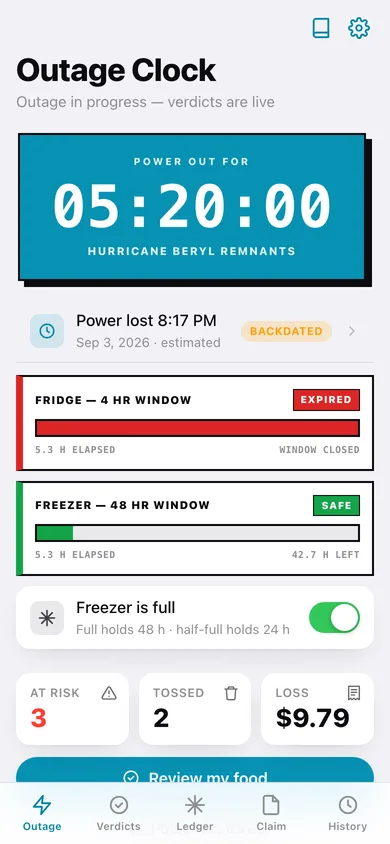
One tap starts a live counter, or set the earliest time you KNOW the power was on — the safety math stays conservative on purpose, because nothing here senses temperature.
4-hour fridge and 24/48-hour freezer bars
Live SAFE / MARGINAL / EXPIRED windows against your timeline, with the full-vs-half-full freezer switch that decides between the 48-hour and 24-hour hold.
34 bundled USDA disposition rows
The real USDA FSIS and foodsafety.gov chart — meat, poultry, seafood, dairy and eggs, produce, prepared dishes, condiments, bakery and frozen desserts — with the fridge and freezer verdict for each.
Per-item verdict with the rule cited
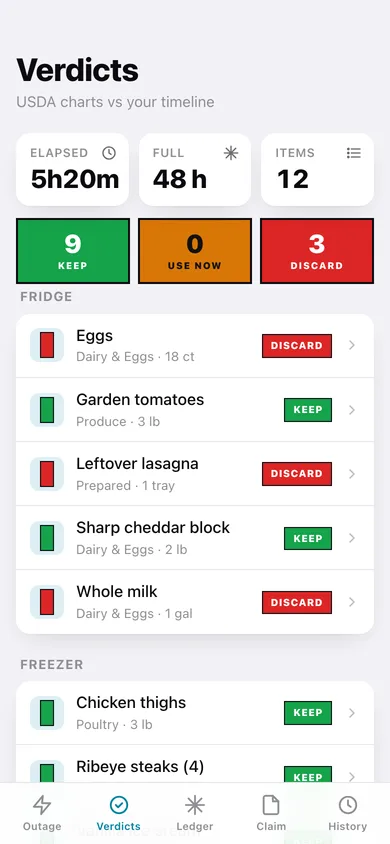
Every ledger item gets KEEP, USE NOW or DISCARD computed from its category, where it is stored and how long the power has been out — with the exact sentence and source behind it.
Freezer ledger built between storms
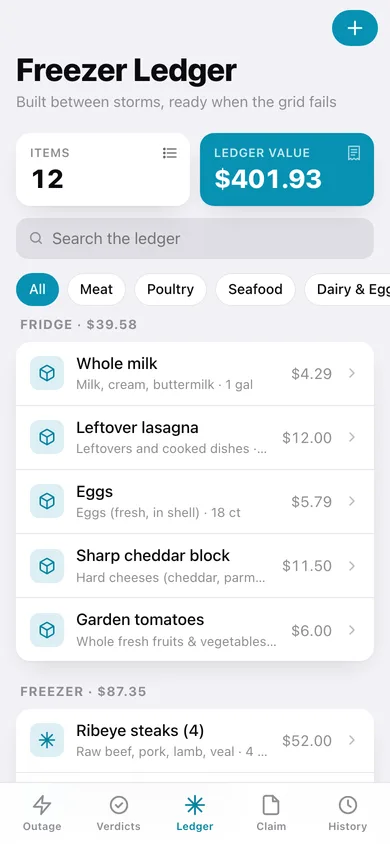
A searchable inventory of fridge, freezer and chest-freezer contents with quantities and replacement values, so the documentation already exists when the grid fails.
Itemized spoilage report
Log & toss captures quantity, price and an evidence note per item; the claim builder totals the loss, holds your policy details, and exports a plain-text report or an itemized CSV.
Screens
Every screen, rebuilt for the browser
-
1
Outage clock
Live power-out counter, fridge and freezer hold-window bars, freezer fullness, and the loss documented so far.
-
2
Verdicts
Keep / use-now / discard tally and every ledger item ruled against your outage timeline, grouped by fridge, freezer and chest freezer.
-
3
Verdict detail
The full-bleed ruling for one item with the USDA sentence, source, elapsed time and safe window.
-
4
Freezer ledger
Searchable inventory by location and USDA group with per-location replacement value.
-
5
Ledger item
Add or edit an item: name, location, USDA category, quantity, replacement value and notes.
-
6
Claim builder
Itemized discard list with running total, policy details, and the deductible warning.
-
7
Spoilage report
The adjuster-ready report — timeline, itemized discards, total loss — to copy, download or export as CSV.
-
8
Outage history
Hours-without-power chart and every outage on record with its documented loss.
-
9
Outage record
One outage's timeline, freezer window, and the items discarded under it.
-
10
Timeline editor
Set or correct the power-lost and noticed timestamps, cause, freezer fullness and notes.
-
11
Safety reference
The two hold-time rules plus the browsable USDA chart with a fridge and freezer verdict per row.
-
12
Settings
Freezer default, marginal warning, source links, backup, sample data and erase.
Try it with sample data: Loads three outages (an active hurricane outage, a 12-hour grid failure and an ice storm), a twelve-item fridge/freezer/chest-freezer ledger, nine documented discards and a State Farm policy record. You can start fresh at any time.
Ready? It's free.
No account, no install, no subscription. Everything you do stays in this browser.
Your say
What should SpoilSafe do? Tell us before we build it.
Tell us what to build next.
Comments need a free Google sign-in, so every one is from a real person.
Sign in with Google to commentNo comments yet — be the first to say what this app should do next.
Questions
Is the web version of SpoilSafe free?+
Yes. Every screen is free to use: no subscription, no in-app purchases, no account.
Do I need an account?+
No. Open SpoilSafe and start using it right away. Sign in with Google only if you want to upvote an app, save it to your list, or leave a comment.
Where is my data stored?+
Only in this browser's local storage. Nothing you enter is sent to our servers, so we can't see it, back it up, or restore it. Clearing site data, a private window, or another device starts empty. Export a backup from the in-app menu to keep it.
Is there a SpoilSafe app for iPhone or Android?+
Not yet. SpoilSafe is a community proposal: the browser version is complete, and we build the iPhone and Android app once 100 people upvote it. Upvoters get one email when it ships.