
Web app · Lifestyle
SoundSpotter
Teach your browser the doorbell — then read back everything it heard
Train any sound in about 30 seconds from five microphone samples, get a per-sound vibration pattern the moment it fires, and scroll a timestamped event log: the oven at 7:14pm, the dog at 3:02am. Runs entirely in this tab, free, no install.
Stored in your browser only. Nothing you do in the web version is sent to our servers. Clear your browser data and it's gone — so export a backup from the in-app menu if you want to keep it.
This app is a community proposal.
Try the full browser version now. We build the iPhone and Android app once 100 people upvote it.
We'll email you once, when it ships. Unsubscribe anytime.
In your browser
What you can do in SoundSpotter on the web
Train any sound in 30 seconds
Five short microphone samples build a 32-band acoustic fingerprint on the spot — your doorbell, the oven beep, the cat at 5am. The audio itself is never recorded or stored, only the shape.
Six pre-loaded starters
Doorbell, Microwave, Smoke Alarm, Knock, Baby Cry and Dog Bark ship in the library with the app's own haptic defaults — train each one on your actual appliance.
Per-sound vibration patterns
One short pulse, three short pulses, or SOS (long-short-long) — the same three patterns as the iPhone app, played through the browser's vibration motor with a preview button.
Live listening with a match meter
A running spectrum, a level bar and a best-match read-out show exactly what the recogniser is hearing, with strict / balanced / loose sensitivity and a 4-second cooldown per sound.
Persistent event log
Every detection is stamped with time, sound and confidence, grouped by day, charted per day and by hour of day, and exportable as CSV.
Nothing leaves this browser
No account, no server, no upload. Sounds, fingerprints and events live in this browser's local storage and can be exported as a JSON backup.
Screens
Every screen, rebuilt for the browser
-
1
Sound library
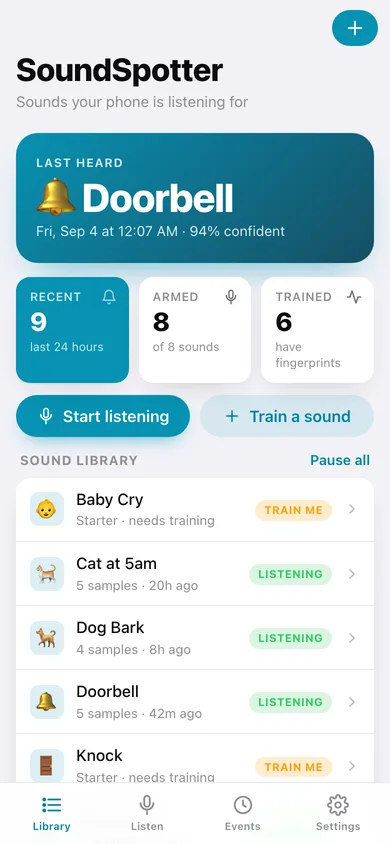
Last heard, today's detection count, and every tracked sound with its training state and last firing.
-
2
Sound detail
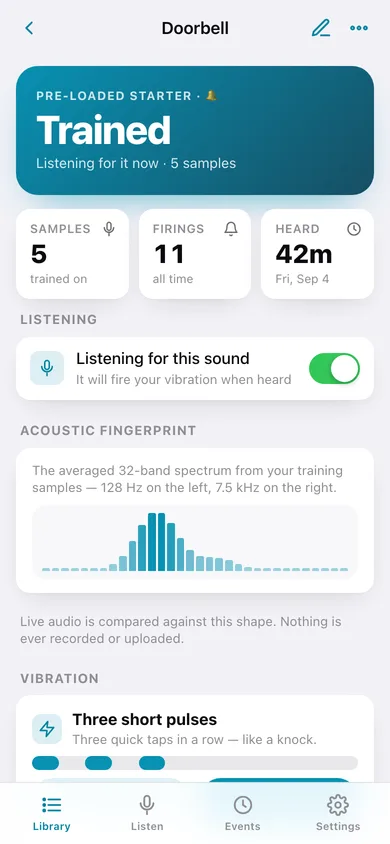
Training state, acoustic fingerprint, vibration pattern, listening switch and every firing of one sound.
-
3
Train a sound
Name it, pick a vibration, then capture five microphone samples with a live spectrum and progress bar.
-
4
Vibration pattern
Pick one short pulse, three short pulses or SOS for a sound, with a timeline and a preview buzz.
-
5
Listen
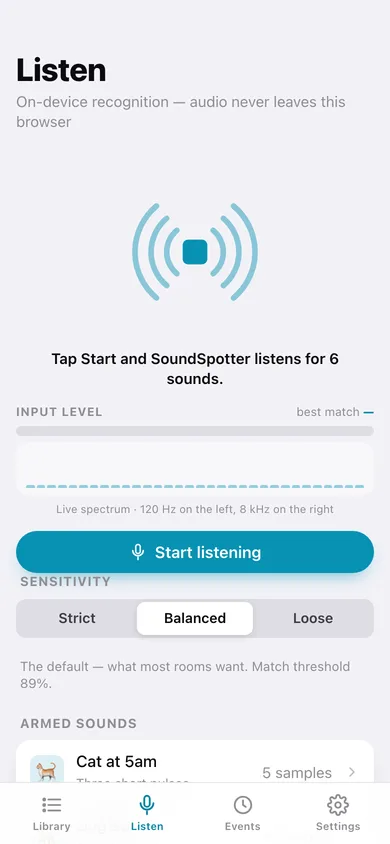
Live recognition with a pulsing wave mark, level meter, best-match read-out and detections as they fire.
-
6
Events
The full detection log grouped by day, with detections per day, which sound fired, and an around-the-clock chart.
-
7
Settings
Sensitivity, vibration and chime on detection, library counts, CSV and JSON export, restore starters, erase.
Try it with sample data: Trains Doorbell, Microwave, Smoke Alarm and Dog Bark, adds two custom sounds (Oven timer, Cat at 5am) and fills three weeks with 33 realistic detections. You can start fresh at any time.
Ready? It's free.
No account, no install, no subscription. Everything you do stays in this browser.
Your say
What should SoundSpotter do? Tell us before we build it.
Tell us what to build next.
Comments need a free Google sign-in, so every one is from a real person.
Sign in with Google to commentNo comments yet — be the first to say what this app should do next.
Questions
Is the web version of SoundSpotter free?+
Yes. Every screen is free to use: no subscription, no in-app purchases, no account.
Do I need an account?+
No. Open SoundSpotter and start using it right away. Sign in with Google only if you want to upvote an app, save it to your list, or leave a comment.
Where is my data stored?+
Only in this browser's local storage. Nothing you enter is sent to our servers, so we can't see it, back it up, or restore it. Clearing site data, a private window, or another device starts empty. Export a backup from the in-app menu to keep it.
Is there a SoundSpotter app for iPhone or Android?+
Not yet. SoundSpotter is a community proposal: the browser version is complete, and we build the iPhone and Android app once 100 people upvote it. Upvoters get one email when it ships.