
Web app · Lifestyle
Soul Ledger
Run the real Cheshbon HaNefesh — 13 middot, one a week, marked on a dot grid
Lefin's 1808 accounting of the soul, as a working ledger rather than a reading list: the 13 middot in canonical order with their maxims, a focus trait that rotates itself every week, a tap-to-mark daily grid where a mark is a lapse, a 13-week season chart and a trend line per trait. Free, private to this browser.
Stored in your browser only. Nothing you do in the web version is sent to our servers. Clear your browser data and it's gone — so export a backup from the in-app menu if you want to keep it.
This app is a community proposal.
Try the full browser version now. We build the iPhone and Android app once 100 people upvote it.
We'll email you once, when it ships. Unsubscribe anytime.
In your browser
What you can do in Soul Ledger on the web
The whole 13-middah scaffold, hardcoded
Menuchat HaNefesh through Prishut in Lefin's canonical order, each with its maxim and a line of practical guidance for the week's work — the public-domain Cheshbon HaNefesh text, nothing to rebuild each season.
The rotation runs itself
One anchor date drives everything: week index, focus middah, season number and week-in-season. Nothing to advance by hand, and the app always opens on the trait you are actually working.
Daily dot grid
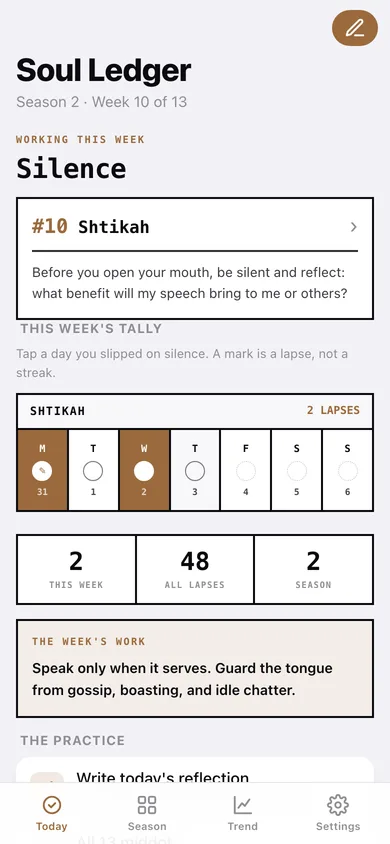
Seven hard cells for the focus week. Tap a day you slipped and it fills; tap again to clear. A mark means a lapse, never a streak — the same logic as the paper Franklin/Lefin tally chart.
The 13-week season chart
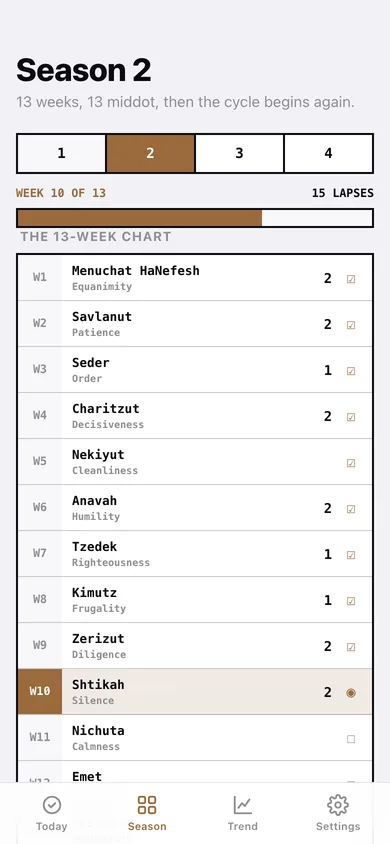
Every trait as a row: worked, live or ahead, with its lapse tally for the season and a progress bar through the 13 weeks. Switch between seasons — four make a year.
Per-trait trend across seasons
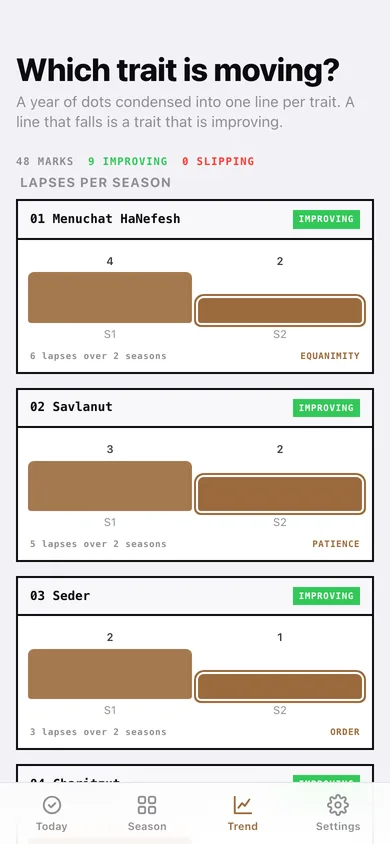
Lapses per season for every trait you have worked, labelled improving, steady or slipping, so you can finally see which middah is actually moving.
Private reflections
A note attached to any day's mark — the journaling half of the practice — readable back from that trait's page, exportable as CSV, and never sent anywhere.
Screens
Every screen, rebuilt for the browser
-
1
Today
The week's focus middah with its maxim, the tap-to-mark dot grid, and this week / all lapses / season counters.
-
2
Season
The 13-week chart: every trait worked, live or ahead, with its lapse tally and the season's progress.
-
3
Trend
Lapses per season for every trait, flagged improving, steady or slipping.
-
4
13 Middot
Lefin's canonical order with English glosses and a live lapse count per trait.
-
5
One middah
The maxim, the week's work, where it falls in the rotation, lapses by season and every reflection written on it.
-
6
Reflection
One day's mark and the private note attached to it — write, clear the mark, or reflect on a day you held the line.
-
7
Settings
The practice start date, restarting the cycle, the source text, CSV and JSON export, and erase.
Try it with sample data: Back-dates the practice 22 weeks and 3 days so the ledger opens mid-Season 2 on Shtikah (Silence), week 10 of 13, with about 45 marks spread across two full seasons of the 13 traits and seven reflections written on them. You can start fresh at any time.
Ready? It's free.
No account, no install, no subscription. Everything you do stays in this browser.
Your say
What should Soul Ledger do? Tell us before we build it.
Tell us what to build next.
Comments need a free Google sign-in, so every one is from a real person.
Sign in with Google to commentNo comments yet — be the first to say what this app should do next.
Questions
Is the web version of Soul Ledger free?+
Yes. Every screen is free to use: no subscription, no in-app purchases, no account.
Do I need an account?+
No. Open Soul Ledger and start using it right away. Sign in with Google only if you want to upvote an app, save it to your list, or leave a comment.
Where is my data stored?+
Only in this browser's local storage. Nothing you enter is sent to our servers, so we can't see it, back it up, or restore it. Clearing site data, a private window, or another device starts empty. Export a backup from the in-app menu to keep it.
Is there a Soul Ledger app for iPhone or Android?+
Not yet. Soul Ledger is a community proposal: the browser version is complete, and we build the iPhone and Android app once 100 people upvote it. Upvoters get one email when it ships.