
Web app · Music
Songbank
Never blank on your karaoke songs — or your key — again
Your whole repertoire in one place: every song with the pitch shift that suits your voice, vibe tags, a Go-To / Practicing / Try-Next tier and a rating, plus Night Lists you build before you walk in. Free, no account.
Stored in your browser only. Nothing you do in the web version is sent to our servers. Clear your browser data and it's gone — so export a backup from the in-app menu if you want to keep it.
This app is a community proposal.
Try the full browser version now. We build the iPhone and Android app once 100 people upvote it.
We'll email you once, when it ships. Unsubscribe anytime.
In your browser
What you can do in Songbank on the web
Pitch-shift memory per song
The −6 to +6 semitone number you punch into the machine, remembered per song and printed next to it when you share the list.
Go-To, Practicing and Try Next tiers
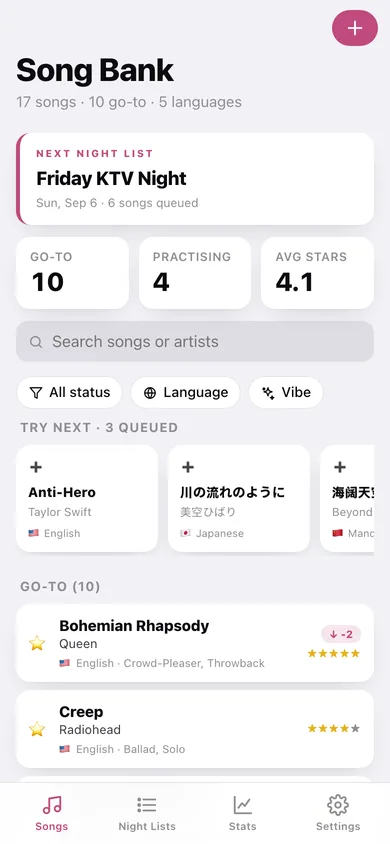
Your bank reflects reality, not wishful thinking — and the Try-Next queue rides on the home screen as a carousel so you keep expanding.
Vibe tags and language filter
Hype, Ballad, Crowd-Pleaser, Solo, Duet, Feel-Good, Throwback — filter the bank by vibe, by language or by tier with one tap each.
Night List builder
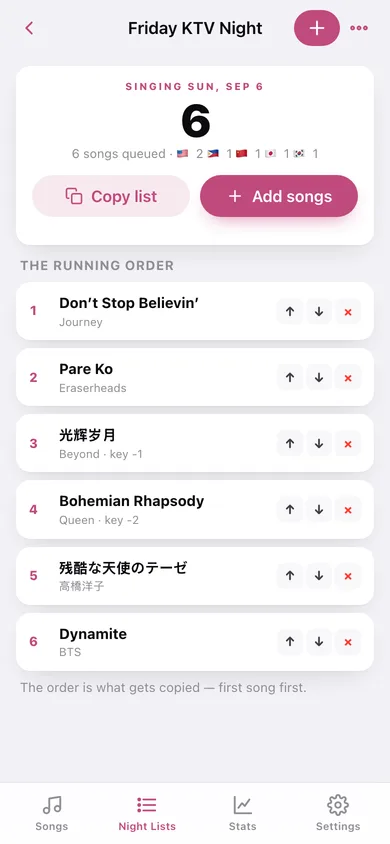
Name a list for the outing, pull songs from your bank, reorder the running order, and copy it as plain text for whoever is booking the machine.
Ratings, notes and last-sung dates
Rate how a song actually lands, jot what to watch for, and mark it sung tonight in a tap.
Stats that show the gap
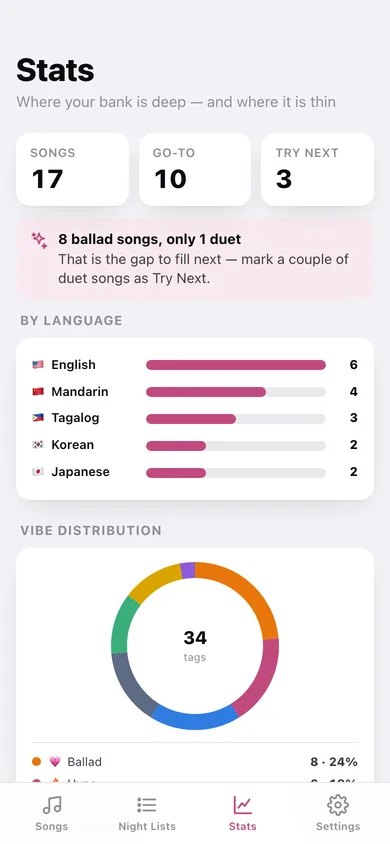
Songs by language, a vibe donut, the rating spread and your average — so you find out you have fourteen ballads and only two hype songs.
Screens
Every screen, rebuilt for the browser
-
1
Song Bank
Your next Night List, the Try-Next carousel, filters and every song grouped by tier.
-
2
Song
Pitch shift, rating, last sung, vibe tags, notes and the lists it is on.
-
3
Add a song
Title, artist, language, pitch shift, tier, rating, last-sung date, vibe tags and notes.
-
4
Night Lists
Every list with its song count and whether the night is still ahead.
-
5
Night List
The running order with reorder and remove, the language mix, and a one-tap copy for the booker.
-
6
Stats
Songs by language, vibe distribution, rating spread and your five-star list.
-
7
Settings
Bank counts, default language, CSV and JSON export, sample data and erase.
Try it with sample data: Loads seventeen songs across English, Mandarin, Tagalog, Japanese and Korean — with real pitch shifts, vibe tags, ratings and notes — plus two Night Lists: an upcoming Friday KTV Night and a past Chill Ballads Night. You can start fresh at any time.
Ready? It's free.
No account, no install, no subscription. Everything you do stays in this browser.
Your say
What should Songbank do? Tell us before we build it.
Tell us what to build next.
Comments need a free Google sign-in, so every one is from a real person.
Sign in with Google to commentNo comments yet — be the first to say what this app should do next.
Questions
Is the web version of Songbank free?+
Yes. Every screen is free to use: no subscription, no in-app purchases, no account.
Do I need an account?+
No. Open Songbank and start using it right away. Sign in with Google only if you want to upvote an app, save it to your list, or leave a comment.
Where is my data stored?+
Only in this browser's local storage. Nothing you enter is sent to our servers, so we can't see it, back it up, or restore it. Clearing site data, a private window, or another device starts empty. Export a backup from the in-app menu to keep it.
Is there a Songbank app for iPhone or Android?+
Not yet. Songbank is a community proposal: the browser version is complete, and we build the iPhone and Android app once 100 people upvote it. Upvoters get one email when it ships.