
Web app · Lifestyle
Sneakerbox
Log every wear and watch the cost-per-wear on each pair fall
The offline sneaker logbook for people who actually wear their kicks: brand, model, colorway, size, what you paid and condition per pair, one-tap wear logging, live cost-per-wear, and a rotation view that calls out the pairs gone cold. Free, no install, no account.
Stored in your browser only. Nothing you do in the web version is sent to our servers. Clear your browser data and it's gone — so export a backup from the in-app menu if you want to keep it.
This app is a community proposal.
Try the full browser version now. We build the iPhone and Android app once 100 people upvote it.
We'll email you once, when it ships. Unsubscribe anytime.
In your browser
What you can do in Sneakerbox on the web
Cost-per-wear, computed live
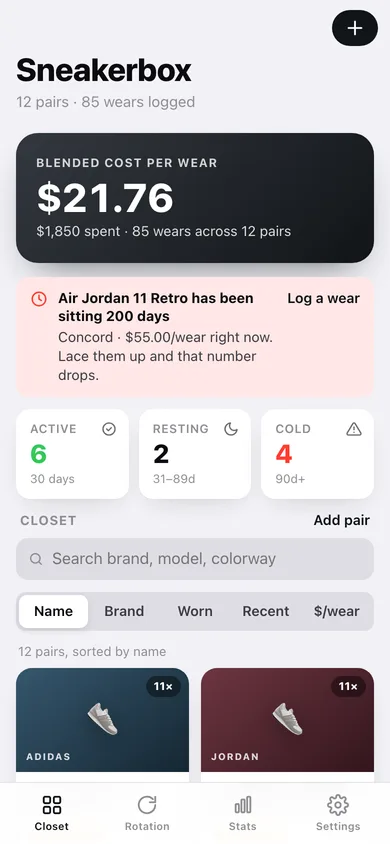
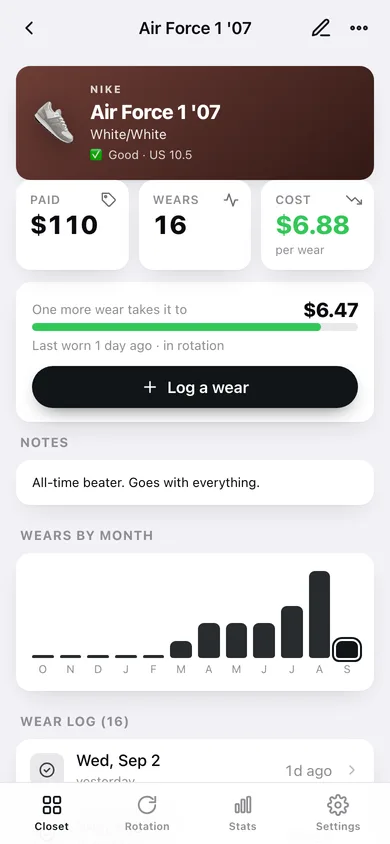
Purchase price divided by total wears, recalculated the moment you log one — with a preview of exactly what the next wear takes it down to, and green/amber/red banding under $10, under $25 and above.
Closet grid with search and five sorts
Every pair as a brand-tinted card with its wear count, colorway, size and cost-per-wear; search by brand, model or colorway and sort by name, brand, most worn, recently worn or cheapest per wear.
Rotation: active, resting, neglected
The same 30-day / 31–89-day / 90-day windows the iPhone app uses, with a band showing the split at a glance and a one-tap way to wear the pair that has been sitting longest.
Wear log per pair
Date plus an optional note for every outing, a twelve-month bar chart of that pair's wears, and edit or delete on any entry.
Collection stats
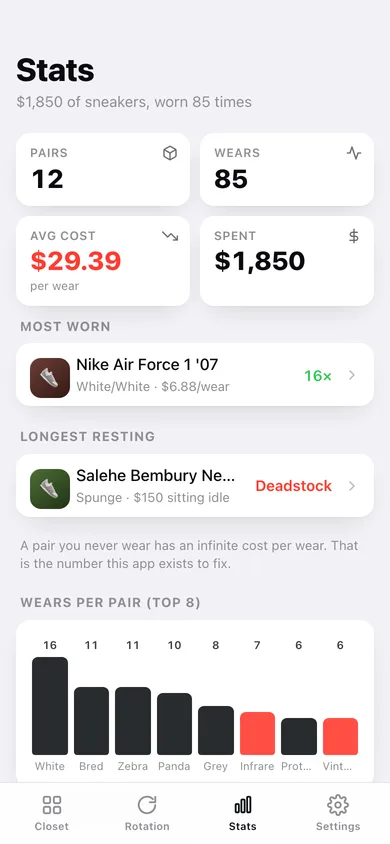
Total spend, total wears, average and blended cost-per-wear, most-worn pair, longest-resting pair, wears by brand, a twelve-week wear heatmap and every pair ranked by cost-per-wear.
Full condition scale
Deadstock, Mint (Unworn), Excellent, Good, Fair and Beater — the whole ladder from the iPhone app, with a plain-English note on what each one means.
Screens
Every screen, rebuilt for the browser
-
1
Closet
Blended cost-per-wear, the pair that has gone cold, rotation counts and the searchable, sortable closet grid.
-
2
Pair
One pair: paid, wears, cost-per-wear, what the next wear does to it, wears by month and the full wear log.
-
3
Stats
Spend, wears, most-worn and longest-resting pairs, wears by brand and every pair ranked by cost-per-wear.
-
4
Rotation
Active, resting and neglected pairs ranked by how recently you laced them up.
-
5
Log a wear
Date and note for a wear, with a live preview of the new cost-per-wear before you save.
-
6
Add or edit a pair
Brand, model, colorway, US size, purchase price, condition and notes, plus the condition scale explained.
-
7
Settings
Rotation thresholds, default closet sort, CSV and JSON export, sample closet and erase.
Try it with sample data: Loads a 12-pair closet — Air Force 1s, a Bred Toe 1, 990v5s, Zebras, Pandas, Kayano 14s, a deadstock Spunge 5740 and more — with about 90 wear entries spanning two years so the rotation, charts and cost-per-wear all have real history. You can start fresh at any time.
Ready? It's free.
No account, no install, no subscription. Everything you do stays in this browser.
Your say
What should Sneakerbox do? Tell us before we build it.
Tell us what to build next.
Comments need a free Google sign-in, so every one is from a real person.
Sign in with Google to commentNo comments yet — be the first to say what this app should do next.
Questions
Is the web version of Sneakerbox free?+
Yes. Every screen is free to use: no subscription, no in-app purchases, no account.
Do I need an account?+
No. Open Sneakerbox and start using it right away. Sign in with Google only if you want to upvote an app, save it to your list, or leave a comment.
Where is my data stored?+
Only in this browser's local storage. Nothing you enter is sent to our servers, so we can't see it, back it up, or restore it. Clearing site data, a private window, or another device starts empty. Export a backup from the in-app menu to keep it.
Is there a Sneakerbox app for iPhone or Android?+
Not yet. Sneakerbox is a community proposal: the browser version is complete, and we build the iPhone and Android app once 100 people upvote it. Upvoters get one email when it ships.