
Web app · Lifestyle
Snackduty
Rotate snack and carpool duty across the whole team — fairly, in your browser
Add your families, drop in the season schedule, and Snackduty hands each game's snack, carpool and jersey-wash duty to whoever has carried the least so far. Swap, mark done, copy the game-day group-chat message. Free, no install, no logins for the other parents.
Stored in your browser only. Nothing you do in the web version is sent to our servers. Clear your browser data and it's gone — so export a backup from the in-app menu if you want to keep it.
This app is a community proposal.
Try the full browser version now. We build the iPhone and Android app once 100 people upvote it.
We'll email you once, when it ships. Unsubscribe anytime.
In your browser
What you can do in Snackduty on the web
Fair rotation, not a sign-up sheet
Every duty goes to the family carrying the lightest season load, tie-broken by who went longest ago, and no family takes two duties in the same game. Turn on size weighting and families with more players on the team take proportionally more turns.
Season schedule with the next game pinned
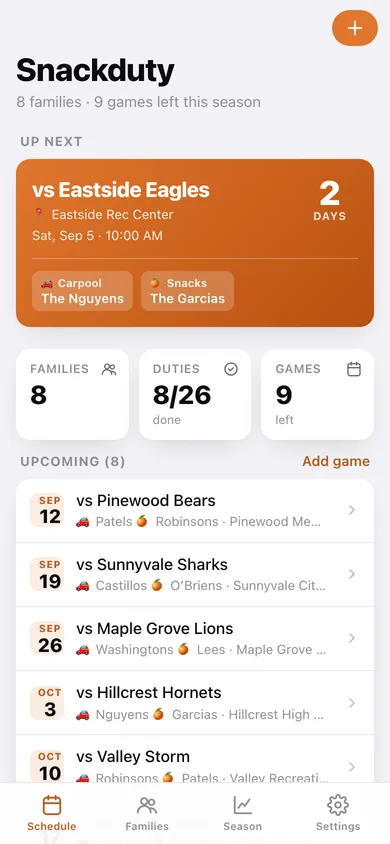
Opponent, field, first whistle and a days-until countdown on the up-next card, with the duty families already named on it; played games stay below with a completed check.
Swap and mark done
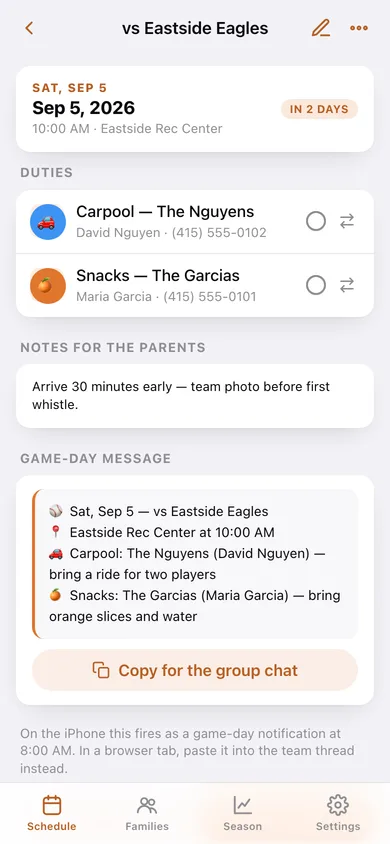
Tap the circle when a family comes through, or swap any duty to another family with an optional reason — the swap note stays on the game and on that family's history.
The whole roster, per family
Parent on the group chat, phone note, kids on the team, what they still owe the season and everything they have already carried, with a follow-through percentage.
Fairness view
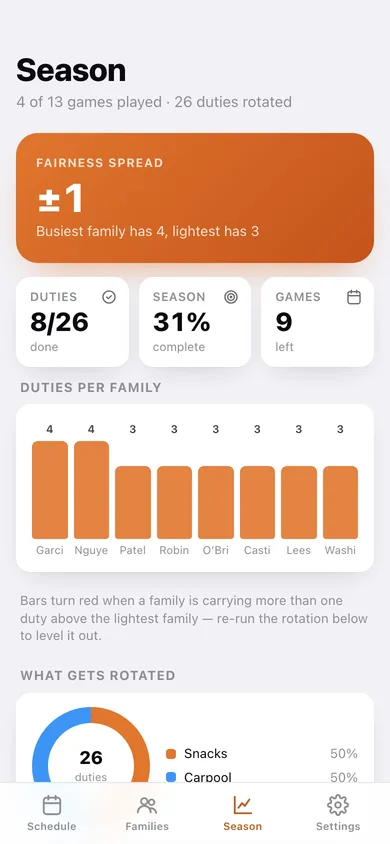
A duties-per-family bar chart that flags anyone more than one duty ahead, a donut of what gets rotated, share-of-season per family, and a one-tap re-rotate for the games still ahead.
Game-day message instead of a push
Copy a ready-to-paste group-chat message — date, field, time and who is on each duty with what to bring — plus a CSV of the whole season.
Screens
Every screen, rebuilt for the browser
-
1
Schedule
The next game pinned with its duty families, season counters, and every upcoming and played game.
-
2
Game day
One game with its duty cards — mark done, swap families, copy the group-chat message.
-
3
Season
Fairness spread, duties per family, what gets rotated, and a re-rotate for the rest of the season.
-
4
Families
The roster in rotation order with how many duties each family still has ahead.
-
5
Family
One family's parent, kids, follow-through rate, upcoming duties and everything already carried.
-
6
Add or edit a family
Family name, the parent on the group chat, phone note and the players on the team.
-
7
Add or edit a game
Opponent, field, date, first whistle, parent notes and optional auto-assign.
-
8
Settings
Which duty types rotate, size weighting, played-game visibility, reminder hour, CSV and JSON export.
Try it with sample data: Loads a full season: 8 families with 15 players, 13 Saturday games from four weeks back to eight weeks ahead, every snack and carpool duty rotated (past ones already marked done) and two families who traded weekends. You can start fresh at any time.
Ready? It's free.
No account, no install, no subscription. Everything you do stays in this browser.
Your say
What should Snackduty do? Tell us before we build it.
Tell us what to build next.
Comments need a free Google sign-in, so every one is from a real person.
Sign in with Google to commentNo comments yet — be the first to say what this app should do next.
Questions
Is the web version of Snackduty free?+
Yes. Every screen is free to use: no subscription, no in-app purchases, no account.
Do I need an account?+
No. Open Snackduty and start using it right away. Sign in with Google only if you want to upvote an app, save it to your list, or leave a comment.
Where is my data stored?+
Only in this browser's local storage. Nothing you enter is sent to our servers, so we can't see it, back it up, or restore it. Clearing site data, a private window, or another device starts empty. Export a backup from the in-app menu to keep it.
Is there a Snackduty app for iPhone or Android?+
Not yet. Snackduty is a community proposal: the browser version is complete, and we build the iPhone and Android app once 100 people upvote it. Upvoters get one email when it ships.